
In this post we will see how we can change Themes Dynamically In Grid. I
recently came across a situation to change the grid’s theme dynamically, whenever user select any theme. So I have done this requirement by using some
in-built functionalities of jQWidget JQX grid. Here I am going to share that. I hope you will like it.
To load a grid from a JSON, you can follow the steps as discussed in this
article.
Background
If you are new to JQWidget JQX Grid, please find out the link here.
Download the Source Code
Please download the source code from here.
Using the code
I hope you have implemented your grid as shown in that article. Now I guess
your page will look like this.
Now let us make sure that grid is working fine. Please run your project.
Figure1: Change Themes Dynamically In Grid
Cool, so grid is loaded. Now need to add a select control in which we are going
to load theme names so that user can select the theme and apply. Is that fine?
- <select id="selectOptions" onchange="applyNewCSS()">
- <option value="0">Select Template</option>
- <option value="metro">metro</option>
- <option value="office">office</option>
- <option value="orange">orange</option>
- <option value="energyblue">energyblue</option>
- <option value="darkblue">darkblue</option>
- <option value="shinyblack">shinyblack</option>
- <option value="lightness" selected="selected">lightness</option>
- <option value="android">android</option>
- </select>
- <link href="JQXItems/jqwidgets/styles/jqx.darkblue.css" rel="stylesheet" title="darkblue" />
- <link href="JQXItems/jqwidgets/styles/jqx.energyblue.css" rel="stylesheet" title="energyblue" />
- <link href="JQXItems/jqwidgets/styles/jqx.metro.css" rel="stylesheet" title="metro" />
- <link href="JQXItems/jqwidgets/styles/jqx.metrodark.css" rel="stylesheet" title="metrodark" />
- <link href="JQXItems/jqwidgets/styles/jqx.office.css" rel="stylesheet" title="office" />
- <link href="JQXItems/jqwidgets/styles/jqx.ui-darkness.css" rel="stylesheet" title="ui-darkness" />
- <link href="JQXItems/jqwidgets/styles/jqx.ui-le-frog.css" rel="stylesheet" title="ui-le-frog" />
- <link href="JQXItems/jqwidgets/styles/jqx.ui-lightness.css" rel="stylesheet" title="ui-lightness." />
- <link href="JQXItems/jqwidgets/styles/jqx.ui-sunny.css" rel="stylesheet" title="ui-sunny" />
- function applyNewCSS() {
- var css = $.trim($("#selectOptions").val());
- if (css == 'metro') {
- $("#jqxgrid").jqxGrid({
- theme: 'metro';
- });
- } else if (css == 'metrodark') {
- $("#jqxgrid").jqxGrid({
- theme: 'metrodark';
- });
- } else if (css == 'office') {
- $("#jqxgrid").jqxGrid({
- theme: 'office';
- });
- } else if (css == 'orange') {
- $("#jqxgrid").jqxGrid({
- theme: 'orange';
- });
- } else if (css == 'energyblue') {
- $("#jqxgrid").jqxGrid({
- theme: 'energyblue';
- });
- } else if (css == 'darkblue') {
- $("#jqxgrid").jqxGrid({
- theme: 'darkblue';
- });
- } else if (css == 'black') {
- $("#jqxgrid").jqxGrid({
- theme: 'black';
- });
- } else if (css == 'shinyblack') {
- $("#jqxgrid").jqxGrid({
- theme: 'shinyblack';
- });
- } else if (css == 'lightness') {
- $("#jqxgrid").jqxGrid({
- theme: 'lightness';
- });
- } else if (css == 'ui-le-frog') {
- $("#jqxgrid").jqxGrid({
- theme: 'ui-le-frog';
- });
- } else if (css == 'ui-darkness') {
- $("#jqxgrid").jqxGrid({
- theme: 'ui-darkness';
- });
- } else if (css == 'ui-sunny') {
- $("#jqxgrid").jqxGrid({
- theme: 'ui-sunny';
- });
- } else if (css == 'android') {
- $("#jqxgrid").jqxGrid({
- theme: 'android';
- });
- }
- }
Here we are applying the theme to the grid according to the user selection. Oops, we forgot one thing. If you apply CSS style sheet directly, the styles won’t get applied in the page content. For that we need to disable the remaining style sheets and enable the selected one alone.
The following code will do that magic:
- var i, link_tag;
- for (i = 0, link_tag = document.getElementsByTagName("link"); i < link_tag.length; i++)
- {
- if ((link_tag[i].rel.indexOf("stylesheet") != -1) && link_tag[i].title)
- {
- link_tag[i].disabled = true;
- if (link_tag[i].title == css)
- {
- link_tag[i].disabled = false;
- }
- }
- set_cookie('style', css, 30);
- }
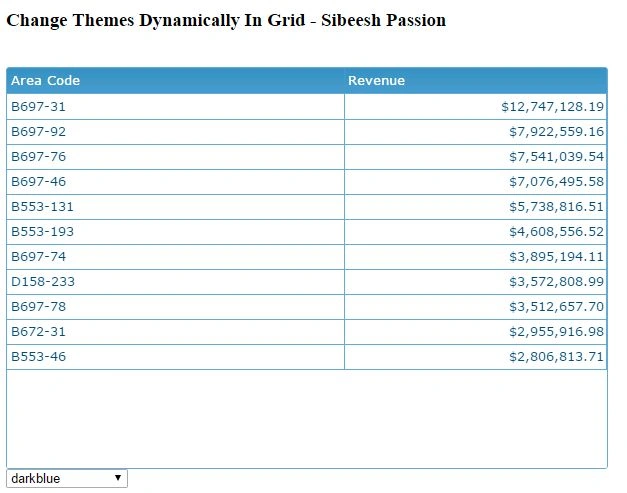
Figure 2: Change Themes Dynamically In Grid

Figure 3: Change Themes Dynamically In Grid
You can see that the grid themes are changing according to the user selection of theme.That’s all we have done it.
Complete Code
- <!DOCTYPE html>
- <html lang="en">
- <head>
- <title>Change Themes Dynamically In Grid - Sibeesh Passion</title>
- <script src="jquery-1.9.1.js"></script>
- <script type="text/javascript" src="JQXItems/jqwidgets/jqxcore.js"></script>
- <script type="text/javascript" src="JQXItems/jqwidgets/jqxdata.js"></script>
- <script type="text/javascript" src="JQXItems/jqwidgets/jqxbuttons.js"></script>
- <script type="text/javascript" src="JQXItems/jqwidgets/jqxscrollbar.js"></script>
- <script type="text/javascript" src="JQXItems/jqwidgets/jqxlistbox.js"></script>
- <script type="text/javascript" src="JQXItems/jqwidgets/jqxdropdownlist.js"></script>
- <script type="text/javascript" src="JQXItems/jqwidgets/jqxmenu.js"></script>
- <script type="text/javascript" src="JQXItems/jqwidgets/jqxgrid.js"></script>
- <script type="text/javascript" src="JQXItems/jqwidgets/jqxgrid.selection.js"></script>
- <script type="text/javascript" src="JQXItems/jqwidgets/jqxdatatable.js"></script>
- <link href="JQXItems/jqwidgets/styles/jqx.base.css" rel="stylesheet" />
- <link href="JQXItems/jqwidgets/styles/jqx.darkblue.css" rel="stylesheet" title="darkblue" />
- <link href="JQXItems/jqwidgets/styles/jqx.energyblue.css" rel="stylesheet" title="energyblue" />
- <link href="JQXItems/jqwidgets/styles/jqx.metro.css" rel="stylesheet" title="metro" />
- <link href="JQXItems/jqwidgets/styles/jqx.metrodark.css" rel="stylesheet" title="metrodark" />
- <link href="JQXItems/jqwidgets/styles/jqx.office.css" rel="stylesheet" title="office" />
- <link href="JQXItems/jqwidgets/styles/jqx.ui-darkness.css" rel="stylesheet" title="ui-darkness" />
- <link href="JQXItems/jqwidgets/styles/jqx.ui-le-frog.css" rel="stylesheet" title="ui-le-frog" />
- <link href="JQXItems/jqwidgets/styles/jqx.ui-lightness.css" rel="stylesheet" title="ui-lightness." />
- <link href="JQXItems/jqwidgets/styles/jqx.ui-sunny.css" rel="stylesheet" title="ui-sunny" />
- <script type="text/javascript">
- function applyNewCSS()
- {
- var css = $.trim($("#selectOptions").val());
- var i, link_tag;
- for (i = 0, link_tag = document.getElementsByTagName("link"); i < link_tag.length; i++)
- {
- if ((link_tag[i].rel.indexOf("stylesheet") != -1) && link_tag[i].title)
- {
- link_tag[i].disabled = true;
- if (link_tag[i].title == css)
- {
- link_tag[i].disabled = false;
- }
- }
- }
- if (css == 'metro')
- {
- $("#jqxgrid").jqxGrid(
- {
- theme: 'metro'
- });
- }
- else if (css == 'metrodark')
- {
- $("#jqxgrid").jqxGrid(
- {
- theme: 'metrodark'
- });
- }
- else if (css == 'office')
- {
- $("#jqxgrid").jqxGrid(
- {
- theme: 'office'
- });
- }
- else if (css == 'orange')
- {
- $("#jqxgrid").jqxGrid(
- {
- theme: 'orange'
- });
- }
- else if (css == 'energyblue')
- {
- $("#jqxgrid").jqxGrid(
- {
- theme: 'energyblue'
- });
- }
- else if (css == 'darkblue')
- {
- $("#jqxgrid").jqxGrid(
- {
- theme: 'darkblue'
- });
- }
- else if (css == 'black')
- {
- $("#jqxgrid").jqxGrid(
- {
- theme: 'black'
- });
- }
- else if (css == 'shinyblack')
- {
- $("#jqxgrid").jqxGrid(
- {
- theme: 'shinyblack'
- });
- }
- else if (css == 'lightness')
- {
- $("#jqxgrid").jqxGrid(
- {
- theme: 'lightness'
- });
- }
- else if (css == 'ui-le-frog')
- {
- $("#jqxgrid").jqxGrid(
- {
- theme: 'ui-le-frog'
- });
- }
- else if (css == 'ui-darkness')
- {
- $("#jqxgrid").jqxGrid(
- {
- theme: 'ui-darkness'
- });
- }
- else if (css == 'ui-sunny')
- {
- $("#jqxgrid").jqxGrid(
- {
- theme: 'ui-sunny'
- });
- }
- else if (css == 'android')
- {
- $("#jqxgrid").jqxGrid(
- {
- theme: 'android'
- });
- }
- }
- $(document).ready(function()
- {
- // prepare the data
- var data = {
- datatype: "json",
- datafields: [
- {
- "name": "AreaCode",
- "type": "string"
- },
- {
- "name": "Revenue",
- "type": "number"
- }],
- url: "jsonData.txt"
- };
- $("#jqxgrid").jqxGrid(
- {
- source: data,
- columns: [
- {
- "text": "Area Code",
- "dataField": "AreaCode",
- "cellsalign": "left",
- "cellsformat": "d"
- },
- {
- "text": "Revenue",
- "dataField": "Revenue",
- "cellsalign": "right",
- "cellsformat": "c2"
- }],
- });
- });
- </script>
- </head>
- <body>
- <h3>Change Themes Dynamically In Grid - Sibeesh Passion</h3>
- <br />
- <div id='jqxWidget' style="float: left; width: 99.9%;">
- <div id="jqxgrid"></div>
- </div>
- <br />
- <br />
- <select id="selectOptions" onchange="applyNewCSS()">
- <option value="0">Select Template</option>
- <option value="metro">metro</option>
- <option value="office">office</option>
- <option value="orange">orange</option>
- <option value="energyblue">energyblue</option>
- <option value="darkblue">darkblue</option>
- <option value="shinyblack">shinyblack</option>
- <option value="lightness" selected="selected">lightness</option>
- <option value="android">android</option>
- </select>
- </body>
- </html>
Did I miss anything that you may think which is needed? Have you ever wanted to do this requirement? Did you try jQWidget yet? Could you find this post as useful? I hope you liked this article. Please share me your valuable suggestions and feedback.
Please see this article in my blog here.
Your turn. What do you think?
If you have any questions, then please mention it in the comments section.


Sibeesh VenuTOP 100Posted Oct 31, 2015, 2:07 AM EDT
Isham Khan Thanks a lot
Sibeesh VenuTOP 100Posted Oct 31, 2015, 2:07 AM EDT
Nilesh Jadav Thanks a lot
Sibeesh VenuTOP 100Posted Oct 31, 2015, 2:06 AM EDT
Harshad Pansuriya Thanks a lot
Sibeesh VenuTOP 100Posted Oct 31, 2015, 2:06 AM EDT
N Vinodh Thanks a lot
Sibeesh VenuTOP 100Posted Oct 31, 2015, 2:06 AM EDT
Upendra Pratap Shahi Thanks a lot
Sibeesh VenuTOP 100Posted Oct 31, 2015, 2:06 AM EDT
Priyaranjan K S Thanks a lot
Sibeesh VenuTOP 100Posted Oct 31, 2015, 2:06 AM EDT
Gowtham K Thanks a lot
Isham KhanPosted Oct 31, 2015, 12:32 AM EDT
so good
Nilesh JadavPosted Oct 30, 2015, 11:51 PM EDT
Good one
Harshad PansuriyaPosted Oct 30, 2015, 8:03 PM EDT
Nice one
Vinodh NarayananPosted Oct 30, 2015, 7:28 PM EDT
Good one
Upendra Pratap ShahiPosted Oct 30, 2015, 9:57 AM EDT
Very nice sir...thanks for sharing..
Priyaranjan K STOP 100Posted Oct 30, 2015, 9:36 AM EDT
Thanks for the share
Gowtham KTOP 100Posted Oct 30, 2015, 8:49 AM EDT
Good Share:)