Introduction:
Here I am creating a web service for a login check and consuming it in a web
application. Follow the given steps to do it.
Step1: Create a web service using the following steps.
- Go to Visual Studeo 2010 and take a New Project.
- Select .NET Framework 3.5.
- Take a ASP.NET Web Service Application.
- Give it a name and click ok button.
using System;
using System.Collections.Generic;
using System.Linq;
using System.Web;
using System.Web.Services;
using System.Data.SqlClient;
using System.Data;
namespace loginwebservice
{
/// <summary>
/// Summary description for Service1
/// </summary>
[WebService(Namespace = "http://tempuri.org/")]
[WebServiceBinding(ConformsTo = WsiProfiles.BasicProfile1_1)]
[System.ComponentModel.ToolboxItem(false)]
// To allow this Web Service to be called from script, using ASP.NET AJAX, uncomment the following line.
// [System.Web.Script.Services.ScriptService]
public class Service1 : System.Web.Services.WebService
{
[WebMethod]
public DataSet login(string uname, string pwd)
{
SqlDataAdapter da = new SqlDataAdapter("select * from login where user_name ='" + uname + "' and password='" + pwd + "' ",
@"DataSource=SERVER_NAME;Initial Catalog=EMP;Integrated Security=True");
DataSet ds = new DataSet();
da.Fill(ds);
return ds;
}
}
}
Step 3: Run this application.
Output:
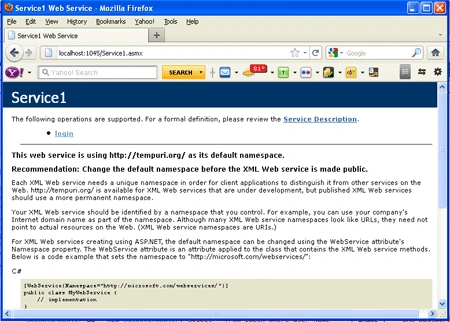
Step 4: Now create a web application to consume the service. For doing this, follow the given steps.
- Go to Visual Studeo 2010 and take a New Project.
- Select a ASP.NET Empty Web Application.
- Give it a name and click ok button.
Step 5: Now add service in your web
application. Go to Solution Explorer and right click at your project. Click at
Add Web Reference. A new window will open. Its screen-shot is given below.
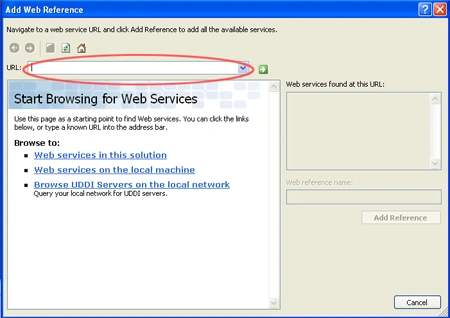
- Now paste the URL of your service and click at Go button.
- Click on Add reference. Now service has added into your project.
- Now go to design page of your web application and take some user interfaces to accept user name and password and a button.
- Write the following code in the .aspx.cs
file on buton Click event.
protected void btnok_Click(object sender, EventArgs e)
{
localhost.Service1 obj=new localhost.Service1();
DataSet ds = obj.login(TextBox1.Text, TextBox2.Text);
if (ds.Tables[0].Rows.Count > 0)
{
Label1.Text = "Hi ," + ds.Tables[0].Rows[0][1].ToString();
}
else
{
Label1.Text = "Invalid UserName or Password.";
}
}
Step 6: Run the web application.
Output: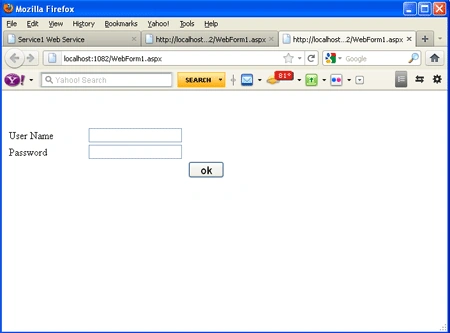
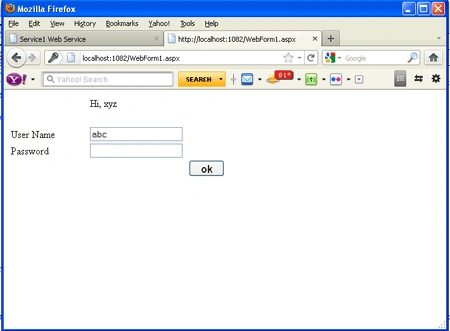
Write the user name and password in TextBoxes and click the ok Button. In
this example, Database name is EMP which has a table Login. There is only one
record in Login table - abc is user_name and xyz is password. Do right input for
user name and password and click the ok button.
Output:
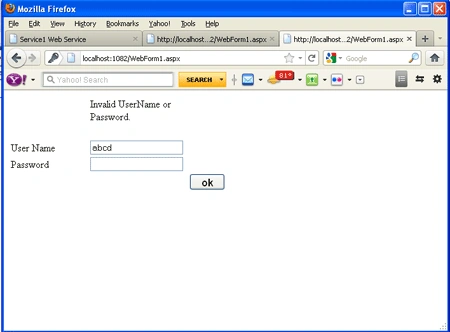
Now do wrong input for user name and password
and click the ok button.
Output:


varun chinnaPosted Dec 2, 2015, 12:14 AM EST
how to consume a Web service in Windows Mobile Application.
Pintoo YadavPosted Sep 30, 2015, 3:43 AM EDT
good one
ketan italiyaPosted Aug 23, 2013, 4:21 AM EDT
so helpful..thankss
surya kumarPosted Apr 3, 2013, 4:39 AM EDT
Easy to Understand..Nice work
Mohamad AhmadPosted Jul 3, 2012, 2:52 AM EDT
Thanks, Good Work.
Manoj Singh PanwarPosted Nov 23, 2011, 11:18 AM EST
Its really nice to know that web services can be used for Log in page also. Thank you for exploring this concept Alok.