The attached source code is a C# application that demonstrates how to create a custom ComboBox control in Windows Forms.
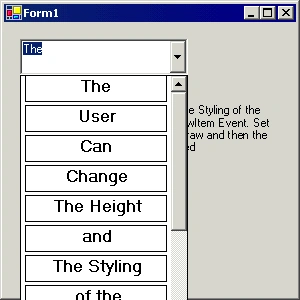
Simply run the code, click on the ComboBox drop down and you will see a form like this:
The attached source code is a C# application that demonstrates how to create a custom ComboBox control in Windows Forms.
Simply run the code, click on the ComboBox drop down and you will see a form like this:
Join the conversation! Your thoughts help the community grow.

Join to leave a comment
Members earn 10 SHARP for a comment, 10 SHARP for a reaction, and 1,000 SHARP for every article they publish.
 DevSocialUpcoming · 3rd editionAI Agents ConferenceDec 1–3, 2026Live onlineFree to attend5days leftRegisterMembers onlyFeatured eBookClaude for AI-Native BuildersDownload now
Write an article and earn +1,000 SHARP when it is approved.
Write an article
NickPosted Apr 13, 2007, 6:13 AM EDT
Hi, Is it possible to add items of different formats into a ComboBox? For example: 1st item is a normal string..2nd item is in BOLD. Thanks in advance..! Cheers, ~Dillip