Suppose you need to edit an item in a list box (it is read-only list of item) at a runtime. This sample code demonstrate a simple approach to create an editable listbox.
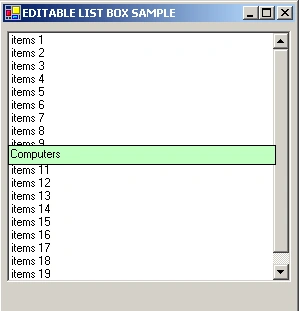
To edit an item in a list box, all you need is one hidden text box. Keep textbox hidden of set property visible as false and show it whenever you required.


Manoj Singh PanwareditedPosted Dec 2, 2011, 7:58 PM ESTEdited Dec 2, 2011, 8:04 PM EST
Very good concept used What caught ma attention was your logic applied in these lines : Rectangle r=this.listBox1.GetItemRectangle(itemSelected); this.textBox1.Location=new System.Drawing.Point(r.X+5,r.Y+5); this.textBox1.Size=new System.Drawing.Size(r.Width+4 , r.Height-10); this.textBox1.Visible=true; this.textBox1.Text=itemText; this.textBox1.Focus(); this.textBox1.SelectAll(); Very nice Mr. Gautam. Thank You for teaching me this beautiful concept.
Amit MaheshwariPosted Dec 2, 2011, 7:15 PM EST
Dear Gautam it's really helpful to us but you should write some description about your article it may become more effective thanks.
Sanjay TripathiPosted Jun 19, 2009, 3:14 AM EDT
Very Good Code
santhanam krishnanPosted Oct 28, 2006, 8:07 AM EDT
Hello gautam shrestha' Plese tell me quick! In c#(ASP.net) The concept is items are added to a list box from a TextBox. if the item is already appear inside the list box it shows Already exist otherwise it can be added. I had written the following query for that. if(ListBox1.Items.Contains(TextBox1.Text)=True)) { Response.Write("Already Exists"); } else { ListBox1.Items.Add(TextBox1.Text) } But the above query doesn't worked. What is the reason Pls tell me quick otherwise I will became a mad!!!!!!!