
Introduce
A QR code (quick response code) is a two dimensional barcode that stores information about the item to which it is attached. The information can be plain text, URL, email address, vCard information, etc.
In this article, you’ll learn how to generate QR code image in C# using free Spire.Barcode instead of using any ‘barcode fonts’. The reasons are that the code to create QR code image with Spire.Barcode is pretty simply, this component also enables programmers to draw most common linear and 2D barcodes besides QR code, and it is totally free for both personal and commercial use.
In the following section, I created a Windows Form Application (QR code generator) to demonstrate how to create customized QR codes according to your own needs and save them as high quality images for immediate use.
Now let’s check the main steps.
Step 1
Download Spire.Barcode from the link mentioned above. You can also find the library from Nuget and E-iceblue.
Step 2
Create a Windows Form Application project in VS, add the dll to your .NET project assemblies.
Step 3
Request a free key from sales team in E-iceblue. This library is free of charge, but you need a free key to remove the ‘E-iceblue’ logo in barcode image. Otherwise, the logo will exist.
Spire.Barcode.BarcodeSettings.ApplyKey("your key");
Step 4
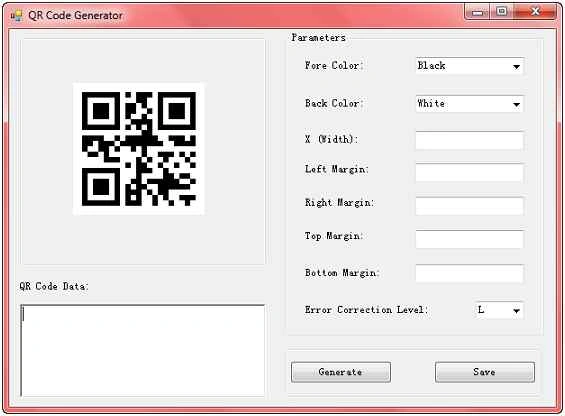
Design the form with some input fields for accepting parameters to customize your QR code, one Generate button to create QR code image and display it in a picture box, and one Save button to save the QR code image to local folder.
Step 5
Using the code. In this case, I only focus on the code under btnGenerate click event. The entire code is available in the zip file attached.
Spire provides a class of BarcodeSettings in which all properties of a barcode can be found and reset. Here are some basic settings of my QR code.
- BarcodeSettings.ApplyKey("your key");
- BarcodeSettings settings = new BarcodeSettings();
- settings.Type = BarCodeType.QRCode;
- settings.Unit = GraphicsUnit.Pixel;
- settings.ShowText = false;
- settings.ResolutionType = ResolutionType.UseDpi;
- //input data
- string data = "12345";
- settings.Data = data;
- if (this.richTextBox1.Text != null && this.richTextBox1.Text.Length > 0) {
- data = this.richTextBox1.Text;
- settings.Data = data;
- }
- //set fore color
- if (this.comboBoxForeColor.SelectedItem != null) {
- string foreColor = this.comboBoxForeColor.SelectedItem.ToString();
- settings.ForeColor = Color.FromName(foreColor);
- }
- //set back color
- if (this.comboBoxBackColor.SelectedItem != null) {
- string backColor = this.comboBoxBackColor.SelectedItem.ToString();
- settings.BackColor = Color.FromName(backColor);
- }
- //set x
- short barWidth;
- if (this.textBoxX.Text != null && this.textBoxX.Text.Length > 0 && Int16.TryParse(this.textBoxX.Text, out barWidth)) {
- settings.X = barWidth;
- }
- //set left margin
- short leftMargin = 1;
- if (this.textBoxLeft.Text != null && this.textBoxLeft.Text.Length > 0 && Int16.TryParse(this.textBoxLeft.Text, out leftMargin)) {
- settings.LeftMargin = leftMargin;
- }
- //set right margin
- short rightMargin = 1;
- if (this.textBoxRight.Text != null && this.textBoxRight.Text.Length > 0 && Int16.TryParse(this.textBoxRight.Text, out rightMargin)) {
- settings.RightMargin = rightMargin;
- }
- //set top margin
- short topMargin = 1;
- if (this.textBoxTop.Text != null && this.textBoxTop.Text.Length > 0 && Int16.TryParse(this.textBoxTop.Text, out topMargin)) {
- settings.TopMargin = topMargin;
- }
- //set bottom margin
- short bottomMargin = 1;
- if (this.textBoxBottom.Text != null && this.textBoxBottom.Text.Length > 0 && Int16.TryParse(this.textBoxBottom.Text, out bottomMargin)) {
- settings.BottomMargin = bottomMargin;
- }
- //select correction level
- if (this.comboBoxCorrectionLevel.SelectedItem != null) {
- int correctionLevel = this.comboBoxCorrectionLevel.SelectedIndex;
- switch (correctionLevel) {
- case 0:
- settings.QRCodeECL = QRCodeECL.L;
- break;
- case 1:
- settings.QRCodeECL = QRCodeECL.M;
- break;
- case 2:
- settings.QRCodeECL = QRCodeECL.Q;
- break;
- case 3:
- settings.QRCodeECL = QRCodeECL.H;
- break;
- }
- }
- //generate QR code
- BarCodeGenerator generator = new BarCodeGenerator(settings);
- Image QRbarcode = generator.GenerateImage();
- //display QR code image in picture box
- pictureBox1.Image = QRbarcode;
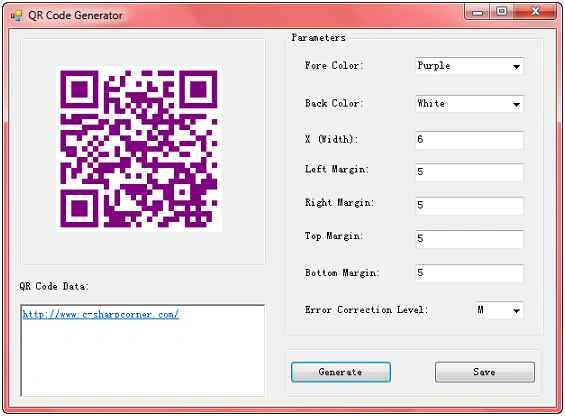
Run the program and input some data as follows, click Generate and you’ll get the following output:
Click Save to extract QR code image to local folder:

Thanks for reading, and hope this article can be of help to someone who is searching an easy solution in this field.


thilinarPosted Apr 27, 2023, 7:34 AM EDT
Great nice work
Dong Lam TrienPosted May 21, 2021, 5:08 AM EDT
This link i came across, i downloaded their example works fine, i created a new one and followed the instructions on this page it doesn't work and i get the library error using Spire.Barcode; even though i added the library to winform but still getting error, how can i fix this ?
Naresh SainiPosted Mar 19, 2021, 4:32 AM EDT
Good Effort.
Ganesh NaiduPosted Dec 24, 2020, 3:52 AM EST
Very useful article, thanks Susan
arunkumar selvarajPosted Jun 3, 2019, 1:05 AM EDT
Hai.. i need QR code free font for crystal report. can i get it..?
Arjun DhilodPosted Mar 21, 2019, 9:31 PM EDT
Great article
amit MishraPosted Apr 17, 2018, 8:00 PM EDT
Hi Susan, Can you give me the key I want to use my logo.
Ayushi GuptaPosted Apr 7, 2018, 8:12 PM EDT
How can i share this generated image via mail??
Ramandeep SinghPosted Feb 10, 2018, 7:15 PM EST
You can use this free open source QR Code generator
Ramandeep SinghPosted Feb 10, 2018, 7:14 PM EST
Https://github.com/codebude/QRCoder
shadab aliPosted Jan 31, 2018, 9:11 PM EST
I need a free key to remove the ‘E-iceblue’ logo in barcode image. please help anybody
Senthil KumarPosted Jan 22, 2018, 2:30 AM EST
Does anyone have the key. IF so please share the link
Abubacarr SillahPosted Jan 16, 2018, 4:52 AM EST
I am junior developer, looking for QR code and came across your site. Thank you for the good work. Can please get the key
Tainã LautenschlagerPosted Nov 6, 2017, 11:02 AM EST
Hey! Is it possible to use this library without Windows Forms?
Nap ChenPosted Oct 12, 2017, 11:42 PM EDT
Thanks for share~Is it available to add my logo image to QR code image?
Aditya SharmaPosted Sep 11, 2017, 9:29 PM EDT
Please give me the key
Aditya SharmaPosted Sep 11, 2017, 9:28 PM EDT
Thank you Susan You Made my day..
Avaz BoltaevPosted Aug 9, 2017, 1:15 AM EDT
Please give me key
md NurunnabiPosted Jul 23, 2017, 8:55 PM EDT
Please give me key
Saineshwar BageriPosted Sep 19, 2015, 9:08 PM EDT
nice one
Uehara AyakaPosted Sep 16, 2015, 12:52 AM EDT
Thanks for the share.