
Web Service
Web service is used to interact with one to another application through HTTP protocols. Web service gets hosted on only http protocol so, Web service does not allow interacting through another protocol as stp and other.
Steps to create a Web service
Step 1: Open Microsoft Visual Studio and go to File, then select new Web site then you will get the following:

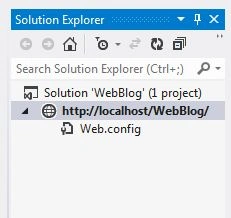
Step 2: Select ASP.NET Empty Web site and change website name as your project, then click Ok button. Then we will get solution explorer as:
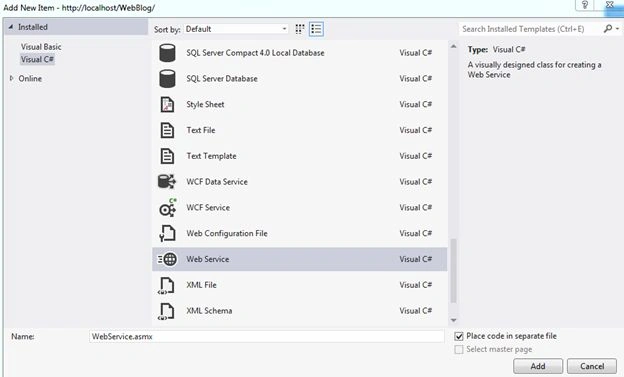
Step 3: Click on website with RM button and select add new item, then select web service and click on Add button
Step 4: Template will appear in Solution Explorer as

Step 5: Write the following code in WebService.cs
- using System;
- using System.Collections.Generic;
- using System.Linq;
- using System.Web;
- using System.Web.Services;
- /// <summary>
- /// Summary description for WebArth
- /// </summary>
- [WebService(Namespace = "http://tempuri.org/")]
- [WebServiceBinding(ConformsTo = WsiProfiles.BasicProfile1_1)]
- // To allow this Web Service to be called from script, using ASP.NET AJAX, uncomment the following line.
- // [System.Web.Script.Services.ScriptService]
- public class WebArth : System.Web.Services.WebService {
- public WebArth () {
- //Uncomment the following line if using designed components
- //InitializeComponent();
- }
- [WebMethod]
- public int Add(int a,int b)
- {
- return a+b;
- }
- [WebMethod]
- public int Sub(int a, int b)
- {
- return a - b;
- }
- [WebMethod]
- public int Multiply(int a, int b)
- {
- return a * b;
- }
- [WebMethod]
- public int Divide(int a, int b)
- {
- return a / b;
- }
- }
Step to Consume Web service
Step 1: Create a new website.
Step 2: Click on Website with RM button and select add new item then select Web form as:
*web form
Then click Add button.
Step 3: Design the Web form as per the requirement, then
Step 4: Add service reference to your web site through the following steps:
- Click on your Web Service with RM button and select Add service reference, then add service reference window will appear as:
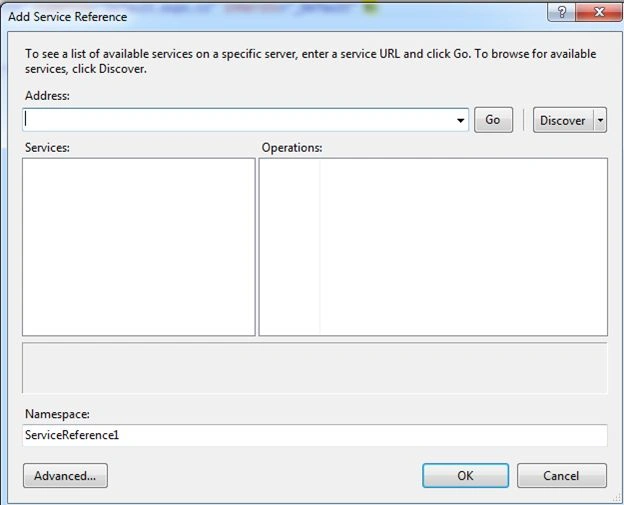
- Click on Advanced button after that click on add Web References button
- Copy the URL from the URL of the browser.
- Past the copied URL address in the address textbox of service reference window. Click 'Go' button.
- Rename the Web reference name as required and then press Add Reference.
- The reference of the Webservice will appear in the Service Reference folder in solution explorer.
- Go to Web form page of your project and write the following code.
- using System;
- using System.Collections.Generic;
- using System.Linq;
- using System.Web;
- using System.Web.UI;
- using System.Web.UI.WebControls;
- using sr1;
- public partial class _Default : System.Web.UI.Page
- {
- WebArth obj = new WebArth();
- int a, b, c;
- protected void Page_Load(object sender, EventArgs e)
- {
- }
- protected void TextBox2_TextChanged(object sender, EventArgs e)
- {
- }
- protected void Button1_Click(object sender, EventArgs e)
- {
- a = Convert.ToInt32(TextBoxfirst.Text);
- b = Convert.ToInt32(TextBoxsecond.Text);
- c = obj.Add(a, b);
- TextBoxResult.Text = Convert.ToString(c);
- }
- protected void Button2_Click(object sender, EventArgs e)
- {
- a = Convert.ToInt32(TextBoxfirst.Text);
- b = Convert.ToInt32(TextBoxsecond.Text);
- c = obj.Sub(a, b);
- TextBoxResult.Text = Convert.ToString(c);
- }
- protected void Button3_Click(object sender, EventArgs e)
- {
- a = Convert.ToInt32(TextBoxfirst.Text);
- b = Convert.ToInt32(TextBoxsecond.Text);
- c = obj.Multiply(a, b);
- TextBoxResult.Text = Convert.ToString(c);
- }
- protected void Button4_Click(object sender, EventArgs e)
- {
- a = Convert.ToInt32(TextBoxfirst.Text);
- b = Convert.ToInt32(TextBoxsecond.Text);
- c = obj.Divide(a, b);
- TextBoxResult.Text = Convert.ToString(c);
- }
- }
This is all about how to consume or work with Web service.


Santhakumar MunuswamyPosted Oct 17, 2015, 11:47 PM EDT
Good one
Mohammed IbrahimPosted Oct 12, 2015, 8:12 AM EDT
nice
RakeshPosted Oct 12, 2015, 7:48 AM EDT
Good Demo share
Sibeesh VenuTOP 100Posted Oct 11, 2015, 11:14 PM EDT
Nice Share
Harshad PansuriyaPosted Oct 11, 2015, 10:28 PM EDT
Nice one
Mukesh KumarPosted Oct 11, 2015, 10:27 PM EDT
Really good to understand the web service.
Rajeesh MenothPosted Oct 11, 2015, 10:08 PM EDT
Nice One!
Akash VarshneyPosted Oct 11, 2015, 9:09 PM EDT
nice !!
Nilesh JadavPosted Oct 11, 2015, 9:05 PM EDT
Good one sir