
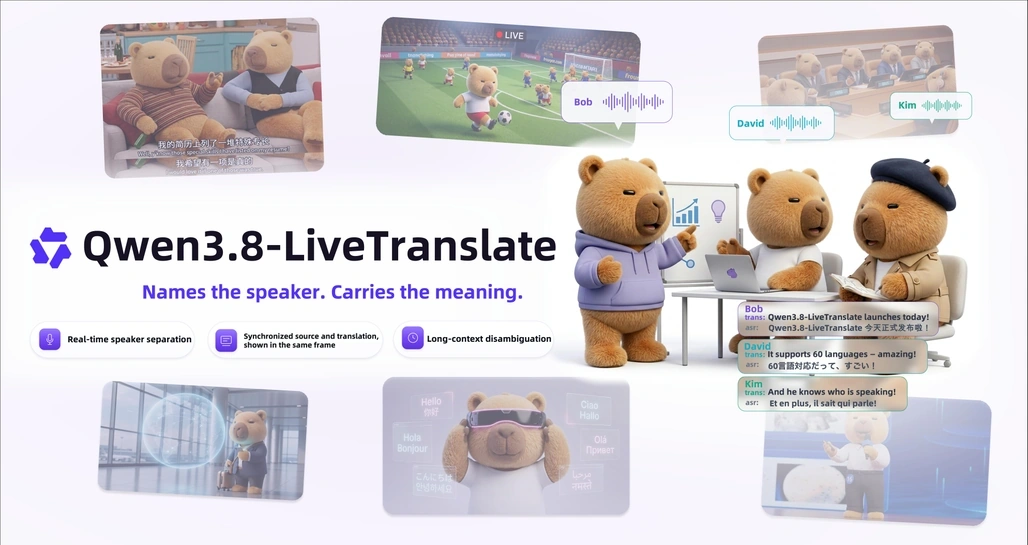
If you have ever sat in an international meeting where half the room was wearing headsets, you know the feeling. The interpreter is brilliant, but a few seconds behind, and by the time the translation arrives the conversation has already moved on. Now imagine software doing that job: listening, understanding, and speaking in another language while the speaker is still mid-sentence.
That is exactly the problem the Qwen team set out to tackle with Qwen3.8-LiveTranslate, their next-generation simultaneous interpretation model. As an Alibaba Cloud MVP, I like to try new Qwen releases as soon as they land, and this one is worth a proper look. In this article I will explain, in plain language, what the model does, how it works, and where it can be useful.
What is Qwen3.8-LiveTranslate?
In simple terms, it is a model that listens to speech in one language and gives you the translation as text and as spoken audio, in real time. It does not wait for the speaker to finish a paragraph. It translates as the person talks.
It was released in September 2026 as part of the Qwen3.8 family, and it follows earlier versions such as Qwen3-LiveTranslate and Qwen3.5-LiveTranslate. According to the official Qwen announcement, it understands 60 languages. Spoken output is available in 29 of them, and the rest are delivered as text. Model Studio documentation also notes that it can detect the source language automatically, which the 3.5 version could not do.
To put the progress in context, the first Qwen3-LiveTranslate-Flash covered 18 languages with around three seconds of delay. Going from 18 to 60 languages in about a year is a big jump.
The problem with real-time translation
Translating live speech is much harder than translating a written sentence. There are three reasons.
Word order differs between languages. A German verb can arrive at the very end of a sentence. A Japanese sentence often builds up to its key point. A system that translates word by word will produce nonsense, and a system that waits for the full sentence will be too slow.
Speed and quality pull in opposite directions. Wait longer, and the translation is more accurate. Respond faster, and you risk mistakes.
Real conversations are messy. People interrupt each other, mention names and technical terms, and refer back to things said ten minutes ago.
Qwen3.8-LiveTranslate is built to deal with exactly these issues.
How it works: the Interleave architecture
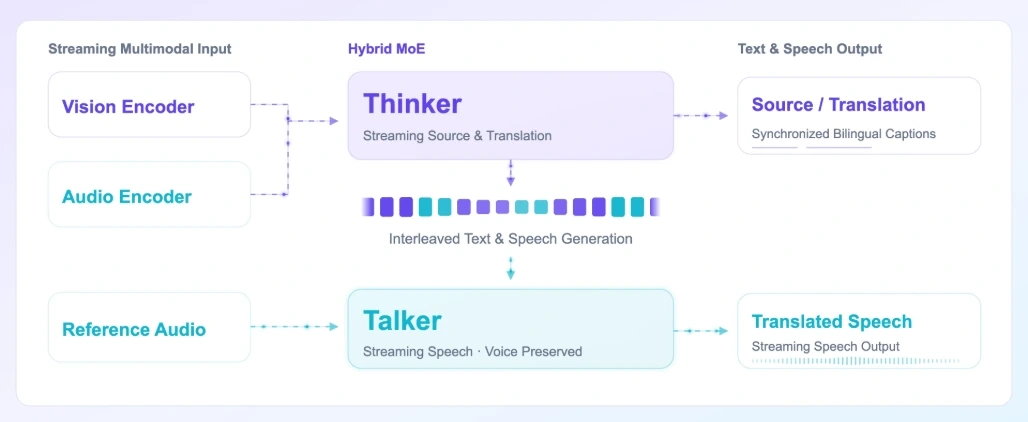
The biggest change is under the hood. Qwen describes the model as being built on an Interleave architecture, with a two-part design based on a Hybrid Mixture-of-Experts (MoE) model:
The Thinker listens to the incoming audio as a stream and understands what is being said.
The Talker turns the translation into natural-sounding speech.
The key idea is that these pieces are connected by interleaving. Understanding, text output and speech generation work together in a continuous flow instead of running one after another. You can think of it like a relay team where the baton is passed constantly in small steps, rather than one runner finishing the whole race before the next starts
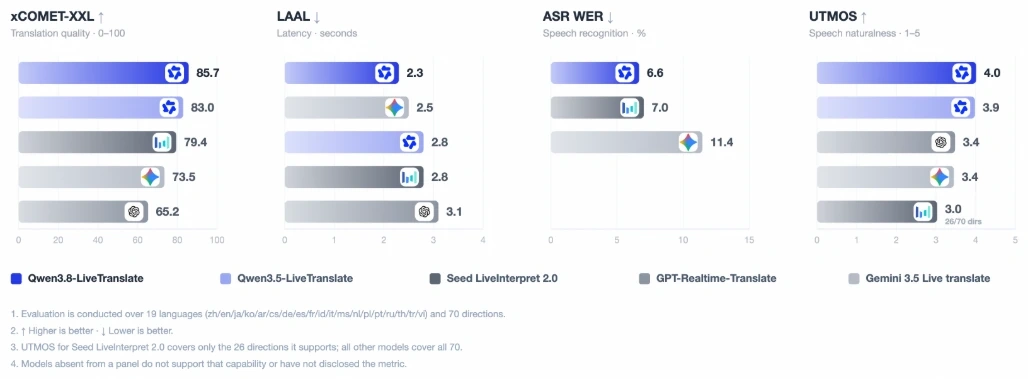
The result, according to Qwen, is better translation faithfulness (does it keep the meaning), fluency (does it sound natural) and conciseness (does it avoid rambling), across the board.
Faster: the latency numbers
For live interpretation, delay is everything. Qwen measures it using LAAL (average lagging), which roughly describes how far behind the speaker the translation runs. With Qwen3.8-LiveTranslate, average lagging dropped from 2.8 seconds to 2.3 seconds. That is nearly a 20 percent improvement over the previous generation.
Half a second might not sound like much, but anyone who has used an interpreter knows how much it matters in a back-and-forth conversation. It is the difference between a natural pause and an awkward silence.
Three new features that make it practical
Beyond the core translation, the Qwen team highlights three new abilities. These are the ones I find most interesting, because they address real meeting and event situations.
1. Real-time speaker diarization
"Diarization" is a technical word for working out who is speaking. In a multi-person conversation, the model can tell speakers apart and keeps each person's voice characteristics through more stable voice cloning. So when you listen to the translated audio of a panel discussion, the output can sound like the different people involved, not like one robotic voice for everyone.
Qwen tested this on a long, multi-speaker evaluation set called Omnilingua-MSpeaker, covering 14 language directions. On that set, the company reports the model outperforming mainstream real-time interpretation systems on faithfulness, fluency, conciseness and Diarization Error Rate.
2. Synchronized bilingual display
The original text and the translation can appear on screen together. This is very useful for conferences, training sessions and live captions, because listeners who understand a little of the source language can check the translation themselves, and it builds trust in what they are reading.
3. Long-context disambiguation
The model uses earlier parts of the conversation to settle names and terminology. If a speaker mentions a product name or a technical term early on, the model can keep translating it consistently later instead of guessing differently each time. Anyone who has seen a name translated three different ways in the same meeting will appreciate this.
Voice cloning without extra cost
One practical detail from the Alibaba Cloud Model Studio documentation: real-time voice cloning does not carry an additional cloning charge. Usage is still billed by tokens. You can clone the voice once at the start of a session, keep cloning continuously (better for multi-person conversations), or use a pre-created voice. Creating a voice in advance is billed separately.
How to try it on Alibaba Cloud
Developers can reach the model through the Alibaba Cloud Model Studio (DashScope) WebSocket Realtime API, using the model name qwen3.8-livetranslate-flash-realtime. It is available in the Singapore and China (Beijing) regions.
A few limits worth knowing before you plan a project:
The context window is 53,248 tokens, with up to 4,096 output tokens.
In the Singapore region, the rate limit is 10 requests and 100,000 tokens per minute.
For a quick start, the usual flow is simple: open a WebSocket connection with your API key, send a session configuration that sets the target language and output type (text, audio, or both), then stream microphone audio at 16 kHz and play back what comes in. Check the current Model Studio documentation for the exact parameters, as they can change between versions.
Where this can be useful
Based on what the model offers, I see a few natural use cases:
Conferences and webinars: live translated audio and bilingual captions for international audiences.
Cross-border business meetings: each participant hears the discussion in their own language, with speakers kept distinguishable.
Customer support: agents helping customers in languages they do not speak.
Education and training: lectures delivered to learners worldwide.
Content creation: quick dubbing and subtitles for video.
An honest note on limitations
No model is perfect, and I think it is fair to say so. Independent hands-on tests published by third parties after launch reported solid translation quality across many languages, but also some problems with turn-taking and latency in practice. Qwen's own comparison numbers come from its benchmarks, so real-world results will depend on your audio quality, network, languages and domain. My advice is to test with your own content before building anything critical on top of it.
My take
What I like about Qwen3.8-LiveTranslate is that it does not only chase raw translation scores. Knowing who is talking, keeping names consistent and showing both languages on screen are the kind of details that decide whether a tool is actually pleasant to use in a real meeting. Cutting lag to 2.3 seconds, across 60 languages, brings machine interpretation a step closer to something people will want to use every day.
If you are building on Alibaba Cloud, it is a good time to experiment with it. Start small, test it with real speakers, and see how it fits your use case.
Sources
Qwen official blog: Qwen3.8-LiveTranslate (qwen.ai/blog?id=qwen3.8-livetranslate)
Qwen announcement on X (@Alibaba_Qwen)
Alibaba Cloud Model Studio documentation: Real-time audio and video translation, and voice cloning configuration
Alibaba Cloud Community Blog: Qwen3-LiveTranslate (original generation)

Join the conversation! Your thoughts help the community grow.