
First we need to create a Web service as was already discussed in Part 1. Again create a new Web Service in Visual Studio.
Step 1
Open Visual Studio and select "File" -> "New" -> "Web Site...".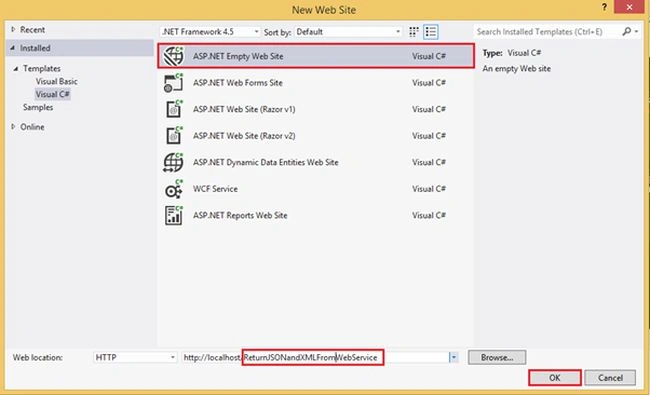
Step 2
Now add a Web Service file (.asmx) to the Web site. 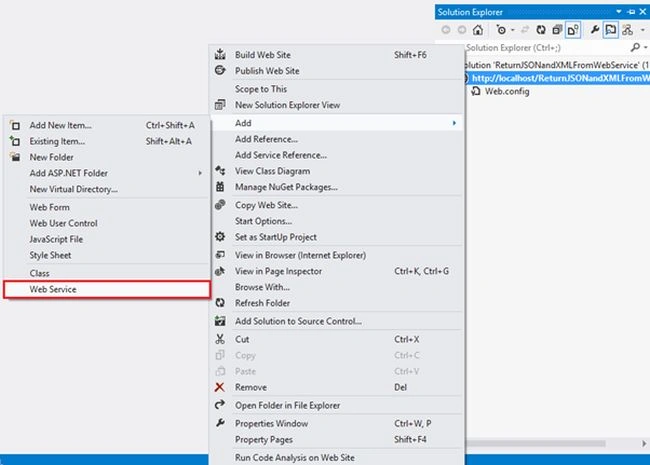
Provide a name for the web service file.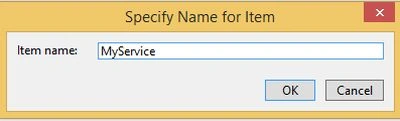
And delete the existing code file from the Solution Explorer so that we can create our own class file to host on this web service.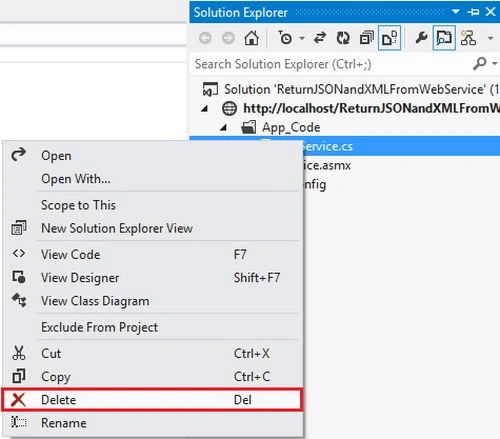
Step 3
Now add a new class file to [WebService] and also a class for a user data type to define the structure.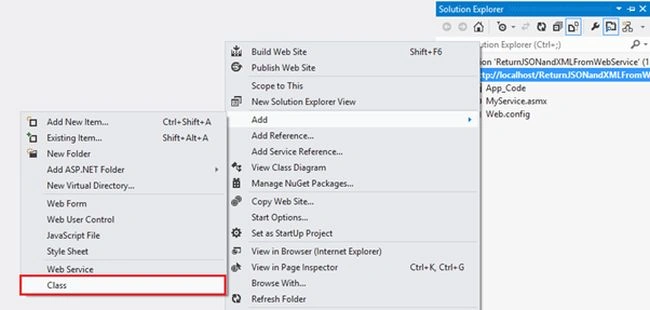
[WebSerivce] Class 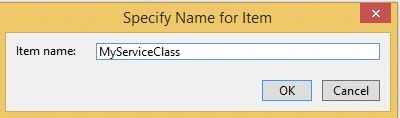
User-define data type for JSON and XML Stucture:
Step 4
Edit the Employee Class and declare a property that we need to use in the JSON and XML object.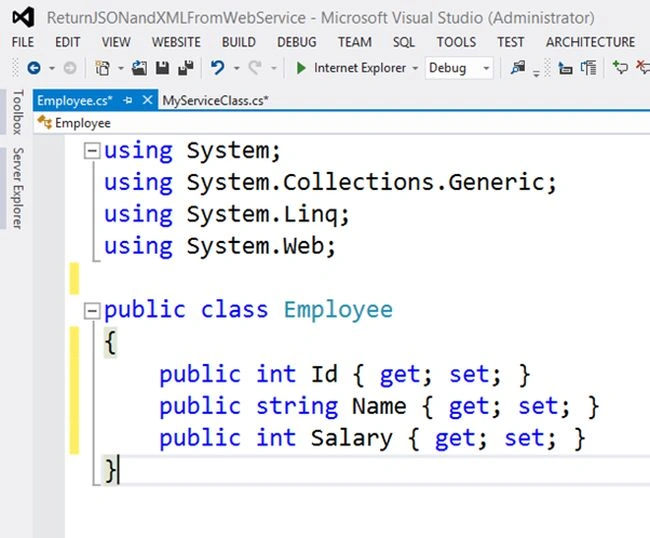
Code:
- public class Employee
- {
- public int Id { get; set; }
- public string Name { get; set; }
- public int Salary { get; set; }
- }
Step 5
Now edit your .asmx file to define the CodeBehind and Class Properties.
Step 6
Next we need to create a [WebService] class MyServiceClass and add all the namespaces first that are required.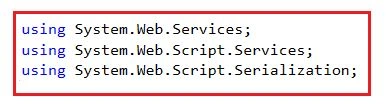
Step 7
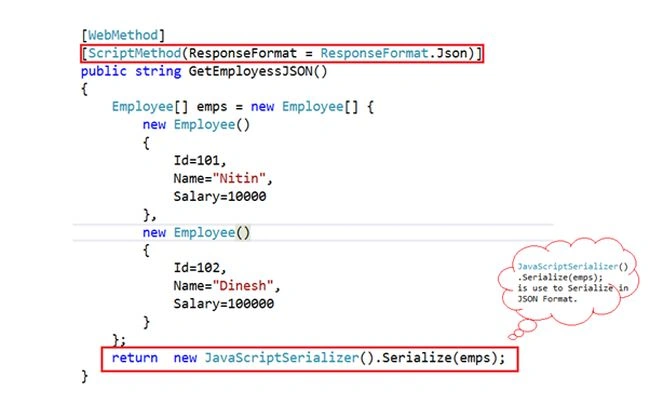
Write the [WebService] attribute over the class name and create the [WebMethod].
- GetEmployeeXML() for returning the data in XML.
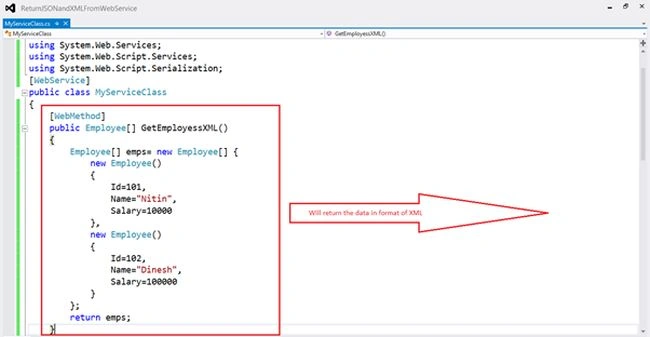
- GetEmployeeJSON() for returning the data in JSON.
Code:
- using System;
- using System.Collections.Generic;
- using System.Linq;
- using System.Web;
- using System.Web.Services;
- using System.Web.Script.Services;
- using System.Web.Script.Serialization;
- [WebService]
- public class MyServiceClass
- {
- [WebMethod]
- public Employee[] GetEmployessXML()
- {
- Employee[] emps= new Employee[] {
- new Employee()
- {
- Id=101,
- Name="Nitin",
- Salary=10000
- },
- new Employee()
- {
- Id=102,
- Name="Dinesh",
- Salary=100000
- }
- };
- return emps;
- }
- [WebMethod]
- [ScriptMethod(ResponseFormat = ResponseFormat.Json)]
- public string GetEmployessJSON()
- {
- Employee[] emps = new Employee[] {
- new Employee()
- {
- Id=101,
- Name="Nitin",
- Salary=10000
- },
- new Employee()
- {
- Id=102,
- Name="Dinesh",
- Salary=100000
- }
- };
- return new JavaScriptSerializer().Serialize(emps);
- }
- }
Step 8
Build the application and view the output in a web browser.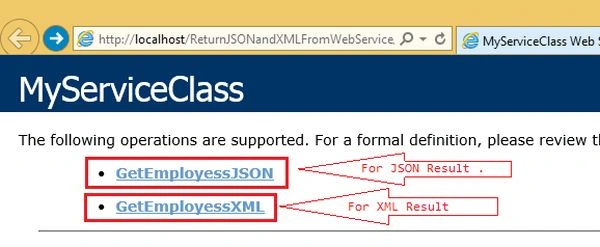
There are two methods, one from the return of JSON and the second for the return of XML result.
Click on any function name and Invoke to test the [WebMethod].
- Click on GetEmployessJSON

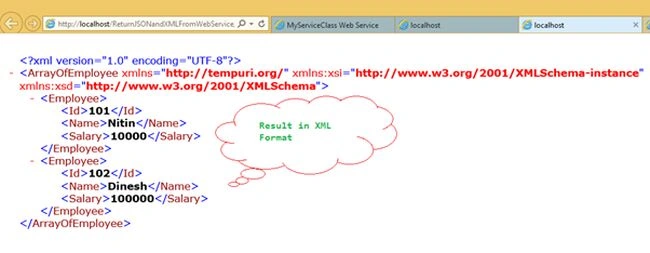
- Click on GetEmployessXML
Thank you for reading this article.


Anandu G NathPosted Jan 6, 2024, 4:43 AM EST
Nice Nitin Pandit
Sufail KalathilPosted Oct 20, 2019, 5:42 PM EDT
How call asp.net web method in postman
Javed AlamPosted Oct 6, 2018, 3:12 AM EDT
In json response I don't need the xml tag as well, because it make erorr when convert to jsonobject for android .
Hadshana KamalanathanTOP 100Posted Jul 21, 2018, 9:52 PM EDT
Good one...
Jayant KumarPosted Feb 19, 2017, 11:51 PM EST
If you are returning string then the JSON output is embedded with <string> tag. so better is return void for GetEmployessJSON Method and use JavaScriptSerializer js = new JavaScriptSerializer(); Context.Response.Write(js.Serialize(emps)); at the last to return pure JSON.
Ramesh PalaniappanPosted Sep 7, 2016, 7:57 AM EDT
Good one
Ahmed SalahPosted Jul 5, 2016, 4:51 PM EDT
By DEfault Web Service returns data in XML format. Here you don't have to create an array, you may use a List<T> object instead and return this list.
dipti bistPosted May 19, 2016, 10:57 PM EDT
How to set credentials and password in case we want clients to have access only if they enter valid credentials?
Sr KarthigaPosted Feb 19, 2016, 12:56 AM EST
Nice Explanation
Santhakumar MunuswamyPosted Nov 27, 2015, 8:42 PM EST
Good One
Mahavirsinh PadhiyarPosted Nov 22, 2015, 7:40 PM EST
Can we just return like this "return Json(arraylist, JsonRequestBehavior.AllowGet);" by defining return type as JsonResult (System.Web.Mvc)?
Humayun Kabir MamunPosted Nov 22, 2015, 7:29 PM EST
Nice...
Rajeesh MenothPosted Nov 22, 2015, 7:04 PM EST
Good One!
Mukesh KumarPosted Nov 22, 2015, 6:45 PM EST
Great One sir..
kalu singh raoPosted Nov 21, 2015, 8:32 AM EST
nice
Ranjan DailataPosted Nov 21, 2015, 8:01 AM EST
Generally it's not advisable to code each method to return the WebService response. Technologies like WebAPI, returns the response based on the accept-type so you don't really have to bother about coding for a specific format of data. Generally, it's a good practice to have data formatters so it can format your data as per the client needs.
Alok DwivediPosted Oct 14, 2015, 11:37 AM EDT
when i publish this on web this will not giving me response following error occur Request format is unrecognized for URL unexpectedly ending in '/GetEmployessXML'
Vipul PatelPosted Jul 6, 2015, 11:12 PM EDT
i am trying to pass the data from mvc controller to web api in json format and reverse also.i want to use web request and response in my project.please give me some reference or demo ...
Vipul PatelPosted Jul 6, 2015, 11:09 PM EDT
Hiii ,
Raees KhanPosted Jul 2, 2015, 2:41 AM EDT
How to consume getEmployeejson at client app.
vijay gautamPosted Jun 6, 2015, 12:55 AM EDT
thanxx for the awesome tutorial...!!! .One little doubt.. why json data is showing inside XML <String> and how to remove that if we want to..
loli festPosted May 19, 2015, 4:43 AM EDT
I HAVE Visual Studio 2012 Ultimate and when i select "Add" item menu, i can't see "WebService" option, Why?
Dipti DhimanPosted May 14, 2015, 3:19 AM EDT
Useful Article Nitin
Upendra Pratap ShahiPosted May 7, 2015, 9:06 PM EDT
nice...
Sourabh TiwariPosted Feb 21, 2015, 5:56 AM EST
Nice Example But JSON one is Not Accurate actually its JSON data in XML file trap in <String> node.
Guest UserPosted Feb 5, 2015, 9:04 PM EST
good one. I think JSON is catching with XML speedly bcause it has minimum meta data payload alongwith.
Rajeev RanjanPosted Feb 5, 2015, 5:55 PM EST
the way you write article it looks topic is so much simple
Khargesh RajputPosted Feb 4, 2015, 7:41 PM EST
thanks sir i need to learn web services using json
Dinesh BeniwalTOP 10Posted Feb 4, 2015, 7:20 PM EST
Congrats Nitin Pandit Articles of the day on ASP.NET
Zeeshan AzimPosted Jan 10, 2015, 4:05 AM EST
Very Nice.
Pramod ThakurPosted Dec 25, 2014, 10:05 PM EST
Nice One :)
Rahul BansalPosted Dec 25, 2014, 8:29 PM EST
Good one Nitin :)
Mukesh Kumar TiwariPosted Dec 25, 2014, 7:47 PM EST
Nitin its a very nice article..But i think u should also explain that how we can consume this service in asp.net. I think that will be very beneficial for new programmer, who have no idea abt web service.
Joginder BangerPosted Dec 25, 2014, 7:05 PM EST
Good job sir
Jitendra KumarPosted Dec 25, 2014, 6:59 PM EST
Good..
Manish Kumar ChoudharyPosted Dec 25, 2014, 6:08 PM EST
Nice one..
Praveen KumarPosted Dec 25, 2014, 5:51 PM EST
superb !