
You may come across a need to sort your data order and on multiple columns. In PowerApps you can bind data to controls like Gallery, Combo box, Dropdown list, List box. There might be a need to sort them in order. You can easily achieve this by mentioning order as either Ascending or Descending.
What if you want to sort the data in a specific order?
For example, weekdays – Sunday, Monday, Tuesday and so on. Or arrange your tasks sorted, such as "Not started" on top, then "In Progress," then "Completed," and so on. Yes you can do this as well easily in PowerApps using the SortByColumns function.
Using this function and parameters we will get the result as below.
- Sort(DataSource,Column, SortOrder.Descending)
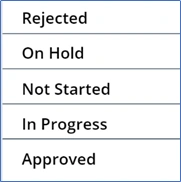
Using the same function with Ascending order we will get the result as below
- Sort(DataSource,Column, SortOrder.Ascending)
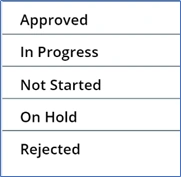
Now let's see how we specify our customized order. Use SortByColumns function to achieve this as shown below.
- SortByColumns( DataSource, Column, [ " Not Started","In Progress","Approved","Rejected","On Hold " ] )
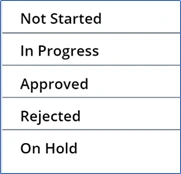
Refer to Microsoft documentation for more details about Sort and SortByColumns function.
I hope this helps.

Join the conversation! Your thoughts help the community grow.