
Overview
Consider a scenario, where you are moving your Power Apps to the Production environment and you only want to show records after the production launch.
Let’s say my Production Live happened at 01:00 PM then I need to show records created after 01:00 PM on that day. So, how can we achieve this?
Solution
We need to use the following Power Fx formula to achieve this.
- DateValue
- Time function with Hour, Minute, and Second
Consider the following example.
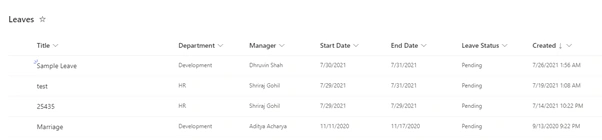
Below is the screenshot for List Items. We need to show records that are created only after “07/26/2021 01:00:00 PM”.
Go to your Power Apps and add the following line of code to your Items Property of the grid.
Filter(
    Leaves,
    (DateValue(
        Text(
            Created,
            "[$-en-US]mm/dd/yyyy"
        )
    ) + Time(
        Hour(Created),
        Minute(Created),
        Second(Created)
    )) > (DateValue("07/26/2021") + Time(
        Value(13),
        0,
        0
    ))
)
Here, we are comparing if the created value from SharePoint List is greater than “07/26/2021 01:00:00 PM”.
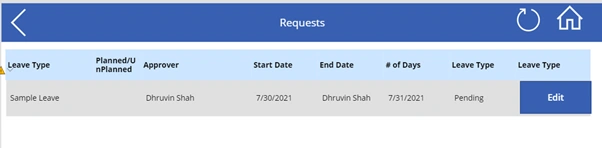
As a result, we are getting the following outcome.
Conclusion
I hope this trick is helpful to you! Happy Power Apping!!


Julien AnidPosted Feb 20, 2022, 5:12 AM EST
Thanks for sharing this amazing post. Is it possible to filter the data based on the current user time zone or regardless of the time zone to display records according to that? Example: Project A is available today from 9:00 AM to 10:00 AM, the current time of User A is 10:05 AM when he opens powerapps this record will not be visible in the gallery anymore. User B is in a different timezone and the time is 9:30 AM so he will be able to see the record.