
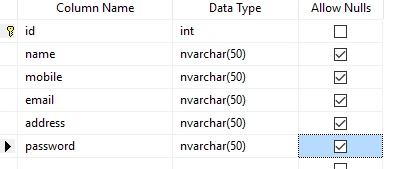
Step 1 - First we have to create Employee Table
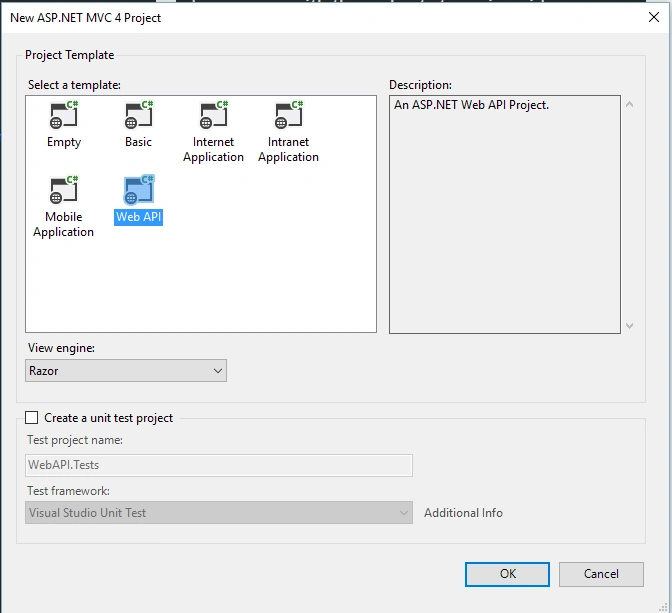
Step 2 - Now we have to create MVC 4 Web Application

Step 3 - In that we have to choose Web API and click OK Button
Step 4 - Then you will get empty Project
Step 5 - In Solution Explorer within Controller folder you will see by default Controllers. And we have to delete both controllers.

Step 6 - After that we have to add Entity Framework (ADO.NET) in Models Folder. Right click on Models Folder select ADO.NET Entity data model.

Step 7 - Connect your database where you created employee table.

Step 8 - After creating Model you will see model diagram like this.

Step 9 - After we have to create Controller. Right click on Controller folder choose
Add->Controller and click Add button.

Step 10 - After clicking add Button you will get empty controller like this.

Step 11 - EmpController.cs Code Behind
- using System;
- using System.Collections.Generic;
- using System.Linq;
- using System.Net;
- using System.Net.Http;
- using System.Web.Http;
- using WebAPI.Models;
- namespace WebAPI.Controllers
- {
- public class EmpController : ApiController
- {
- guruapiEntities db = new guruapiEntities();
- // GET api/emp
- public IEnumerable<employee> Get()
- {
- return db.employees.ToList<employee>();
- }
- // GET api/emp/name
- public IEnumerable<employee> Get(string id)
- {
- var list = from g in db.employees where g.name == id select g;
- return list;
- }
- // POST api/emp
- public HttpResponseMessage Post(employee value)
- {
- try
- {
- if (ModelState.IsValid)
- {
- db.employees.Add(value);
- db.SaveChanges();
- return Request.CreateResponse(HttpStatusCode.OK);
- }
- else
- {
- return Request.CreateResponse(HttpStatusCode.InternalServerError, "Invalid Model");
- }
- }
- catch (Exception ex)
- {
- return Request.CreateResponse(HttpStatusCode.InternalServerError, ex.Message);
- }
- }
- // PUT api/emp/5
- public employee Put(int id, string name, string mobile, string email, string address,string pwd)
- {
- var obj = db.employees.Where(n => n.id == id).SingleOrDefault();
- if (obj != null)
- {
- obj.name = name;
- obj.mobile = mobile;
- obj.email = email;
- obj.address = address;
- obj.password = pwd;
- db.SaveChanges();
- }
- return obj;
- }
- // DELETE api/emp/5
- public void Delete(int id)
- {
- var obj = db.employees.Find(id);
- db.employees.Remove(obj);
- db.SaveChanges();
- }
- }
- }
Step 12 - Run the application. Then you will get browser like this. And write API link in URL box here.

Step 13 - Then you will get output in XML format

Step 14 - If you want output in JSON format then add below code in WebApiConfig.cs.
- var appXmlType = config.Formatters.XmlFormatter.SupportedMediaTypes.FirstOrDefault(t => t.MediaType == "application/xml");
- config.Formatters.XmlFormatter.SupportedMediaTypes.Remove(appXmlType);
Step 15 - JSON Format output is

Step 16 - If you want particular data then make it back slash after emp and write a name then you will get particular data. In this API we done in LINQ Query.



Aman RahejaPosted Mar 27, 2018, 2:41 AM EDT
GuruapiEntities db = new guruapiEntities(); what does this line mean?
Pravas RanjanPosted Feb 1, 2017, 11:07 PM EST
Hi Guru can you please post a complete article on web api concept, so that it will be very help full for us and thanks for effort here for providing valuable information..........
Bhimashankar GangadePosted Sep 28, 2016, 11:19 PM EDT
Nice
Suresh MolabantiPosted Sep 27, 2016, 3:59 AM EDT
Step 12 and step 13 url's same.But,what is the difference between and why getting error in step 12