I make web design to resignation form submittion . i face issue on design for part under filled by employee
so i need to make web design for the part under filled by employee
what i try as below :
CSS
    .form-header {
text-align: center;
width: 30%;
margin: 0 auto;
background-color: gray;
border-radius: 10px 10px 0 0;
padding: 20px;
}

.form-header h2 {
color: white;
margin: 0;
}

.form-container {
  background-color: #eee;
  padding: 20px;
  border: 1px solid #ccc;
  border-radius: 5px;
  max-width: 100%;
  margin: 0 auto;
  display: flex;
  justify-content: space-between;
}

.form-section {
  margin-bottom: 10px;
  width:400px;
}

label {
  display: block;
  font-weight: bold;
  margin-bottom: 5px;
}

input[type="text"] {
  width: 100%;
  padding: 5px;
  border: 1px solid #ccc;
  border-radius: 3px;
}

.fill-by-employee {
  text-align: right;
  font-style: italic;
  color: #888;
}
h1 {
  text-align: center;
}

form {
  margin-top: 20px;
}

label {
  display: block;
  margin-top: 10px;
  font-weight: bold;
}

input[type="text"],
textarea,
input[type="date"] {
  width: 100%;
  padding: 5px;
}

input[type="submit"] {
  background-color: #4CAF50;
  color: white;
  padding: 10px 20px;
  border: none;
  border-radius: 4px;
  cursor: pointer;
  margin-top: 20px;
}

input[type="submit"]:hover {
  background-color: #45a049;
}


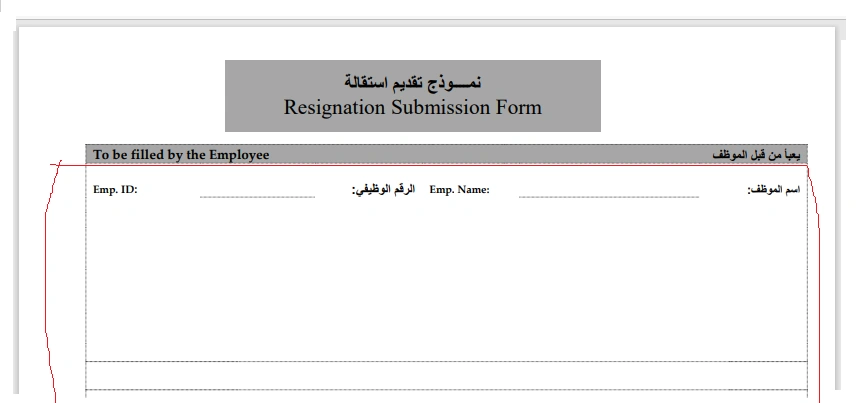
     ????? ??? ?? ???????
 Resignation Submission Form


    Filled By Employee:


    ???? ?? ??? ??????


        Emp. ID:


        ????? ???????:


        Emp Name:


        ??? ??????:


        Reason of Resignation:
desired result as below with red color
so can you please help me







Tahir AnsariRank #366 · 6.8K reputationPosted Sep 23, 2023, 4:25 AM EDT
hey Adjust the code according to your need
.form-header { text-align: center; width: 30%; margin: 0 auto; background-color: gray; border-radius: 10px 10px 0 0; padding: 20px; } .form-header h2 { color: white; margin: 0; } .form-container { background-color: #eee; padding: 20px; border: 1px solid #ccc; border-radius: 5px; max-width: 100%; margin: 0 auto; display: flex; justify-content: space-between; } .form-section { margin-bottom: 10px; width: 400px; } label { display: block; font-weight: bold; margin-bottom: 5px; } input[type='text'] { width: 100%; padding: 5px; border: 1px solid #ccc; border-radius: 3px; } .fill-by-employee { text-align: right; font-style: italic; color: #888; } h1 { text-align: center; } form { margin-top: 20px; } label { display: block; margin-top: 10px; font-weight: bold; } input[type='text'], textarea, input[type='date'] { width: 100%; padding: 5px; } input[type='submit'] { background-color: #4caf50; color: white; padding: 10px 20px; border: none; border-radius: 4px; cursor: pointer; margin-top: 20px; } input[type='submit']:hover { background-color: #45a049; } .form-header { background-color: gray; padding: 10px; text-align: center; } .form-header h1 { color: white; margin: 0; } .form-section { display: inline-block; vertical-align: top; width: 48%; } label { display: inline-block; width: 100px; /* Adjust the width for labels as needed */ text-align: right; } input[type="text"] { display: inline-block; width: calc(100% - 120px); /* Calculate input width minus label width */ border: none; border-bottom: 1px solid #000; padding: 5px; outline: none; } .form-section:last-child input[type="text"] { width: calc(100% - 100px); /* Adjust the last input width to align with the label */ } Employee Resignation Submission Form Fill out the details below to submit your resignation. Emp. ID: Emp. Name:ahmed salahRank #2,240 · 628 reputationPosted Sep 23, 2023, 10:58 AM EDT
not achieve what i need
if you run it script
it will not give you wht exactly i need
can you modify script to give result as above