I have checkboxes in the access database. When pulling data, it returns true and false. If what I want is true, the checkbox should be output, if it is false, it should be empty.
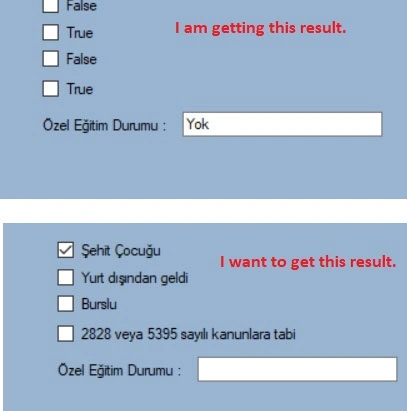
checkBox1.Text = dataGridView1.CurrentRow.Cells["sehitcocuk"].Value.ToString();
if (checkBox1.CheckState == CheckState.Checked)
{
checkBox1.CheckState = CheckState.Checked;
}
else
{
checkBox1.CheckState = CheckState.Unchecked;
}







Jayraj ChhayaRank #304 · 8.2K reputationPosted Jan 29, 2024, 9:20 AM EST
To display the checkboxes based on the true and false values retrieved from the database, you can use the following code:
checkBox1.Text = dataGridView1.CurrentRow.Cells["sehitcocuk"].Value.ToString();

if (checkBox1.Text == "True")
{
    checkBox1.Checked = true;
}
else
{
    checkBox1.Checked = false;
}