Loading
Articles by Jayant Kumar

Managed vs Unmanaged Environments in Power Platform
Understand Power Platform environments: Managed for governance and Unmanaged for development. Learn the differences, benefits, and ALM lifecycle for secure deployments.
Security Groups in Power Platform & Why Default Environment Cannot Be Restricted
Understand Power Platform security groups and why the Default environment can't be restricted. Learn governance strategies and best practices for environment control.
Managed and Unmanaged Solutions in Microsoft Power Platform – A Complete Guide
Master Power Platform solutions! Learn the difference between managed and unmanaged solutions, how to create them, and best practices for ALM. Ensure safe deployments!
Concurrency in Power Apps
Boost Power Apps performance with concurrency! Learn how to use the Concurrent() function for parallel operations, optimize data loading, and handle data conflicts effectively. Build faster, more responsive apps!
Entity Tag (ETag) in Power Apps – A Complete Guide
Unlock the power of Entity Tags (ETags) in Power Apps! This comprehensive guide demystifies Etags, the hidden version identifiers crucial for preventing data conflicts in multi-user environments. Learn how Etags ensure data consistency, enable optimistic concurrency control, and facilitate safe collaborative editing. Discover best practices for handling ETag conflicts and build robust, scalable Power Apps that guarantee data integrity. Master ETag for reliable approval workflows and secure transactional operations.
Environment Variables in Microsoft Power Platform
Master Power Platform Environment Variables! Simplify deployments, enhance flexibility, and boost security. Learn to create robust, scalable, and maintainable apps.

Handling Large SharePoint Lists in Power Automate Using Pagination and Batching
Master Power Automate for large SharePoint lists! Learn pagination and batching techniques to efficiently process thousands of items without hitting limits or errors.
SharePoint Deprecated Features and Their Modern Alternatives
Migrate from deprecated SharePoint features! Learn about replacements for InfoPath, SPD workflows, and classic publishing. Modernize with Power Apps, SPFx, and more.
Evolution of Extranet Sites in Modern SharePoint
Discover how Modern SharePoint has revolutionized external collaboration! Learn how to securely share sites with partners using guest access, eliminating complex extranets.
Power Apps vs SharePoint List Customization vs Microsoft Forms - Choosing the Right Approach in Microsoft 365
Compare Power Apps, SharePoint List Customization, and Microsoft Forms for data collection in Microsoft 365. Learn which tool best suits your needs with our guide!
Migrating SharePoint Customized List Form to a Standalone Power App (Using “Copy Code” Method)
Migrate SharePoint customized list forms to standalone Power Apps using the 'Copy Code' method. Avoid export/import issues and gain a cleaner, scalable app. Step-by-step guide included!
How Python’s Namespace Concept Differs from Other Programming Languages
Explore the unique nature of Python namespaces compared to languages like C#, Java, and C++. Discover how Python treats namespaces as dynamic, runtime objects (dictionaries) that map names to objects, enabling flexible code modification. Contrast this with the compile-time namespaces in other languages, which serve primarily for code organization and collision prevention, lacking runtime mutability and dynamic lookup.
Static Classes and Static Methods in Python
Explore static methods and emulated static classes in Python. Learn how to define and use static methods with @staticmethod, understand the difference between class methods and static methods, and discover how to group related utility functions using class design. Improve code organization and avoid global namespace clutter by encapsulating helper functions within classes, promoting cleaner, modular, and maintainable Python code.
Enforcing Naming and Constant Rules in Python Using Metaclasses
Unlock Python's potential with metaclasses! This article demonstrates how to use metaclasses to enforce strict naming conventions and constant validation, ensuring code consistency and preventing runtime errors. Learn to automatically validate class names, method names, and constant types at class creation, leading to more maintainable and robust Python projects. Improve code quality and catch errors early with this powerful technique.
Conceptual Difference Between SharePoint Online and SharePoint On-Premises
Explore the key conceptual differences between SharePoint Online and SharePoint On-Premises. Understand hosting, management, customization, and integration aspects to choose the right solution for your organization. Learn about hybrid approaches and the future of SharePoint in the cloud. Discover the ideal use cases for each platform and how they align with business needs and compliance requirements. Navigate the complexities of SharePoint deployment with clarity.

How Enterprise-Wide Third-Party Client Applications Use Azure Authentication
Understand how enterprise third-party client applications like ShareGate leverage Azure Active Directory (now Microsoft Entra ID) for secure authentication within Microsoft 365. Learn the difference between delegated (user-based) and app-only (service principal-based) authentication, when admin consent is required, and how this dual-model approach balances security and productivity for tenant-wide operations versus user-specific tasks. Discover how to manage permissions effectively for tools like ShareGate, AvePoint, and Colligo.

How to Access Microsoft 365 Services via a Client Application
Learn how to securely access Microsoft 365 services like SharePoint, Teams, and OneDrive from client applications. Understand delegated vs. app-only authentication, when to use tokens and app registration in Azure AD, and how SPFx simplifies access. Discover the steps for registering your app and using MSAL for secure API calls. Simplify Microsoft 365 integration!
Evolution of SharePoint Web Services: From _vti_bin to REST and Microsoft Graph
Explore the evolution of SharePoint web services, from the legacy _vti_bin directory and SOAP-based .asmx services to the modern REST API and Microsoft Graph. Understand how SharePoint's service architecture transformed to provide efficient data access and integration with Microsoft 365, enabling developers to build powerful collaboration solutions. Discover the benefits of each approach and the future of SharePoint development.
SharePoint Customization Options — Modern vs Classic Approaches
Explore SharePoint customization options, contrasting classic approaches (master pages, server-side code) with modern methods like SPFx, Power Platform, and PnP provisioning. Understand the capabilities, limitations, and non-customizable areas in modern SharePoint. Learn how to choose the right approach for forms, workflows, UI, and site provisioning, embracing security and cloud-readiness.
The End of “Open in Windows Explorer” in SharePoint and the Rise of OneDrive
The 'Open in Windows Explorer' feature in SharePoint is gone! This article explains why, due to the retirement of Internet Explorer and the shift to modern SharePoint. Discover recommended alternatives like OneDrive Sync Client and Microsoft Edge in IE Mode. Learn why OneDrive offers superior file management, collaboration, and security compared to traditional file servers, making it ideal for today's hybrid work.
How the SharePoint Development Landscape Has Evolved — What’s New, What’s Fading
Explore the evolution of SharePoint development, from classic server-side coding to modern web development with SPFx and Microsoft Graph. Discover deprecated technologies like CSOM and Farm Solutions, and learn about the modern toolkit including PnP.PowerShell, Power Platform, and Azure Functions.
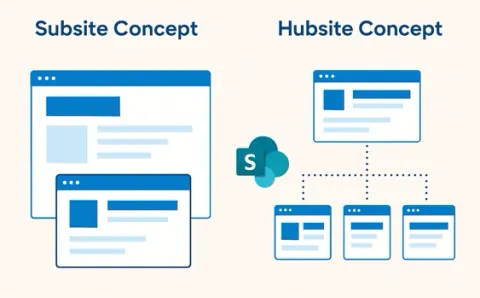
The Shift from SharePoint Subsites to Modern Site Architectures
Discover why Microsoft is moving away from SharePoint subsites towards modern site architectures. Learn about the limitations of subsites with Microsoft 365 groups and the benefits of hub sites, including shared navigation, content roll-up, and improved search capabilities. Embrace a streamlined and efficient approach to SharePoint management and collaboration.
OneDrive vs SharePoint Document Library: Choosing the Right Storage for Your Organization
This article clarifies the differences between OneDrive for Business and SharePoint Document Libraries (including 'Team OneDrive'). Learn when to use each for optimal file management, collaboration, security, and compliance. Discover how to choose the right tool to boost team productivity and ensure secure, well-organized content within your organization.
How to Convert a Python Script to an Executable (.exe)
Learn how to convert your Python scripts into standalone Windows executables (.exe) using PyInstaller! This comprehensive guide covers everything from installation and basic conversion to adding custom icons, bundling external resources like images and JSON files, and accessing those resources reliably at runtime using sys._MEIPASS.
User-Defined Functions (UDFs) in Power Apps
Learn how to enable, create, and call experimental user-defined functions in Power Apps Canvas apps, including parameters, return types, benefits, and preview limitations.