Loading
Priyaranjan K S's contributions

Getting Started with SharePoint Framework Development using TypeScript, PnP JS, and React JS
In this book you will learn about SharePoint Framework Development using TypeScript, PnP JS, and React JS.
Retrieve User Profile Properties Using SPFx And PnP JS In SharePoint Online
SharePoint Framework is the new development model in which a lot of work has been going on since it went to General Availability on Feb 23, 2017. It is a page and web part model that provides full support for client-side SharePoint development, easy integration with SharePoint data and support for open source tooling. With the SharePoint Framework, you can use modern web technologies and tools in your preferred development environment to build productive experiences and apps in SharePoint.
SharePoint Webhooks As Event Receivers For SharePoint Online
SharePoint Webhooks were made generally available in January 2017. They provide the mechanism of catching the Asynchronous Events like item added, item deleted etc: that happens in the SharePoint Objects. At present, SharePoint Webhooks cannot be used with Synchronous events like Item Adding for which we will still have to rely on Remote Event Receiver solution using Provider Hosted Add-in.
Simulate SharePoint Online Timer Jobs Using Azure Functions
SharePoint Server provides native Timer Jobs that inherit SPJobDefinition class to run at regular intervals defined in the SPSchedule object. This way we can create solutions that have to be iteratively run to process logic at regular intervals. However, in case of SharePoint Online Native Timer Jobs cannot be used.
Create SharePoint Framework Web Part To Retrieve SharePoint List Items Using REACT And REST API
Create SharePoint Framework Web Part to retrieve SharePoint List Items using REACT and REST API.
Retrieve And Display SharePoint List Items Using REST API And ReactJS
Retrieve And Display SharePoint List Items Using REST API And ReactJS.

Resolve Issues While Starting SharePoint Synchronization Using Microsoft Identity Manager(MIM)
Resolve issues while starting SharePoint Synchronization using Microsoft Identity Manager(MIM).

Retrieve And Mail Azure Resource Manager Virtual Machine Status Using PowerShell
Retrieve And Mail Azure Resource Manager Virtual Machine Status Using PowerShell.
Getting Started With SharePoint Framework Development Using PnP JS
Getting Started with SharePoint Framework development using PnP JS.
SharePoint List Creation Using PnP JS And SPFx
SharePoint List Creation using PnP JS and SPFx. In this section, we will see how to use PnP JS in SPFx to create and provision a SharePoint custom list.
Upgrade SharePoint Framework Solution Using Upgrade Actions
Upgrade SharePoint Framework Solution using Upgrade Actions.
Provision SharePoint List With Custom Site Columns And Content Type Using SharePoint Framework
Provision SharePoint List With Custom Site Columns And Content Type Using SharePoint Framework.
Dynamic Navigation Menu For SharePoint Using Superfish jQuery Plugin
Dynamic Navigation Menu For SharePoint Using Superfish JQuery Plugin.
Provision Custom Sharepoint List Using SharePoint Framework Development Model
Provision Custom SharePoint List using SharePoint Framework development model
Retrieve SharePoint Hosted Add-in Data As JSON From A Console Application Using HTTP REST Request
Retrieve SharePoint Hosted Add-in data as JSON from a Console Application using HTTP REST request.
Rectify The Solution Error For Synchronizing Microsoft Identity Manager SP1 With SharePoint 2016
Rectify The Solution Error For Synchronizing Microsoft Identity Manager SP1 With SharePoint 2016.
Convert SharePoint List View To Radar Chart Using Client Side Rendering And Chart JS
This article helps you in converting SharePoint List View to Radar Chart, using Client Side Rendering and Chart JS.
SQL Server 2016 - Getting Started With Row Level Security Feature
This article familiarizes you with SQL Server 2016 - Getting started with Row Level Security feature.
Resolve The Missing App Launcher Issue In SharePoint Server 2016
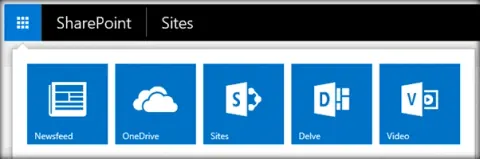
In SharePoint Server 2016, we can navigate to SharePoint and Office 365 locations directly from the app launcher.
Working With R Programming Using Microsoft R Open And R Tools For Visual Studio
This article illustrates working with R Programming, using Microsoft R Open and R Tools for Visual Studio.
Implement Business Connectivity Services Using oData, Entity Framework And SharePoint Hosted Add-in
Implement Business Connectivity Services Using oData, Entity Framework And SharePoint Hosted Add-in.

Send Mails And Attachments From PowerShell Using Gmail SMTP Server
In this article, you will learn how to send mails and attachments from PowerShell, using Gmail SMTP Server.
Invoke Azure Runbooks Using Webhook From Client Applications
Invoke Azure Runbooks Using Webhook From Client Applications.
Getting Started With API Testing Utilities - JSON Server And Postman
Getting started with API testing utilities - JSON Server and Postman.