Loading
Articles by Satyajit Paul

Getting Started With Microsoft Forms In SharePoint/Teams - Part I
This is a two-part article. This is the first part of the series and will cover the below articles • Designing a form • Deployment in Teams • Deployment in SharePoint • Getting notifications of user responses • Viewing results

How To Create A Classic Site In SharePoint Online
Learn to create SharePoint classic sites in Microsoft 365 using both out-of-the-box methods and PowerShell. Explore the admin center and PowerShell cmdlets for seamless classic site creation alongside modern SharePoint sites.
Set Up Multi Factor Authentication In Microsoft 365
In this article, we will explore the different means by which we can enable multi-factor authentication in Microsoft 365 (also known as Office 365). This explains in details about Security Defaults, Conditional Access and per person MFA

Create Teams In Bulk Using Teams PowerShell
In this article we will look at how multiple teams can be created from data present in an CSV file. We will be using Teams PowerShell to achieve this.

Getting Started With Teams PowerShell
In this article, we will see how to install and set up Microsoft Teams PowerShell for Windows.
Show/Hide Controls In InfoPath Form For SharePoint Lists - Part Two
In this article, you will learn show to ?Show/Hide Controls in InfoPath Form for SharePoint Lists.
Show/Hide Controls In InfoPath Form For SharePoint Lists - Part One
In this article we will see how to make a section visible to certain users for a SharePoint list form designed in InfoPath
Query String Using JavaScript
This article explains how to use the query string properties and methods available in JavaScript.
Quick Charts In SharePoint Online
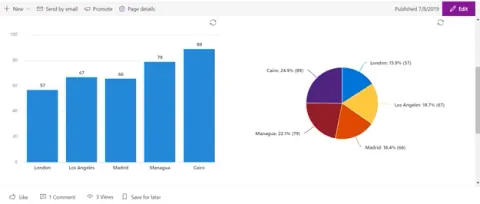
In this article, we will have a look at Quick Charts in modern web parts introduced in SharePoint Online.

Create A PowerApps App For SharePoint List
In this article, we will learn how to create a new app for SharePoint list using PowerApps.
Find All Workflows In SharePoint Using PowerShell
In this article, you will learn how to find all workflows in SharePoint using PowerShell.
Top 5 Workflow Tools For SharePoint
This article describes the top 5 workflow provisioning applications/platforms for SharePoint.
Top 5 Applications For Designing Attractive Forms In SharePoint
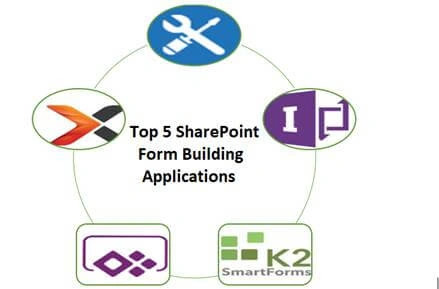
This article describes a few of the SharePoint Form building applications with their descriptions.
Find All Lists And Libraries Using Infopath In SharePoint
This article explains how to find out all the lists and libraries using InfoPath form in SharePoint using PowerShell.
Create SharePoint List Items From Twitter Hashtags
This article explains how to create list items in SharePoint Online from Tweets based on hashtags using Flow.
Customize The Login Page Of Office 365
This article explains how to customize the default login page of Office 365.
Create Dashboards In SharePoint Using ChartJS
Learn how to create dynamic and interactive dashboards in SharePoint using ChartJS. This guide covers step-by-step integration of ChartJS with SharePoint, enabling you to visualize data with stunning charts and graphs.
Create Easy Dashboards In HTML Using ChartJS
ChartJS is one of the most widely used open source Dashboard solutions across many platforms. Leveraging HTML5 canvas, its great rendering and responsive performances across browsers makes it a developer’s first choice.
How To Make Attachments Mandatory In SharePoint Lists
We might come across scenarios where we must work with “attachments”. Ideally – SharePoint libraries are the answer, but due to various reasons we might still have to use lists rather than library. Now, there is no direct means to make an “Attachments” field mandatory in SharePoint Lists. But, we can very easily get it worked around with a little bit of tweaks here and there. Read on to know how!
Working With Views In SharePoint Online
Views are an integral part of SharePoint landscape. List and Libraries in SharePoint have views that help in data organization, grouping, assimilation, etc. Features like filtering and sorting data also make views a much useful component. They make the data interactive and help business save their time and improve processes.
Create A Custom Page Layout For SharePoint Online
Learn how to create a custom page layout in SharePoint Online to enhance your site's design and functionality. This guide covers essential steps for customizing page layouts, including utilizing web parts, applying responsive design techniques, and optimizing user experience.
Create A Custom Master Page In HTML For SharePoint Online
We often come across the need for using a customized master page, owing to various business needs. SharePoint has advanced much in terms of its master page design and deployment, and gives much emphasis to non-server side components (HTML5/CSS3, Bootstrap, etc.)
SharePoint Migration Tool - V2 Release And Introduction
A new and improved version of Microsoft’s very own migration tool – SharePoint Migration Tool – version 2 was released yesterday. This tool is slowly gaining momentum slowly with many developers, using it for quick, lightweight migrations.
Delete Item Versions In SharePoint Programmatically
Versioning in SharePoint is an awesome feature that lets users create versions of their documents. However, when left unchecked, especially when the below category of “Document Version History” is selected – an end user will be able to create practically an indefinite number of versions. This is not a recommended best practice, and may end up using a huge amount of storage over the years.