Loading
Articles by Shyju

Installing and Configuring PowerView in SharePoint 2010 / 2013
This article describes PowerView and how to insall and configure it in a SharePoint Farm.
Enable PowerView in a SharePoint Site Collection
This article provides the procedure for enabling PowerView in a site collection. PowerView is a browser-based Silverlight application for SharePoint Server that enables users to present and share insights through interactive presentations.
Install SQL Server Reporting Service 2012 in SharePoint Integrated Mode
In this article you will learn how to Install SQL Server Reporting Service 2012 in SharePoint Integrated Mode.
Create Reporting Services Service Application in SharePoint
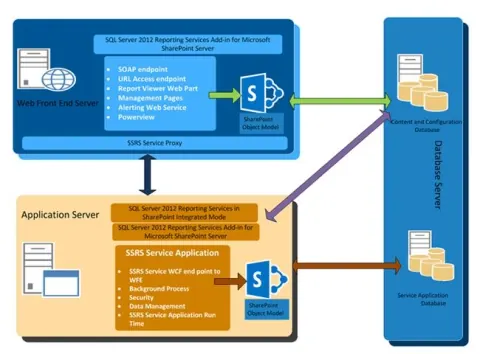
Reporting Services service application need to be running in one of the application servers, then only reporting service feature could be used in SharePoint Integrated Mode.
Install SQL Server 2012 Reporting Services Add-in For SharePoint 2010 and Sharepoint 2013
This article explains how to install SQL Server 2012 Reporting Services Add-in for SharePoint 2010 and Sharepoint 2013.
Anonymous Access in SharePoint 2013
In this article I explain the procedure for setting up anonymous access in SharePoint 2013.
How to Debug Workflow With Workflow Manager 1.0 and Visual Studio 2012
To debug a workflow you need to first create a workflow using Visual Studio.
Configuring Microsoft Workflow Manager
The Workflow Manager Configuration wizard will help you to configure the system, as described here.
Installing Microsoft Workflow Manager
Workflow manager is a multi-tenant host for running and managing Windows Workflow Foundation workflows, supporting high scale and high density execution.
Creating Multiple SharePoint 2010/2013 Web Applications in Single Port
Setting up a SharePoint web application is fun and easy if we know some of the basics of web application hosting.
SharePoint 2013 and Sharepoint 2010 Site Pages With Inline Code
Recently a couple of people asked about adding inline code into an aspx page, that resides in a page library or document library.
Fix Corrupt User Profile / Temp Profile in Windows Server 2008/ 2012
You will see here how to fix a corrupt user profile or temp profile in Windows Server 2008/2012
Installing SharePoint 2013: Part 1
Installing SharePoint 2013 is an interesting experience if you didn’t mess it up. As a first step we need to understand the hardware and software requirement for SharePoint 2013.
Disable Loop Back Check in Windows Server 2012
Microsoft introduces a security feature in 2003 server to prevent attacks on windows servers.
Disable Strict Name Check in Windows Server 2012
Microsoft has introduced a security feature that refuses to serve a request if the target server name is not the server's actual name.
SharePoint 2010 Content DataBase Performance Considerations
Here you will see DataBase Performance Considerations of SharePoint 2010 Content.
Configure web analytics and health data collection in SharePoint 2010
How to Configure web analytic and health data collection in SharePoint 2010.
Deleting Web Application in SharePoint 2010
In this article you will learn how to Delete Web Application in SharePoint 2010
Creating Web Application in SharePoint 2010
Here you will see how to create a Web Application in SharePoint 2010.
Developer Dashboard in SharePoint 2010
Developer dashboard is one of the coolest feature in SharePoint 2010 and loved by the developer community. Developer dashboard can help in diagnosing various issues in a custom code.
SharePoint 2010 - Creating Custom Timer Job
A Timer Job is something that comes to mind for batch processing operations in SharePoint. In most of the real-time SharePoint site requires integration of information available across different applications.
Double Hope Issue in Sharepoint/Asp.net application with IIS
Explains the IIS double-hop authentication problem in SharePoint and ASP.NET applications and outlines solutions using shared machine keys, application pool identities, or explicit credentials.

Creating Custom Sections and Encryption in web.config
Web application development requires various kinds of customization. One of the common scenarios is creation of custom sections in web.config.