




In this article, I am going to explain how to extract data from database and how to show data on a page using WPF ListView control.
I am using Northwind database, you can use whatever you want, and only you have to change is the connection string, your SQL string, and the binding properties in XAML code.
Here is the. xaml code:
- <Grid x:Name="Grid1">
- <ListView Name="ListViewEmployeeDetails" Margin="4,20,40,100" ItemTemplate="{DynamicResource EmployeeTemplate}" ItemsSource="{Binding Path=Table}">
- <ListView.Background>
- <LinearGradientBrush>
- <GradientStop Color="Gray" Offset="0"/>
- </LinearGradientBrush>
- </ListView.Background>
- <ListView.View>
- <GridView>
- <GridViewColumn Header="Employee ID" DisplayMemberBinding="{Binding Path=EmployeeID}"/>
- <GridViewColumn Header="First Name" DisplayMemberBinding="{Binding Path=FirstName}"/>
- <GridViewColumn Header="Last Name" DisplayMemberBinding="{Binding Path=LastName}"/>
- <GridViewColumn Header="BirthDate" DisplayMemberBinding="{Binding Path=BirthDate}"/>
- <GridViewColumn Header="City" DisplayMemberBinding="{Binding Path=City}"/>
- <GridViewColumn Header="Country" DisplayMemberBinding="{Binding Path=Country}"/>
- </GridView>
- </ListView.View>
- </ListView>
- </Grid>
Here is .cs code:
- SqlConnection con = new SqlConnection();
- SqlDataAdapter ad = new SqlDataAdapter();
- SqlCommand cmd = new SqlCommand();
- String str = "SELECT EmployeeID, FirstName, LastName, BirthDate, City, Country FROM Employees";
- cmd.CommandText = str;
- ad.SelectCommand = cmd;
- con.ConnectionString = "Data Source=localhost; Initial Catalog=Northwind; Integrated Security=True";
- cmd.Connection = con;
- DataSet ds = new DataSet();
- ad.Fill(ds);
- ListViewEmployeeDetails.DataContext = ds.Tables[0].DefaultView;
- con.Close();
- using System.Data.SqlClient;
- using System.Data;
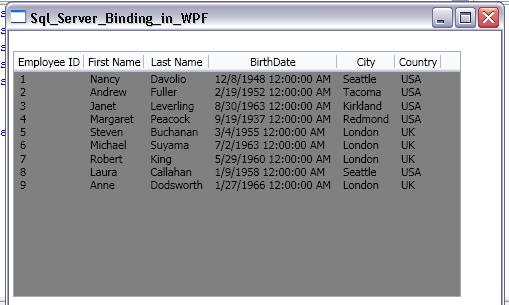
I hope you will like this article. If yes drop me a line or write a comment below in the comments section.
Mike FultonPosted Mar 31, 2020, 3:07 PM
"In this article, I am going to explain..." I must have missed that part. The explanation, that is. After reading this, I have more questions than when I started. Like, what is the ItemTemplate XAML property for? And what is the "Employee Template"? Is t hat supposed to be some object in the C# code, or something in the XAML? It is not to be found aywhere else. I don't have the NORTHWIND database pre-installed in SQL SERVR (tsk tsk, I khow) so apparently I need to change the data binding properties in the XAML. To what, i dunno, because i apparently missed the explanation.
J JPosted Jul 10, 2019, 12:37 PM
This can not work without the referenced employeetemplate. Its not in the text and not in de downloadable code.
vivek chauhanPosted Sep 29, 2014, 6:12 AM
where is employeetemplate.?
Prasad MakkenaPosted Jan 9, 2013, 9:04 AM
nice...thank u very much
manasaPosted Sep 25, 2012, 4:14 AM
can u please tell how can i achieve filter mechanism on this example
Georges MouawadPosted Dec 19, 2011, 1:43 AM
Dear Raj, I want to add a record to a list view in wpf application when I click on an add button, and then saving the record into database I'm working on visual studio 2010 .. .Net Framework 3.5 and sql server 2008 any idea? Thank you
Mukesh PatelPosted Nov 10, 2011, 3:18 PM
Hi Raj, this code does not work if the dataset is filled with Oracle data. Any help is appreciated. Thanks.
jason pezzimentieditedPosted May 1, 2011, 2:16 AMEdited May 1, 2011, 2:18 AM
Thanks for this great article, it's nice to see some real stuff in WPF. However, it is not working for me. I downloaded and extracted the files, and without changing anything, I ran the app, and it gives me this error: 'The invocation of the constructor on type 'Sql_Server_Binding_in_WPF.Window1' that matches the specified binding constraints threw an exception.' Line number '3' and line position '5'. Can someone please explain why this error is happening? Thanks!
saswat guptaPosted Jan 3, 2011, 6:08 AM
this is a good example. I have a problem i have a grid view and want to vertical scroll in down to up direction. Thanks in advance.
BatyaPosted Nov 23, 2010, 9:05 AM
thanks
Guest UserPosted Jul 26, 2010, 12:50 PM
this is really a good example for beginners.really its helpful......................great job
rcthomasPosted May 19, 2010, 10:55 AM
If I were to click on a row of the list view, how could I retrieve a value, for example the Employee ID, from that particular row? [email protected]
anindya chatterjeePosted Feb 27, 2010, 1:59 PM
Sir many many thanks for this article.For a long time I was searching for such an article . As I am a fresher. Anindya Chatterjee
RanganPosted Oct 22, 2008, 1:20 AM
Hi, I followed the above mentioned procedure for displaying records from SQL Server 2008. The problem I have facing is that there are no records that are getting displayed in the grid inspite of 3 records existing in the database. I am not getting any errors too. The dataset is getting loaded with the records from the database. But the same is not getting bound to the grid control. Request your expert advice in this regard. Regards Rangan Parthasarathy
RAVIKUMAR PRABHAKARPosted Mar 18, 2008, 1:14 AM
Hi, I am getting this error in my application, Request for the permission of type 'System.Data.SqlClient.SqlClientPermission, System.Data, Version=2.0.0.0, Culture=neutral, PublicKeyToken=b77a5c561934e089' failed.
surineni surineniPosted Mar 5, 2008, 3:10 AM
this example is very simple and easy to undestand how the binding works in wpf thanq very much shanthi