
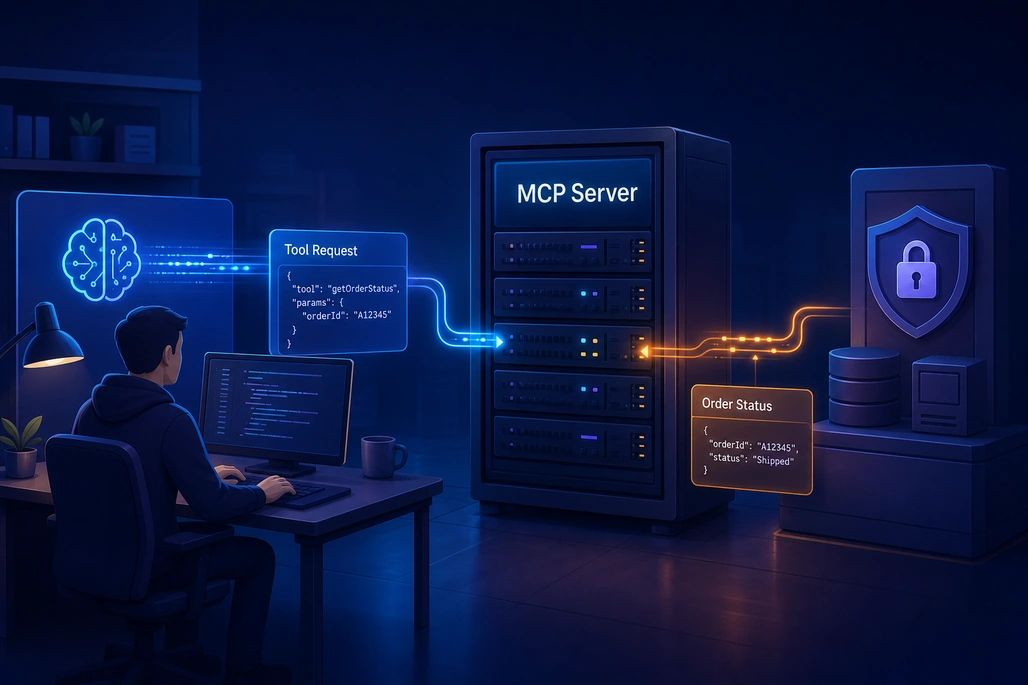
An MCP server provides a controlled bridge between an AI host and application capabilities.
A Model Context Protocol (MCP) server in C# is a .NET application that presents carefully defined tools, resources, or prompt templates to an AI host through a standard protocol. The host connects through an MCP client, discovers what the server can do, and can call a tool with structured arguments; the server performs normal application code such as querying an API or applying business rules, then returns a structured result. The official C# SDK removes most protocol plumbing, so a beginner can expose a C# method as an MCP tool using attributes and a small amount of host configuration.
Key takeaways
- MCP separates an AI host, an MCP client, and one or more servers that expose capabilities to that host.
- In the C# SDK, a method marked with
[McpServerTool]can be discovered and exposed as an MCP tool. - Tool names, descriptions, parameter types, and parameter descriptions matter because clients use them to understand how to invoke a capability.
stdiois a strong starting transport for local IDE integrations, while Streamable HTTP fits remote services and production deployments.- An MCP server is an integration boundary, not a security boundary: authentication, authorization, validation, auditing, and least privilege remain application responsibilities.
What is an MCP server in C#?
Model Context Protocol is an open protocol for connecting AI-powered applications to external tools and data. Microsoft describes the architecture as a host application containing MCP clients that connect to MCP servers; a server can provide an abstraction over a REST API or local data source. That architecture lets one host connect to several specialized services instead of requiring every AI application to invent a separate connector for each system.
In a C# project, the server is regular .NET code with an additional protocol-facing layer. It can call existing application services, repositories, HTTP APIs, or SDKs. Its job is not to be an LLM and it does not decide what a user means; it advertises capabilities and executes a request when an MCP client sends one.
A useful mental model is an API designed for AI clients. A traditional web API might expose an endpoint such as GET /orders/42. An MCP server can instead expose a tool named get_order_status with a documented orderId argument. The MCP client discovers that tool, provides the schema to its host, and sends a tool-call request only when the host elects to use it.
The official MCP C# SDK getting-started guide identifies three packages. ModelContextProtocol.Core contains lower-level client and server APIs; ModelContextProtocol adds hosting, dependency injection, and attribute-based discovery for typical clients and stdio servers; and ModelContextProtocol.AspNetCore adds HTTP hosting support for ASP.NET Core applications.
How do the host, client, and server work together?
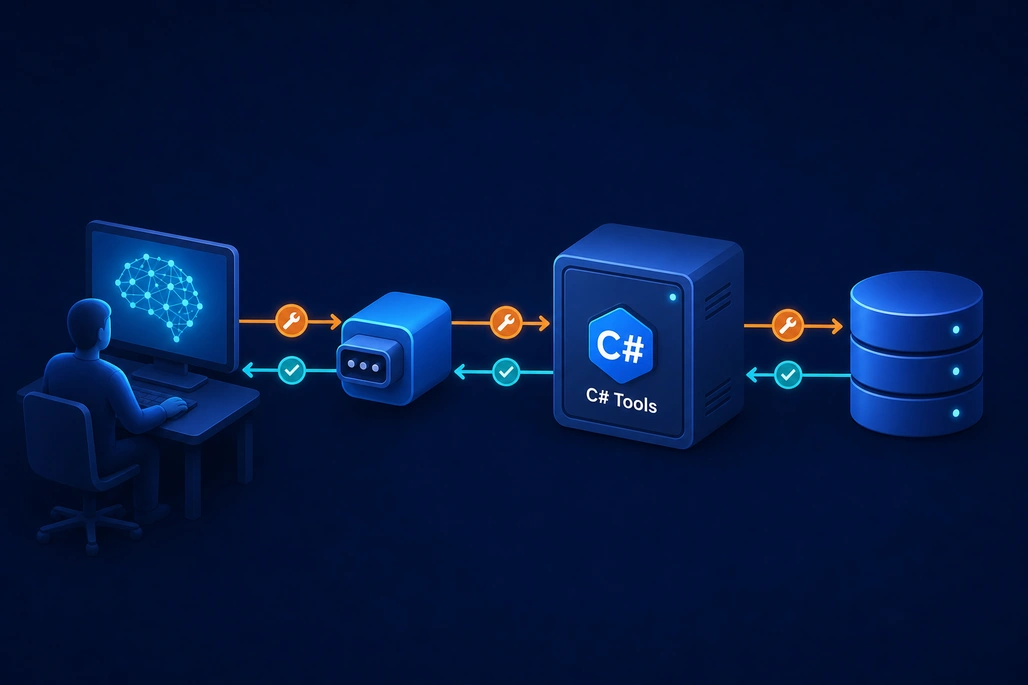
The host's MCP client discovers and calls capabilities exposed by the server.
The terms are related but describe different responsibilities. The host is the software the developer or user interacts with, such as an AI-enabled editor, agent application, or chat product. Within the host, an MCP client manages the connection to an MCP server. The server advertises and executes capabilities.
| Component | Responsibility | Typical example |
|---|---|---|
| MCP host | Provides the AI experience and decides how connected capabilities are surfaced. | An AI-enabled development environment or custom agent app. |
| MCP client | Connects to a server, negotiates capabilities, lists tools, and sends requests. | The protocol component running inside the host. |
| MCP server | Defines capabilities and executes the underlying business operation. | A .NET app that queries an internal service. |
| Tool implementation | Contains the domain logic that validates input and returns a result. | A C# method that reads a shipment status. |
The conversation begins when a client connects and initializes the server. It can then request the server's list of tools, resources, or prompts. For a tool, the server supplies metadata including a name, description, and input schema. When a tool is selected, the client sends the tool name and JSON-compatible arguments, and the server returns content or an error result.
This distinction is important for beginners: the LLM does not directly receive database credentials or invoke an arbitrary C# method. The MCP host and client communicate with a server, and the server decides what its tools permit. A well-designed server offers narrow, understandable operations rather than exposing a general-purpose administrative API.
What can an MCP server expose?
The three common server capability types are tools, resources, and prompts. They solve different problems, and a beginner's first server should usually start with one or two read-only tools.
| Capability | What it represents | Good first use |
|---|---|---|
| Tool | A callable operation with structured input and output. | Look up an order, search documentation, calculate a quote, or create a ticket after approval. |
| Resource | Data or content the client can retrieve, commonly identified by a URI. | Expose a read-only handbook, runbook, or product catalog entry. |
| Prompt | A reusable prompt template that the client can obtain and present. | Provide a consistent incident-summary or code-review prompt. |
Tools are generally the most direct way to connect an AI workflow to an action or data lookup. The C# SDK supports several ways to define them, but the attribute-based approach is the most approachable. A class receives [McpServerToolType], and public methods intended for discovery receive [McpServerTool].
The SDK generates JSON Schema for tool parameters from .NET method signatures. For example, a string maps to a JSON string, an int maps to an integer, and a class becomes an object with properties. The Description attributes are not decorative: they populate the capability metadata that helps a client understand the operation and its arguments.
How does a C# method become an MCP tool?
The following small server exposes one read-only tool over standard input and output. It intentionally uses a fixed in-memory result so the protocol shape is clear before a database, API key, or authentication system is introduced.
using Microsoft.Extensions.DependencyInjection;
using Microsoft.Extensions.Hosting;
using Microsoft.Extensions.Logging;
using ModelContextProtocol.Server;
using System.ComponentModel;

var builder = Host.CreateApplicationBuilder(args);

builder.Logging.AddConsole(options =>
{
    // stdio is reserved for protocol messages.
    options.LogToStandardErrorThreshold = LogLevel.Trace;
});

builder.Services
    .AddMcpServer()
    .WithStdioServerTransport()
    .WithToolsFromAssembly();

await builder.Build().RunAsync();

[McpServerToolType]
public static class OrderTools
{
    [McpServerTool, Description("Gets the current status for a known order number.")]
    public static string GetOrderStatus(
        [Description("The order number to look up.")] string orderNumber)
    {
        if (string.IsNullOrWhiteSpace(orderNumber))
        {
            return "An order number is required.";
        }

        return $"Order {orderNumber} is being prepared for shipment.";
    }
}
At startup, AddMcpServer() registers MCP services with .NET dependency injection. WithStdioServerTransport() configures a local transport that communicates through the process's input and output streams. Finally, WithToolsFromAssembly() scans the assembly, finds the attributed type and method, and registers the method as a server tool.
When a client asks for available tools, the SDK can describe get_order_status and its input. When the client calls it with an orderNumber, the SDK deserializes the argument and invokes the method. A returned string is converted into text content for the MCP result.
This sample is deliberately simple, but the method does not need to remain static or isolated. The SDK supports services supplied through dependency injection as tool-method parameters. In a production server, a tool can depend on an application service that encapsulates database access, authorization checks, retry policies, and domain rules.
Why should tool descriptions and input schemas be precise?
An MCP client cannot infer the meaning of a vague capability reliably. A tool called run with a description of “runs a process” provides little guidance and may be unsafe. By contrast, get_order_status with a description that says it retrieves the current status for a known order number has a small, explicit purpose.
Describe what the tool does, what each argument means, valid limits, whether an operation changes data, and what result a caller should expect. Prefer stable, domain-oriented names. A tool named create_support_ticket is clearer than post_data.
Also separate retrieval from mutation. A read-only get_customer_summary tool has a different risk profile from update_customer_address. Keeping these operations distinct makes authorization, user approval, logging, and testing much easier.
Which transport should a beginner choose?
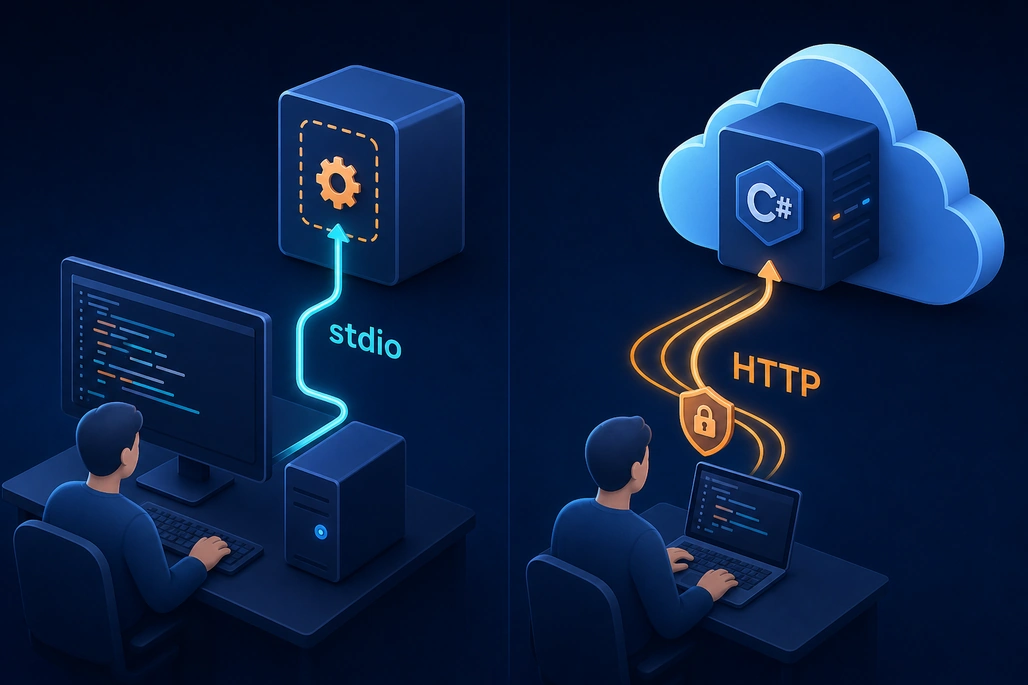
stdio suits local integrations, while HTTP supports remote server deployments.
Transport defines how MCP messages move between a client and server. The SDK documentation supports stdio, Streamable HTTP, and legacy Server-Sent Events (SSE). For a first local server intended for an editor or desktop client, stdio is usually the simplest option because the host starts the server as a child process and communicates through its standard streams.
| Transport | Connection model | Best fit | Important consideration |
|---|---|---|---|
| stdio | Client launches a local child process. | Local tools and IDE integrations. | Do not write ordinary logs to standard output; protocol messages use it. |
| Streamable HTTP, stateless | Independent HTTP requests. | Remote, horizontally scalable deployments. | It cannot send unsolicited server-to-client notifications. |
| Streamable HTTP, stateful | HTTP with server-tracked sessions. | Remote scenarios that need server-to-client requests or notifications. | Deployment needs session affinity. |
| SSE | HTTP requests plus a server-to-client event stream. | Legacy compatibility. | The C# SDK documents it as legacy. |
For an HTTP server, use the ASP.NET Core package and map the MCP endpoint in a web application. The official SDK guidance recommends stateless HTTP mode by default for servers that do not require server-to-client requests such as sampling or elicitation. For local HTTP development and production hosting, configure accepted host names carefully; permissive host configuration can create DNS rebinding exposure.
How should errors and results be handled?
A tool failure is not necessarily a protocol failure. The C# SDK distinguishes tool errors from JSON-RPC-level errors. If normal tool execution fails, the server can return a tool result marked as an error so the caller can see that the requested operation did not complete and potentially recover.
Do not return stack traces, connection strings, tokens, or internal exception details to an AI client. The SDK's automatic exception handling avoids exposing arbitrary exception messages for most exception types, but application code should still return safe, actionable messages. For example, “No order was found for that order number” is useful; a database provider exception is not.
Results should be concise and structured enough for the host to use. A string is fine for a first server. As the integration grows, consider returning typed, bounded data rather than a large unfiltered document. The SDK can also return richer content blocks, including text and embedded resources, when that is genuinely required.
What security controls does an MCP server need?
MCP standardizes communication; it does not automatically grant safe access to business systems. Every tool should validate its arguments, authorize the caller for the requested action, limit the data it returns, and apply the same business rules used by other application entry points. Treat tool input as untrusted even when it originated from a familiar AI host.
For a remote server, use HTTPS, authenticate callers, and implement authorization inside the operation. Avoid embedding credentials in tool descriptions, configuration files committed to source control, or responses. Grant a service identity only the permissions required for its narrow responsibilities rather than broad administrator access.
Operational controls are equally important. AWS guidance for tool integration recommends logging tool invocations, monitoring anomalous usage, and rate limiting excessive calls. Record the caller identity when available, tool name, outcome, latency, and a privacy-appropriate summary of arguments; do not automatically log sensitive payloads in full.
Finally, assume that untrusted content can influence an AI workflow. A retrieved document may contain instructions that attempt to manipulate a model, but it must not be able to bypass the server's authorization checks. Server-side validation and explicit allowlists are more dependable controls than asking a model to follow a security rule.
How can a developer get started with an MCP server?
Developers using .NET 10 or later can install Microsoft's preview project templates and create a starter server with the following commands:
dotnet new install Microsoft.McpServer.ProjectTemplates
dotnet new mcpserver -n SampleMcpServer
cd SampleMcpServer
dotnet build
The template supports local stdio and remote HTTP choices. It creates a project with server registration and a sample random-number tool, which makes it a useful way to inspect a functioning layout before replacing the sample capability with a real application service.
For a manual console project, create the project, add ModelContextProtocol and Microsoft.Extensions.Hosting, then use the earlier sample as a baseline. Connect it to an MCP-compatible host that supports local stdio servers, verify that the tool appears in the host's tool list, and test deterministic read-only requests first.
From there, add one real integration at a time. Keep the tool contract small, write automated tests for validation and authorization paths, add useful logs, and make mutating operations require the appropriate approval and permissions. The value of an MCP server comes from making an existing, trustworthy capability accessible in a predictable protocol—not from giving an AI client unrestricted access to a system.
Frequently asked questions
Is an MCP server the same as an AI model?
No. An MCP server exposes tools, resources, and prompts to an MCP client. It typically runs ordinary application code and can connect to existing APIs or data sources; the host application supplies the AI experience and model interaction.
Do C# MCP servers require ASP.NET Core?
No. A local server can be a console application using stdio transport and the ModelContextProtocol package. ASP.NET Core and ModelContextProtocol.AspNetCore are appropriate when hosting an HTTP-based server.
What is the best first MCP transport for C# developers?
For local development and IDE integration, stdio is usually the easiest first transport. Streamable HTTP is the better fit when the server must be remotely hosted and accessed over HTTP.
Can an MCP tool change data?
Yes, but mutating tools need stronger safeguards than read-only lookups. Validate input, enforce authorization, log actions, limit permissions, and ensure the host's approval flow matches the risk of the operation.
Why are Description attributes important in MCP tools?
The SDK uses descriptions to document tools and parameters in generated metadata. Clear descriptions help a client understand the intended operation and supply arguments in the correct format.
Based on reporting by Model Context Protocol, Microsoft Learn, AWS Prescriptive Guidance and Code With Mukesh.

Join the conversation! Your thoughts help the community grow.