
Welcome to a blog on how to use Submit logic in PowerApps. When you insert a connection to SharePoint, a form or the grid loads up but you don’t have a way to edit the form and submit the newly updated data. We can achieve that with the following process.
Once your connection is finished with the data, drag and drop a button from the gallery and name it “Submit”, as shown below under the button’s Advanced properties.
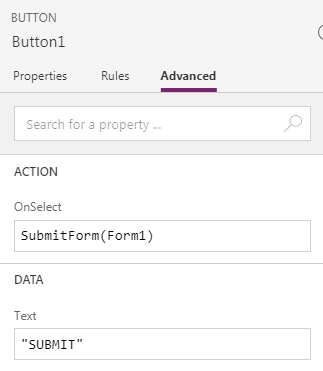
To add the functionality to the button where it will update your data source, on the window above, you will have to update the OnSelect code. Paste the following code for each submit.
Submit - SubmitForm(Form1)
SubmitForm is the function to submit the form and “Form1” is the name of your data source. This button, when clicked, submits the data to the data source.
I hope it helps you. Keep reading and keep learning!

Join the conversation! Your thoughts help the community grow.