Loading
Quick takes from developers at work.
Tips, fixes and short write-ups on what developers ran into this week, in their own words.
Learn Microsoft Power Platform, including Power Apps, Power Automate, Power BI, Power Pages, Copilot Studio, Dataverse, integrations, security, and governance.

Learn how to create and use Dataverse low-code plug-ins with Power Fx for server-side validation, event-based business logic, solution deployment, and ALM.
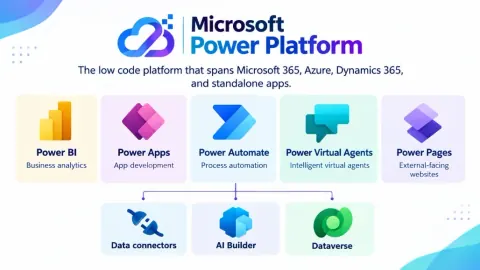
Learn Microsoft Power Platform and its five core tools—Power BI, Power Apps, Power Pages, Power Automate, and Copilot Studio—and their business benefits.
Learn how to use Dataverse default tables effectively instead of creating unnecessary custom tables. This article explains when to use standard tables like Account and Contact, when to create custom tables, and how it improves your Power Apps data model.
Master Power Automate's Delay & Delay Until actions! Learn to strategically time your flows for approvals, reminders, & efficient automation. Optimize workflows now!
Unlock the power of PowerApps Collections! Learn how to use Collect() and ClearCollect() for temporary data storage, improved performance, and offline capabilities. Master data manipulation before saving!
Confused about Power Apps vs. Power Apps in Teams? This guide breaks down the key differences in features, licensing, and use cases to help you choose the right platform.
Unlock the Power Platform! Learn the difference between Managed & Unmanaged solutions for optimal development, testing, and production deployments. Master the flow!
Learn how to seamlessly add existing components like apps, flows, and tables from the Power Platform Default Solution to your custom solutions. Avoid redundancy and streamline your development process with this easy guide! Perfect for Power Apps and Dynamics 365 developers.
Learn how to prevent errors in your Power Automate flows by handling special characters in Power Apps text inputs. This guide provides a step-by-step solution for validating user input and ensuring data integrity. Avoid flow failures caused by characters like # or % with this simple technique. (158 characters)
Master Power Apps Collections! This guide provides 50 practical examples for creating, manipulating, filtering, and optimizing collections for efficient data management.
Master PowerApps variables with Set & UpdateContext! Learn when to use global (Set) vs. screen-specific (UpdateContext) variables for efficient app development. Optimize data management!
Control PowerApps visibility with role-based access! This guide uses a SharePoint list to manage user roles (like Admin) and dynamically show/hide app features. Update access instantly without app edits!
Struggling with DefaultSelectedItems in Power Apps Modern Combo Box for large data sources? This guide provides a simple fix to ensure default selections always appear, even with thousands of records. Learn how to merge selected records and overcome virtualization limits!
Sometimes, it happens that your solution gets stuck while importing or exporting in Power Apps (as shown in the image below). Even if you try multiple times, you don’t get a zip file download pop-up or anything. In this blog, I am going to show you how you can overcome this issue in your tenant or Power Apps environment.
This blog covers common causes, such as improper server configurations and restrictive CORS policies, and provides step-by-step solutions to fix the issue, ensuring seamless image loading and a better user experience.
This guide covers the steps to implement icon state changes using formulas and conditional formatting, improving user experience and visual appeal.
Updating library components in Power Apps is essential for maintaining and enhancing application performance. This process involves implementing the latest features, fixing bugs, and ensuring compatibility with other components.
Encountered an error in Power Automate: "Recipient of type ‘Contact’ is marked as non-emailable." The issue stemmed from the email preference being set to "Do Not Allow" in the contact’s preferences. After updating to "Allow," the flow successfully sent the email.
Step by step details to enable the Dark mode in Microsoft Power Apps.
Discover Microsoft's Low Code/No Code apps designed for small and medium-sized businesses. Learn how these tools empower you to create custom applications.
Track your weekly time, ensuring accurate records and efficient time management. Perfect for professionals and teams, our solution simplifies the process of weekly hours calculation, helping you stay organized and productive.
Encounter issues with your Power Apps? Explore common causes of app malfunction, from connectivity problems to design flaws. Learn troubleshooting tips for debugging and enhancing app performance. Get insights on resolving technical glitches to optimize user experience and app functionality.
Learn to harness the power of Canvas Apps in Microsoft Power Apps by calling stored procedures. This step-by-step guide ensures efficient integration with databases, offering improved performance, centralized logic, and more.
In this blog will learn the use of FirstN and LastN functions in PowerApps. In this blog post, explore the "FirstN" and "LastN" functions in PowerApps, designed to retrieve a specific number of records from a data source or collection, with examples and use cases.
Everything on Power Apps, not only its blogs: the Power Apps page →
Write a blog post and earn +250 SHARP when it is approved.
Write a blog