Loading
Sibeesh Venu's contributions

Create A Microsoft Azure Cognitive Service Face API Application In 30 Minutes
In this article, we are going to create Microsoft Azure Cognitive Service Face API in half an hour. Microsoft Azure Cognitive Services are set of APIs and Services available for the developers to make their applications more interactive and intelligent. This was formerly known as Project Oxford. Here Microsoft uses Machine Learning in the background to create these APIs.
Create A Microsoft Azure Cognitive Service Face API Application
In this video, we are going to create Microsoft Azure Cognitive Service Face API in half an hour. Microsoft Azure Cognitive Services are set of APIs and Services available for the developers to make their applications more interactive and intelligent. This was formerly known as Project Oxford. Here Microsoft uses Machine Learning in the background to create these APIs.
Microsoft MVP 2017 - 2018
It is my immense pleasure to inform you that I have been awarded Most Valuable Professional from Microsoft.
Fix For 404 ResourceNotFound Error After Uploading To Azure Container
Here, in this post, we will see how we can resolve 404 ResourceNotFound Error after uploading to Azure CDN . It is obvious that you may feel very sad, if you are unable to see the image you recently uploaded to Azure container.
Azure Content Delivery Network (CDN) - A Walk Through
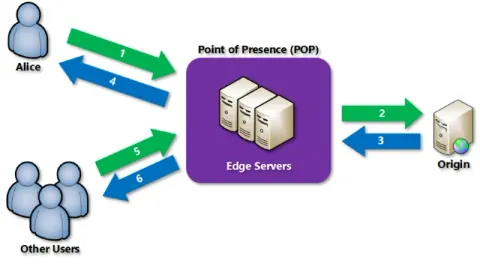
This post is going to walk through the Azure Content Delivery Network (CDN). Before we go deep into Azure CDN, it is recommended that you know what a CDN is and what the use of a CDN is. So let’s go and try to answer those questions.
Upload Content To Azure Container, CDN In WordPress Folder Format
Here, in this article we are going to a see how we upload contents to our Azure container in our CDN storage in a WordPress folder format. You may be thinking what is so special in WrdPress folder format, what makes the difference in other formats? When I say WordPress folder format, I mean one folder in an another folder. In WordPress we usually have the structure as wwwroot/wp-content/uploads/2017/05/. The real problem is, we can not create a container inside a container. Yeah, you heard it right. But, you don’t need to worry about it, there are always few ways we can achieve this need, in this post I am going to show you that. I hope you will like this. Now let’s begin.

LINQ Basic To Advanced - MVC Demo Application
Here, in this post, we are going to see some basic and advanced LINQ queries

Installing ASP.NET Core Docker For Windows
In this post, we are going to see how we can install ASP.NET Core Docker in our Windows.
Add TOC (Table Of Contents) To Your Wordpress Posts Or Pages
In this post, we are going to a see how we can add Table of Contents to our WordPress posts and pages. Here, we are going to install a plugin to do this work. I have chosen this plugin because it is so simple and yet does the work very well. It doesn’t have more settings and features but the way it is created is 100% apt for what it is meant to be.

Why Visual Studio 2017? Few Features of VS2017 You May Love
This is the video recording of the Webinar executed on April 2, 2017 on C# Corner Chennai Chapter. In this video we are sharing some cool new faetures of VS2017.
New Refactoring and Text Editor Options in VS2017
Refactoring options are there in all the versions of Visual Studio. But what makes the difference in VS2017, In this video we are going to find out that. With the release of VS2017, the team has added few more text editor options which makes the user to do some stuffs in super easy manner, here will will be discussing that too. I hope you will like this.
What Is There For A JavaScript Developer In VS2017
If you are a JavaScript developer, with the release of VS2017, now you have some new cool features available. In this video we are going to see few of them in action. I hope you will like this.
Modify Or Add Project Templates To VS2017
In this video, we are going to see how we can add or modify the project templates or workloads in our existing Visual Studio 2017.
Visual Studio 2017 Start Page Changes
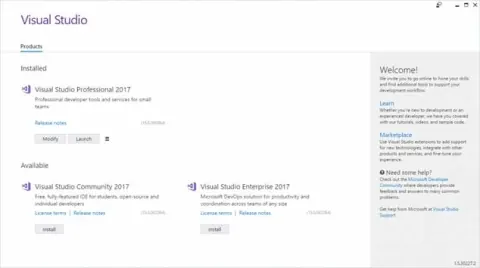
In this video, we are going to see what are all things VS2017 start page has to offer.
New Debugging Features In Visual Studio 2017
In this video, we are going to see the new debugging features available in VS2017. I hope you will like this.
Why Visual Studio 2017? Let Us Try It - Part Two
In this article, we are going to see some features of the brand new Visual Studio 2017. This is the second article of the Visual Studio 2017 series. Please note that this is not the complete series of new functionalities of Visual Studio 2017, here I am going to share only a few things to get you started with the new Visual Studio 2017. I hope you will like this. Now let’s begin.
Why Visual Studio 2017? Let Us Try It
Here, we are going to a see some live action of the brand new Visual Studio 2017. Please be noted that this is not the complete series of new functionalities of Visual Studio 2017. Here, I have shared only a few things to get you started with the new Visual Studio 2017.
Do You Know JavaScript? Are You Sure? - Part Two
Here, we are going to a see another article in the JavaScript series. In the first part, we have see some basics that you can start with. In this article, we will be discussing about JavaScript object continuations and constructors etc.
KnockoutJS Validations - Without A Plugin And Using A Plugin
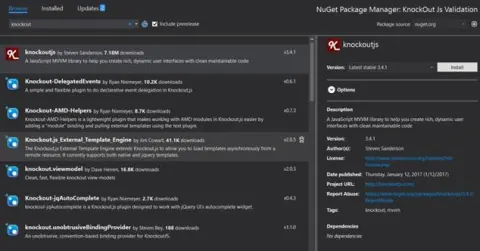
Here, we are going to see how we can implement some basic validations using KnockoutJS.
Do You Know JavaScript? Are You Sure? - Part One
Here, we are starting a series of articles related to JavaScript. As this is the first part of the series, here we are going to see some basics of JavaScript which you may have forgotten already or you may not be aware of.
How To Be A Successful Software Engineer
In this video we are going to discuss a few points which you must be taken care of, to be a successful software engineer.

Record A Video, Audio, Screenshot In Windows 10
In this video, we are going to see how we can create a video, audio, screenshots in Windows 10 without using any third party tools. Windows 10 Video Creator, Windows 10 Audio Creator, Take Screenshots in Windows 10, Best Video Creator Tool for Windows 10, Advanced Windows 10 Features, XBOX Video Creator.
MVC CRUD Actions Using Knockout JS
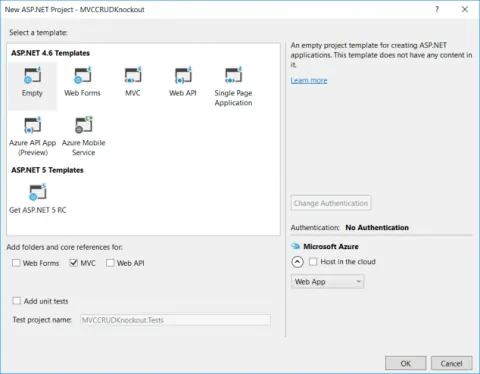
In this post, we are going to create an MVC CRUD Application with the help of Knockout JS.
Upload Files Or Images To Server Using Node.js
In this post, we will see how we can upload files or images to the Server, using Node.js.
SQL Server CRUD Actions Using Node.js
In this post, we will see how we can perform CRUD operations in our SQL database, using Node JS.