Loading
Vignesh Ganesan's contributions

Introduction to Microsoft Kaizala And How to Empower Your Mobile Workforce using Kaizala?
This is a recording of the webinar conducted by me and Microsoft MVP Vijai Anand on Microsoft Kaizala and how to empower your mobile workforce using Microsoft Kaizala.
Overview of Kaizala Extensibility and Programmability
This is a recording of the webinar conducted by myself and Microsoft MVP Vijai Anand on Kaizala Extensibility and Programmability. This is a follow-up session of our previous webinar on Microsoft Kaizala's Introduction.
Getting Started With Microsoft Search
This video gives an overview of Microsoft Search and how to get started with it.

Overview Of SharePoint Server 2019 Public Preview
This is a recording of our webinar on SharePoint Server 2019 Public Preview. In this video, we will be discussing the new features of the public preview of SharePoint Server 2019.
Overview Of Microsoft SharePoint Migration Tool
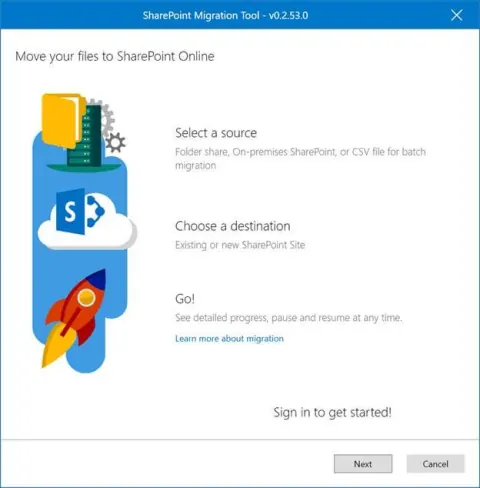
This is a recording of our webinar on Microsoft SharePoint migration tool. We will have an overview of Microsoft SharePoint Migration Tool in this video.
How Secure Is Your Office 365 Ecosystem - Part One
So, today’s blog post is going to be focused on the Security and Compliance features in Office 365 so that you folks can understand how secure your Office 365 ecosystem is.
Useful PowerShell cmdlets To Administer Office 365 Groups
Howdy Folks! As promised in previous blog post related to Office groups , I’m back now with some cool PowerShell cmdlets which should ease your work in managing Office 365 groups in your organization . If you’re new to Office 365 groups, I humbly request you to read in detail about Office 365 groups by accessing this link. I’ve tried my best to explain Office 365 groups there.
Office 365 Groups - What You Need To Know
Office 365 groups lets you choose a set of people that you wish to collaborate with and easily set up a collection of resources for those people to share. Resources such as a shared Outlook inbox, shared calendar, shared document library, Planner and a site for collaborating on files are a part of an Office 365 group.
Security And Compliance In Office 365 - Part One
This is a recording of my webinar on Security and Compliance in Office 365 Security (Part-1) .In this session I'll be discussing in detail about how Microsoft secures the customer's data in Office 365 datacenters by following the defence in-depth approach and we will also look into the Security and Compliance offerings in Office 365 such as ATP, Threat Intelligene, DLP, AIP, Compliance Manager for Office 365 and Cloud Access Security Broker etc.

Slide Decks Of Our Event On Digital Transformation At Microsoft Bangalore
Thanks to everyone who attended our event at Microsoft Bangalore last Saturday on Digital Transformation.
Overview Of Digital Transformation And Microsoft 365
In this webinar recording , I have given a detailed overview of Digital Transformation and how it has been disrupting the organizations across the globe and I have also given some insights about how Microsoft 365 can help in planning your organization's Digital Transformation.
Slide Decks Of Our Event On SharePoint, Office 365 & Azure At Microsoft Bangalore
Slide decks of our event on SharePoint,Office 365 & Azure at Microsoft Bangalore.
How Email Notification Works In Microsoft Planner
The contents mentioned in this article below describes the current functionality of Microsoft Office 365 Planner and may or may not change in the near future.
Everything You Want To Know About SharePoint 2016
The new kid in town. Well, I hope you won’t mind when I say that SharePoint 2016 is the new kid in town considering the fact that it has been more than a year since Microsoft has released SharePoint Server 2016 and it has also announced the release of SharePoint Server 2019 a month back at Ignite Conference. However, there’s reason for me to still call SharePoint 2016 as the new kid in town because it still remains to be a cutting-edge platform for many SharePoint professionals out there and I’ve seen many organizations actively working on adapting SharePoint Server 2016 as the modern collaboration platform for their IT workspace.

Limitations To Be Aware Of In Microsoft Teams
Learn the key Microsoft Teams limits for teams, owners, channels, members, chats, meetings, and Microsoft 365 Group-based team creation restrictions.
Get To Know The New Microsoft SharePoint Migration Tool
For many years SharePoint Migration has been a very challenging task for all the SharePoint professionals as it really requires a lot of planning, assessment and careful implementation to ensure that the data remains secure and it doesn’t get missed during the migration.
Purchasing A New Service To Your Office 365 Tenant
This is going to be a very simple article where I’ll be describing about how to add a new service to your Office 365 tenant. Let’s say there comes a scenario where your organization has been using Office 365 for quite some time and all of a sudden, the business shows interest on a new Office 365 service then you need to follow the steps mentioned in this article below to purchase that new service for your existing Office 365 tenant.
User Guide To Enroll iOS Device With Microsoft Intune And Configuring Outlook App
If your company or school uses Microsoft Intune for Mobile Device Management and Mobile application management, you can enroll your iOS device to get access to company email, files, and other resources. When you enroll your devices, your IT department can manage the resources, keep them secure, and give you the freedom to use your preferred device to get your work done.
Webinar on SharePoint Online Communication Sites
Recording of my Webinar on SharePoint Online Communication Sites.
Get To Know Microsoft 365
Learn how Microsoft 365 combines Office 365, Windows 10, and Enterprise Mobility + Security, including its Business and Enterprise plans.
PowerShell Script To Move List Of Users To Office 365 And Assign Them O365 Licenses
Office 365 is a SaaS platform which is being used by many organizations these days and it can become quite hard for IT administrators to onboard their users to Office 365 manually .Of course , this may not be the case when your user identities get synced to Azure AD from on-premises AD using AAD connect tool.
When To Perform A Search Full Crawl In SharePoint 2013
Search is indeed a mission critical component in SharePoint 2013 and it’s very important that it functions properly so that you get the desired results. As we all know, the search results and their relevancy is directly proportional to how often your content sources are crawled and what sort of crawling you’re running in your SharePoint farm.
Demystifying MinRole In SharePoint Server 2016
Demystifying MinRole In SharePoint Server 2016. in this article I’ll be explaining what is MinRole, how to deploy a SharePoint 2016 farm using MinRole topology, different server roles in MinRole, MinRole topologies, MinRole Administration, MinRole compliancy.