Loading
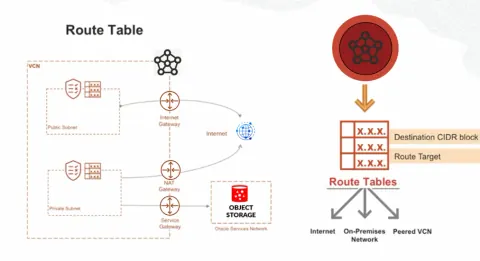
Understanding OCI Routing
Master OCI routing: Understand route tables, VCNs, subnets, NAT Gateways, DRGs, and VCN peering for seamless cloud network communication.
PL/SQL SET Serveroutput ON
The PL/SQL SET SERVEROUTPUT ON command is used in Oracle SQL*Plus (or other similar Oracle interfaces) to enable the display of output from PL/SQL blocks. When you use commands like DBMS_OUTPUT.PUT_LINE() in your PL/SQL code to print values, you must use SET SERVEROUTPUT ON to make sure that the output is shown in the console. This command helps to debug and track the flow of your PL/SQL programs by displaying output results directly to the user interface.
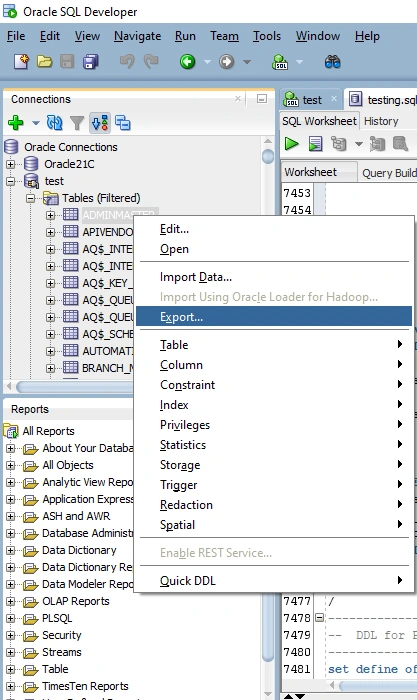
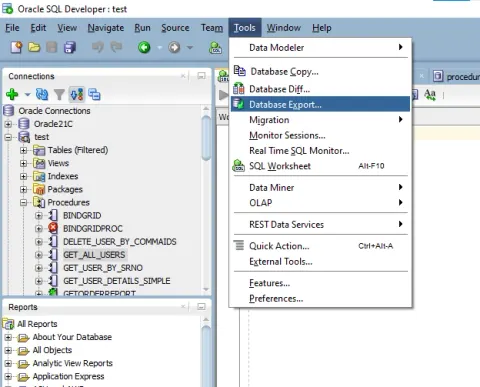
How to Get Table and Procedure Scripts in Oracle Server (Schema + Data Included)
In this blog post, we will explore the process of extracting table and procedure scripts from an Oracle Database, including both schema and data. Whether you're migrating databases, creating backups, or simply documenting your database structure, knowing how to generate these scripts is essential for database administrators and developers alike. We will cover various methods to retrieve the DDL (Data Definition Language) for tables and stored procedures, as well as how to export the data contained within those tables. By the end of this guide, you will have a comprehensive understanding of how to effectively obtain and utilize table and procedure scripts in Oracle Server.
High-Performance Data Access The Definitive Guide to Dapper with Oracle Database
Unlock peak .NET performance with Dapper and Oracle! This guide covers setup, CRUD operations, type handling, and crucial optimizations for high-throughput apps.
Introduction to OCI Networking: What Is a Virtual Cloud Network (VCN)?
Explore Oracle Cloud's Virtual Cloud Network (VCN): a private, secure network for instances, internet, and on-premises connections. Master cloud networking!
Understanding Oracle Cloud Infrastructure (OCI) Compartments
Unlock the power of Oracle Cloud Infrastructure (OCI) Compartments! Learn how to effectively organize, isolate, and control access to your cloud resources. This guide explains how compartments enhance security, streamline management, and align with your organizational structure. Discover nested compartments, quotas, budgets, and global access for optimal cloud governance. Master OCI compartments for a secure and well-managed cloud environment.
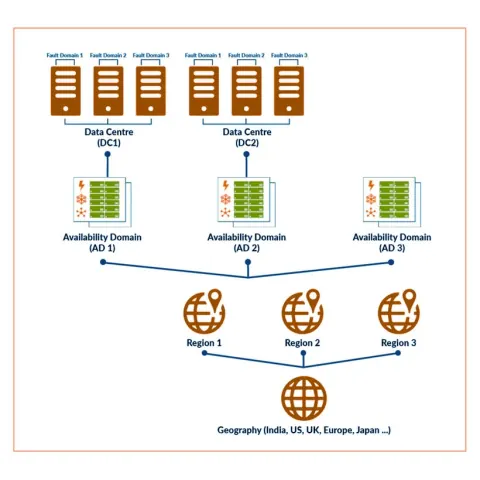
Understanding Oracle Cloud Infrastructure (OCI) Architecture: Regions, Availability Domains, and Fault Domains
Explore OCI's architecture: Regions, Availability Domains, and Fault Domains. Learn how these components ensure high availability, data protection, and disaster recovery.
Understanding Oracle Cloud Infrastructure (OCI) Identity and Access Management (IAM)
Understand Oracle Cloud Infrastructure (OCI) Identity and Access Management (IAM). Learn how IAM uses authentication and authorization to control access to your cloud resources. Discover key components like identity domains, users, groups, policies, and compartments. Explore Oracle Cloud IDs (OCIDs) and how they uniquely identify resources, ensuring a secure cloud environment by granting the right permissions to the right people.
student management system
Both DataSource and DataSourceID are defined on 'GridView1'. Remove one definition. Description: An unhandled exception occurred during the execution of the current web request. Please review the stack trace for more information about the error and where it originated in the code. Exception Details: System.InvalidOperationException: Both DataSource and DataSourceID are defined on 'GridView1'. Remove one definition. Source Error: Line 26: Line 27: GridView1.DataSource = dt; Line 28: GridView1.DataBind(); Line 29: } Line 30: } Source File: c:\Users\Ujwal S shetty\OneDrive\Mobile =doc,pic,videos\Desktop\Mini Project\studentmanagement\studentmanagement\ManageStudent.aspx.cs Line: 28 Stack Trace: using System; using System.Data; using System.Data.OleDb; using System.Configuration; public partial class Pages_ManageStudent : System.Web.UI.Page { string connStr = ConfigurationManager.ConnectionStrings["AccessConn"].ConnectionString; protected void Page_Load(object sender, EventArgs e) { if (!IsPostBack) { BindGrid(); } } void BindGrid() { using (OleDbConnection conn = new OleDbConnection(connStr)) { string sql = "SELECT * FROM Students"; OleDbDataAdapter da = new OleDbDataAdapter(s
Control Statements and Looping Mechanisms in Oracle PL/SQL
Master control flow in Oracle PL/SQL! Learn IF/THEN/ELSE statements, nested conditions, and looping mechanisms (BASIC, WHILE, FOR) with practical examples.
Oracle: Driving Global Innovation in Databases and Cloud
Oracle has evolved from being just a database company to becoming a comprehensive cloud and enterprise technology provider. With a strong focus on innovation, security, and performance, Oracle continues to power the digital backbone of many organizations worldwide.
Understanding TCL (Transaction Control Language) in Oracle — With Clear Examples for Developers
Learn how to use Transaction Control Language (TCL) commands like COMMIT, ROLLBACK, and SAVEPOINT in Oracle Database with clear examples for developers.
Mastering GRANT & REVOKE in Oracle Database (DCL) — Complete Guide with Examples
Learn how to use GRANT and REVOKE commands in Oracle Database to manage user access and database security with clear, step-by-step examples.
Data Manipulation Language (DML) in Oracle Database — With Practical Examples
Learn how to use Oracle Database Data Manipulation Language (DML) commands like INSERT, UPDATE, DELETE, and MERGE with practical examples and transaction management tips.
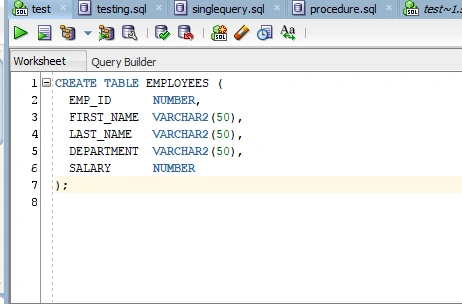
Understanding DDL in Oracle with Syntax and Examples
Learn essential Oracle DDL commands, including CREATE, ALTER, DROP, TRUNCATE, and RENAME, to manage and modify database structures. Understand syntax, usage, and best practices for schema changes.
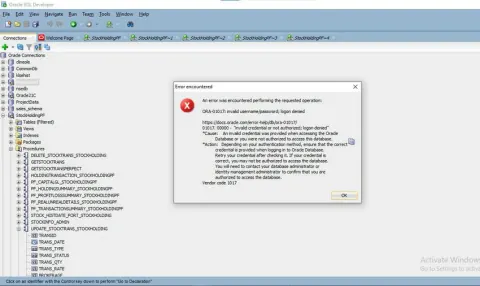
Fix ORA-01017: Invalid Username or Password Error
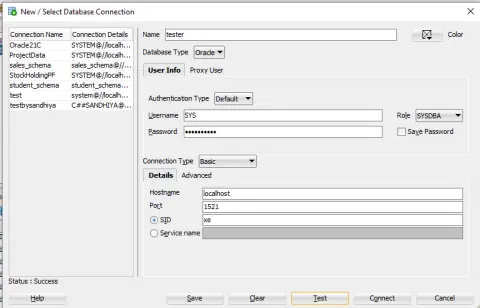
Learn how to fix the Oracle ORA-01017 error by resetting the SYSTEM user password using SQL*Plus. This guide covers multitenant (CDB/PDB) environments, SYSDBA access, and the proper use of service names.
Getting Started with Indexes in Oracle Database
Learn everything you need to know about indexes in Oracle Database, including their importance, types (B-tree, Bitmap, Unique, Composite, IOT, etc.), creation syntax, and real-world examples.
How to Change a Column Data Type from NUMBER to VARCHAR2 in Oracle Database
Learn how to change a column's data type from NUMBER to VARCHAR2 in Oracle Database safely. Step-by-step guide with SQL syntax, precautions, and tips for avoiding data loss.
How to Create a Schema in Oracle: Step-by-Step for Beginners
Learn how to create a schema in Oracle Database with this easy-to-follow guide. Whether you're a beginner or a developer looking to refresh your basics, this blog covers everything from what a schema is to how to create one using SQL commands.
Import Excel Data into Oracle
In this blog post, we will guide you through the process of importing Excel data into an Oracle Database.
Get Multiple User-Selected Table & Procedure Scripts in Oracle (Schema + Data)
In this blog post, we’ll walk through how to extract multiple table and procedure scripts from an Oracle database, including both the schema structure and the underlying data.
CRUD Operations in ASP.NET Web Forms Using Oracle Stored Procedures
In this blog, you'll learn how to perform Create, Read, Update, and Delete (CRUD) operations in ASP.NET Web Forms using Oracle Database with stored procedures.
date format issue
Hello, I am using oracle database. I have one table with column END_DATE as varchar datatype. The data in the column is like 02/01/2025 in DD/MM/YYYY date format. I am using between date query, but it says - Not a valid month Please suggest any valid date format so i can convert those dates in valid format. I have tried to_char(), to_date and trunc() My query : select * from table where END_DATE between to_date('01/12/2024', 'DD/MM/YYYY.') and to_date('10/02/2025', 'DD/MM/YYYY.') OR How can I write query to get last 3 month data from table according to current date. For Ex: BETWEEN SYSDATE-90 and SYSDATE Thanks in adv !
.netcore api with dapper using oracle
I am trying to create .net core api with dapper using oracle connection.In existing project that project on sql i need to change almost all db side logic.how can i start
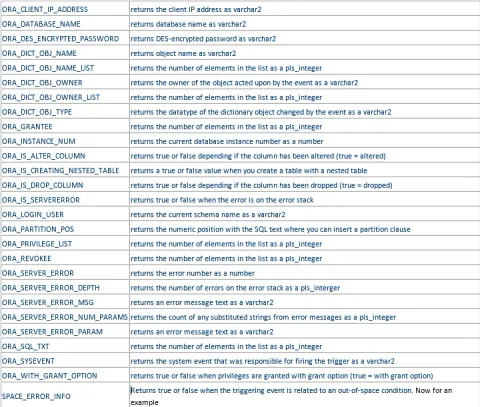
Learn about Different Type of Triggers in Oracle
In this article, you will learn about different type of triggers in Oracle.