Loading
Why Android App Links Open in the Browser Instead of Your App
Learn why Android App Links open in a browser and how to troubleshoot intent filters, Digital Asset Links, URL matching, and domain verification.
Fixing Android Gradle Builds That Cannot Reuse the Configuration Cache
Learn why Android Gradle builds fail to reuse the configuration cache and how to diagnose incompatible build logic, task configuration, and plugin issues.
Android Baseline Profiles: How to Improve App Startup and First-Use Performance
Learn how Android Baseline Profiles optimize startup and first-use code paths, how to generate and package them, and which performance limitations and mistakes to consider.
Jetpack Compose vs XML: 10 Benefits of Modern Android UI Development with Kotlin
Learn the benefits of Jetpack Compose for Android development, including declarative UI, state management, reusable components, Kotlin integration, and recomposition.
Android : Introduction to Jetpack Compose
Learn Jetpack Compose for Android development, including declarative UI, Kotlin-based composable functions, state management, layouts, and building a simple Compose app.
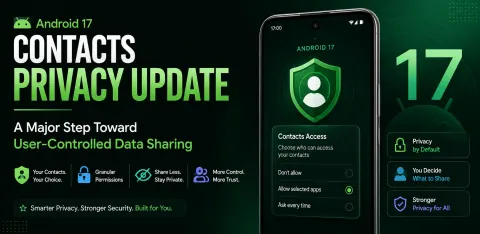
Android 17 Contacts Privacy Update: A Major Step Toward User-Controlled Data Sharing
Android 17's Contact Picker empowers users with granular control over contact sharing, enhancing privacy and trust by replacing broad access with selective sharing.
Android Studio Panda 2025.3.4 Review: AI Features, Planning Mode & More
A review of Android Studio Panda 2025.3.4, covering Gemini AI features such as Planning Mode, Next Edit Prediction, AI project setup, web search, and upgrade assistance.
What is ViewModel in Android MVVM architecture and how does it work?
Learn about ViewModel in Android MVVM: manage UI data, handle configuration changes, and improve app performance. Essential for modern Android development.
What is Fragment Lifecycle in Android and How Does it Differ from Activity Lifecycle?
Master Android's Fragment lifecycle! This guide simplifies the fragment lifecycle, contrasting it with the Activity lifecycle for robust, high-performance apps. Learn to avoid crashes and memory leaks!
What is Activity Lifecycle in Android and How Does It Work?
Master the Android Activity Lifecycle! Learn how activities are created, started, resumed, paused, stopped, and destroyed. Build robust & user-friendly apps with ease.
Getting Started with Kotlin: A Modern Programming Language for Developers
Discover Kotlin, a modern language by JetBrains, ideal for Android, web, and server-side development. Concise, safe, and interoperable with Java. Boost your productivity!
What Is Kotlin and Why Is It Better Than Java for Android Development?
Discover Kotlin, Google's preferred language for Android development. Learn why it's better than Java: cleaner code, null safety, faster development, and modern features. Ideal for new Android projects!
Using Kotlin Multiplatform (KMP) to Share UI Logic: Compose vs Native SwiftUI
Explore Kotlin Multiplatform for cross-platform apps: Compose Multiplatform (shared UI) vs. native SwiftUI. Discover the best approach for your project's needs and team.
Java: A Comprehensive Guide for Modern Developers
Explore Java's core features, architecture, and applications in modern software development. Discover why Java remains a top choice for developers in 2026.
How Do Developers Debug ANR (App Not Responding) Issues on Android 14 Devices?
Learn to diagnose and prevent Android 14 ANRs using Play Console reports, Logcat, StrictMode, Android Studio Profiler, and background threading.
RecyclerView in Android with Java
In this article, we will learn how to implement RecyclerView in Android with Java.
Prepare for 16 KB Memory Pages (Mandatory by Nov 1, 2025)
Learn how to prepare Android apps with native libraries for 16 KB memory pages by updating the NDK, Android Gradle Plugin, dependencies, and testing on a compatible emulator.
Modern Android Development in 2025: A Practical Guide for Developers
Explore Android development in 2025: Kotlin, Jetpack Compose, AI, 5G, AR, best practices, and future trends for building exceptional mobile apps.
Master Android App Development: From Beginner to Advanced with Android Studio
Learn Android app development with Android Studio, covering Java, Kotlin, UI design, data storage, APIs, testing, background work, and Google Play publishing.
Kotlin Multiplatform (KMP) in Android Development
Kotlin Multiplatform lets developers share business logic across Android, iOS, and more, while keeping native UIs. It speeds development, improves maintainability, and ensures consistent performance across platforms using Kotlin.
Kotlin Flow in Android
Kotlin Flow is a reactive, coroutine-based API for handling asynchronous data streams in Android. It supports operators like map, filter, and combine, and is ideal for real-time updates, UI, and data changes.
DataStore in Jetpack Compose
Learn how to use Preferences DataStore in Jetpack Compose to save and observe string values with Kotlin coroutines and Flow as a replacement for SharedPreferences.
Custom Slider in Jetpack Compose
Create a fully customized slider in Jetpack Compose with a green track, a white circular thumb, a thicker track, and a percentage range. Perfect for modern Android UIs that require elegant, user-friendly controls.
QR Code Scanner using ML kit and Camera APIs in Android using Compose
This article explains about the process of QR code scanning and processing results. I have used ML kit for object detection and QR detection from gallery and camera as well. Decode the QR image from gallery is most interesting feature of this app.