Loading
Angular Material
Hi I am using Angular 17 Angulat Material. I have created a file like below so that same code mot required to be written in all files. Is there any other better way to do this import { NgModule } from "@angular/core"; import { MatTabsModule } from "@angular/material/tabs"; import { MatDialogModule } from '@angular/material/dialog'; import { MatIconModule } from "@angular/material/icon"; import { MatFormFieldModule } from '@angular/material/form-field'; import { MatCheckboxModule } from '@angular/material/checkbox'; import { MatButtonModule } from '@angular/material/button'; import { MatTooltipModule } from '@angular/material/tooltip'; import { MatMenuTrigger, MatMenuModule } from '@angular/material/menu'; import { MatOptionModule } from '@angular/material/core'; import { MatSelectModule } from '@angular/material/select'; import { MatInputModule } from '@angular/material/input'; import { MatProgressSpinnerModule } from '@angular/material/progress-spinner'; @NgModule({ declarations: [], imports: [ MatTabsModule, MatDialogModule, MatIconModule, MatMenuModule, MatInputModule, MatSelectModule, MatOptionModule, MatProgressSpinnerModule, ], exports: [ MatTabsModule, MatDialogModule, MatIconModule, MatMenuModule, MatInputModule, MatSelectModule, MatOptionModule, MatProgressSpinnerModule, ] }) export class MaterialModule { } Thanks
Upload Image Component
Hi I want to create a component for below image. so that it can be used in any component. What should be the code Thanks
How code works
Hi In a form i have below code . How it works . What does this line mean <app-file-uploader formControlName="fileUpload"></app-file-upload> <div class="row"> <div class="col-xl-12"> <label>Upload</label> <app-file-uploader formControlName="fileUpload"></app-file-upload> </div> </div> Thanks
Upload files and some Data
Hi Are there any free API to upload multiples files and some data fields information also. Thanks
Error - Failed to remove some directories
Hi When npm i command is run we are getting below erro Failed to remove some directories [ npm WARN cleanup [ npm WARN cleanup 'D:\\kartik\\My Data\\dist\\node_modules\\@types', npm WARN cleanup [Error: EPERM: operation not permitted, rmdir 'D:\kartik\My Data\dist\node_modules\@types'] { npm WARN cleanup errno: -4048, npm WARN cleanup code: 'EPERM', npm WARN cleanup syscall: 'rmdir', npm WARN cleanup path: 'D:\\kartik\\My Data\\dist\\node_modules\\@types' npm WARN cleanup } npm WARN cleanup ] npm WARN cleanup ] npm ERR! code 1 npm ERR! path D:\kartik\My Data\dist\node_modules\nx npm ERR! command failed npm ERR! command C:\Windows\system32\cmd.exe /d /s /c node ./bin/post-install npm ERR! D:\kartik\My Data\dist\node_modules\nx\src\native\native-bindings.js:244 npm ERR! throw loadError npm ERR! ^ npm ERR! npm ERR! Error: The specified module could not be found. npm ERR! \\?\D:\kartik\My Data\dist\.nx\cache\18.3.5-nx.win32-x64-msvc.node npm ERR! at Module._extensions..node (node:internal/modules/cjs/loader:1465:18) npm ERR! at Module.load (node:internal/modules/cjs/loader:1206:32) npm ERR! at Module._load (node:internal/modules/cjs/loader:1022:12) npm ERR! at Module._load (D:\kartik\My Data\dist\node_modules\nx\src\native\index.js:64:25) npm ERR! at Module.require (node:internal/modules/cjs/loader:1231:19) npm ERR! at require (node:internal/modules/helpers:179:18) npm ERR! at Object.<anonymous> (D:\kartik\My Data\dist\node_modules\nx\src\native\native-bindings.js:66:29) npm ERR! at Module._compile (node:internal/modules/cjs/loader:1369:14) npm ERR! at Module._extensions..js (node:internal/modules/cjs/loader:1427:10) npm ERR! at Module.load (node:internal/modules/cjs/loader:1206:32) { npm ERR! code: 'ERR_DLOPEN_FAILED' npm ERR! } Thnaks
How to build Angular 17 App
Hi I have developed Angular App in ver 17. How to build and what is to be configured on user computer so it can be run. Thanks
Position of Button
Hi I have below code and i want button to appear on right side corner. <mat-form-field> <mat-label>Filter</mat-label> <input matInput (keyup)="applyFilter($event)" placeholder="Ex. Mia" #input> </mat-form-field> Thanks
How to create Custom Directive.
Hi I have textbox with numeric and text data type. I want that user should only enter numeric values or dot in numeric boxes. In text boxes user can enter only alphabets using custom directive. Thanks
Cursor at first column
Hi I have below HTML and i want the cursor should be at first column by default. <div class="parent"> <section> <span></span> <span></span> <span></span> <span></span> <span></span> <span></span> <span></span> <span></span> <span></span> <span></span> <span></span> <span></span> <span></span> <span></span> <span></span> <span></span> <span></span> <span></span> <span></span> <span></span> <span></span> <span></span> <span></span> <span></span> <span></span> <span></span> <span></span> <span></span> <span></span> <span></span> <span></span> <span></span> <span></span> <span></span> <span></span> <span></span> <span></span> <span></span> <span></span> <span></span> <span></span> <span></span> <span></span> <span></span> <span></span> <span></span> <span></span> <span></span> <span></span> <span></span> <span></span> <span></span> <span></span> <span></span> <span></span> <span></span> <span></span> <span></span> <span></span> <span></span> <span></span> <span></span> <span></span> <span></span> <span></span> <span></span> <span></span>
Close Angular Material Dialog
Hi I am using Angular Material dialog. I want when user clicks Cancel button it should gets closed. <div mat-dialog-title> <h4> Employee Form </h4> </div> <form [formGroup]="empForm" ngSubmit="Save()"> <div mat-dialog-content class="content"> </div> </form> Thanks
Difference between Services & Directives in Angular
Hi What s the difference between Services & Directives in Angular Thanks
How to pass values
Hi How to pass values from component to {{Value}} {{Message}} <h1 mat-dialog-title> {{title}} </h1> <div mat-dialog-content> {{message}} </div> Thanks
Angular UI effects are not shown
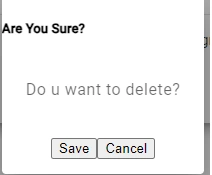
Hi I have below TypeScript & Html but material UI effects are not shown. Simple dialog box is shown import { Component, Inject } from '@angular/core'; import { MatDialog, MAT_DIALOG_DATA, MatDialogRef, MatDialogActions, MatDialogClose, MatDialogTitle, MatDialogContent, MatDialogModule} from '@angular/material/dialog'; @Component({ selector: 'app-confirmation-dialog', standalone: true, imports: [MatDialogModule,MatDialogActions, MatDialogClose,MatDialogTitle,MatDialogContent], templateUrl: './confirmation-dialog.component.html', styleUrl: './confirmation-dialog.component.css' }) <h5>Are You Sure?</h5> <mat-dialog-content> <p>{{message}}</p> </mat-dialog-content> <mat-dialog-actions align="center"> <button mat-raised-button color="primary" (click)="onConfirmClick()" tabindex="1">{{confirmButtonText}}</button> <button mat-raised-button mat-dialog-close tabindex="-1">{{cancelButtonText}}</button> </mat-dialog-actions> Thanks
Confirmation Modal
Hi I have below Layout Component code. In Dialog Component HTMl i have delete function. Where i need to define & how to delete the record export class LayoutComponent implements OnInit { constructor(private _dialog:MatDialog, private dialog: MatDialog){} openAddEditForm(){ this._dialog.open(EmpAddEditComponent) } ngOnInit(): void { this.getallEmployee(); } openConfirmationDialog(): void { const dialogRef = this.dialog.open(ConfirmationDialogComponent, { width: '250px', data: { message: 'Are you sure you want to delete?' } }); dialogRef.afterClosed().subscribe(result => { if (result) { // Perform delete action here } }); } } <div mat-dialog-title> <h4> {{title}} </h4> </div> <mat-dialog-content> <h5> {{message}} </h5> </mat-dialog-content> <mat-dialog-actions> <button mat-raised-button color="warning" >Cancel</button> <button mat-raised-button color="primary" (click)="Delete()" type="submit">Delete</button> </mat-dialog-actions>
Error - TypeError: data.slice is not a function
Hi I am getting error - TypeError: data.slice is not a function at MatTableDataSource._orderData (table.mjs:1245:31) at table.mjs:1213:93 at map.js:7:37 at OperatorSubscriber2._this._next (OperatorSubscriber.js:15:21) at Subscriber2.next (Subscriber.js:34:18) at combineLatest.js:47:40 at OperatorSubscriber2._this._next (OperatorSubscriber.js:15:21) at Subscriber2.next (Subscriber.js:34:18) at mergeInternals.js:25:28 at OperatorSubscriber2._this._next (OperatorSubscriber.js:15:21) handleError @ core.mjs:6531 Show 1 more frame Show less import { Component,OnInit,ViewChild } from '@angular/core'; import {MatToolbarModule} from '@angular/material/toolbar'; import {MatIconModule} from '@angular/material/icon'; import {MatButtonModule} from '@angular/material/button'; import {MatDialog, MatDialogModule} from '@angular/material/dialog'; import { EmpAddEditComponent } from '../emp-add-edit/emp-add-edit.component'; import {MatPaginator, MatPaginatorModule} from '@angular/material/paginator'; import {MatSort, MatSortModule} from '@angular/material/sort'; import {MatTableDataSource, MatTableModule} from '@angular/material/table'; import {MatFormFieldModule} from '@angular/material/form-field'; import {MatInputModule} from '@angular/material/input'; import { Observable, throwError } from 'rxjs'; import { Injectable } from '@angular/core'; @Component({ selector: 'app-layout', standalone: true, imports: [MatFormFieldModule,MatIconModule,MatButtonModule,MatInputModule,MatToolbarModule,MatTableModule, MatSortModule, MatPaginatorModule], templateUrl: './layout.component.html', styleUrl: './layout.component.css' }) export class LayoutComponent implements OnInit { displayedColumns: stri
Confirmation using Modal Form
Hi In below code i want when user clicks Delete it should ask for confirmation in Modal Form. I don't want to use confirm() <ng-container matColumnDef="action"> <th mat-header-cell *matHeaderCellDef mat-sort-header> Action </th> <td mat-cell *matCellDef="let row"> <button mat-icon-button color="primary"> <mat-icon>edit</mat-icon> </button> <button mat-icon-button color="warn"> <mat-icon>delete</mat-icon> </button> </td> </ng-container> Thanks
Error - Reactive Form Validation
Hi I am getting error - Parse error Missing expected ] <mat-form-field appearance="outline"> <mat-label>First Name</mat-label> <input matInput type="text" formControlName="firstName"> <div class="text-danger" @if="empForm.firstName.invalid && (emoForm.firstName.touched || empForm.firstName.dirty)"> <span @if="firstName.errors?.['required'> This is required </span> </div> </mat-form-field> Thanks
Data not getting displayed in table
Hi Below code returns 2 records but no Data is shown in table getallEmployee() { this.htp.get('onlinetestapi.gerasim.in/api/TeamSync/GetAllEmployee').subscribe((result: any)=>{ this.dataSource = new MatTableDataSource(result); debugger; }) Thanks
No Data displayed in table
Hi Data has 2 records but it is not displaying in table <mat-toolbar color="primary"> <button mat-icon-button class="example-icon" aria-label="Example icon-button with menu icon"> <mat-icon>menu</mat-icon> </button> <span>Crud Application</span> <span class="example-spacer"></span> <button mat-raised-button (click)="openAddEditForm()"> <!-- <mat-icon>favorite</mat-icon> --> ADD EMPLOYEE </button> </mat-toolbar> <mat-form-field> <mat-label>Filter</mat-label> <input matInput (keyup)="applyFilter($event)" placeholder="Ex. Mia" #input> </mat-form-field> <div class="mat-elevation-z8"> <table mat-table [dataSource]="dataSource" matSort> <!-- ID Column --> <ng-container matColumnDef="id"> <th mat-header-cell *matHeaderCellDef mat-sort-header> ID </th> <td mat-cell *matCellDef="let row"> {{row.id}} </td> </ng-container> <!-- Progress Column --> <ng-container matColumnDef="empName"> <th mat-header-cell *matHeaderCellDef mat-sort-header> First Name </th> <td mat-cell *matCellDef="let row"> {{row.empName}}% </td> </ng-container> <!-- Name Column --> <ng-container matColumnDef="empContactNo"> <th mat-header-cell *matHeaderCellDef mat-sort-header> Contact No </th> <td mat-cell *matCellDef="let row"> {{row.empContactNo}} </td> </ng-container> <!-- Fruit Column --> <ng-container matColumnDef="empEmail"> <th mat-header-cell *matHeaderCellDef mat-sort-header> Email </th> <td mat-cell *matCellDef="let row"> {{row.empEmail}} </td>
How to use @for loop
Hi I have below code and i want to convert it using @for condition. education is an array <mat-option *ngFor="let val of educaion" [value]="val">{{val}}</mat-option> Thanks
Lazy loading in Angular
How would you implement lazy loading in Angular for a large-scale ERP application built on .NET Core? Use Case: To optimize performance and reduce initial loading time for the ERP application by loading modules asynchronously.
Bootstrap Modal on click of delete button
Hi I have below code . I want when user clicks Delete Bootstrap Modal should open if user selects o.k then record should be deleted <tbody> @for (item of employeeArray;track $index){ <tr > <td>{{$index+1}}</td> <td>{{item.empName}} </td> <td>{{item.empContactNo}}</td> <td> <button class="btn btn-success btn-sm" (click)="onEdit(item.empId)">Edit</button> <button class="btn btn-danger btn-sm mx-2" (click)="onDelete(item.empId)">Delete</button> </td> </tr> } </tbody> Thanks
Master Detail Crud form using Angular 17
Hi I need to create Master Detail Crud form using sample API with Angular 17 only. Are there any links available. Is there any Angular Gird available where we can add multiple records Thanks
Property file does not exist on type 'Advance Component'
Hi In below code i am getting error <div class="col-3 text-end"> <input type="file" class="btn btn-primary" (change)="uploadImage($event)"> </div> <div class="row"> <div class="col-3 text-end" @for (item of uploadedFileNames)> <img [src]="fileUrl + file" alt=""> </div> </div> uploadImage(event:any){ debugger; const file = event.currentTarget.files[0]; if(event.target.files.length > 0 ){ if(file.type == 'image/png' || file.type == 'image/jpeg') { const formObj = new FormData(); formObj.append('file',file); this.post('storeapi.gerasim.in/Customer/Upload',formObj).subscribe((res: any)=>{ this.uploadedFileNames.push(res); }); } } } Thanks
Select in Angular
Hi How the below code works <label for="empName" class="form-label">Name</label> <select id="empName" class="form-select" [(ngModel)]="objattendance.empId"> <option *ngFor="let item of attendanceArray" [value]="item.empId">{{ item.empName }}</option> </select> Thanks