Loading
dropdown List
dropdown list doesn't work in my application angular i did every thing but not working
Regarding Pdf Preview
Hey guys, I want to implement pdf preview and i have to name the pdf from api. How can I get a preview on Behalf of the name?
Ag grid ngbdatepicker datepicker - calendar rendering inside cell
Hi, I added ngbdatepicker in ag grid cell. Unfortunately the calendar is coming inside the cell. Here is my code. <input data-input type="text" class="form-control" autocomplete="off" [(ngModel)]="model" [container]="'body'" ngbDatepicker #d="ngbDatepicker" (click)="d.toggle()" placement="bottom-right" (dateSelect) = "onDateSelect($event)" size="13">
upgrade file version
Hi, Can you tell me - How to upgrade the moment.js version in angular . Thanks
Ag Grid datepicker in edit cell date column throwing following error
Hi, I am trying to edit a date cell by following this documentation ag grid official documentation. I did installed "jquery": "^3.7.1" as well. I am getting below error when i run the code. Error: src/app/features/project-info/pages/plan-info/plan-info.component.ts:123:20 - error TS2339: Property 'datepicker' does not exist on type 'JQuery<HTMLInputElement>'. 123 $(this.eInput).datepicker({ ~~~~~~~~~~ Datepicker class: class DatePicker implements ICellEditorComp { getValue() { return this.eInput.value; } isPopup?(): boolean { // and we could leave this method out also, false is the default return false; } afterGuiAttached?(): void { this.eInput.focus(); this.eInput.select(); } getGui(): HTMLElement { return this.eInput; } eInput!: HTMLInputElement; // gets called once before the renderer is used init(params: ICellEditorParams) { // create the cell this.eInput = document.createElement('input'); this.eInput.value = params.value; this.eInput.classList.add('ag-input'); this.eInput.style.height = 'var(--ag-row-height)'; this.eInput.style.fontSize = 'calc(var(--ag-font-size) + 1px)'; $(this.eInput).datepicker({ dateFormat: 'dd/mm/yy', onSelect: () => { this.eInput.focus(); }, }); }}
Angular Material Datepicker throwing error with input element
I am getting below error when using Angular Material datepicker in Angular ag grid. error NG8002: Can't bind to 'matDatepicker' since it isn't a known property of 'input'. HTML Code: <input matInput [matDatepicker]="picker" /> <mat-datepicker-toggle matIconSuffix [for]="picker"> <mat-icon matDatepickerToggleIcon>keyboard_arrow_down</mat-icon> </mat-datepicker-toggle> <mat-datepicker #picker></mat-datepicker>
dashboard is not loading
In App.routing In App routing const routes: Routes = [ { path: '', redirectTo: 'login', pathMatch: 'full' }, { path: 'login', component: LoginComponent }, { path: 'dashboard', loadChildren: () => import('./admin.module').then(m => m.AdminModule)}] @NgModule({ imports: [ RouterModule.forRoot(routes) ], exports: [RouterModule] }) in the Admin routing const routes: Routes = [ { path: '', component: AdminComponent, children: [ { path: '', component: DashboardComponent } ] } ]; @NgModule({ imports: [ RouterModule.forChild(routes) ], exports: [RouterModule] }) <router-outlet></router-outlet> in the AdminComponent.html
Angular Reactive form patchValue is not setting the data to control
Hi, I have an edit modal popup form (reactive). while loading the modal popup form controls are not being set with the values i get from api. Console window gets the data but patchValue block is getting skipped without assigning the actual data. // Load data this.editdata = item; //getting projectId data correctly here in this.editdata this.editForm.patchValue( /// not working. this line getting skipped and going out of this block { projectId:this.editdata[0].projectId, }); Form group initialization code: editForm = this.builder.group({ projectId: this.builder.control(''), projectType: this.builder.control(''), planNumber: this.builder.control(''), planName: this.builder.control(''),
Ag grid - Modal popup to edit row - Angular
I am using Ag-grid component. I want to edit the row data in a modal popup from cellRenderer image icon or a button. any help?
How to reduce the disk size of a project in Angular?
I created a new Angular project using ng new ProjectName command. Then I found that the size of the node_modules folder in my project happens to be 290MB. This is strange, why should I lose so much disk space for each and every project I create. Any idea how to reduce this size?
what different between observable and promise angular 9?
I work on angular 9 i sarch more for different between promise and observable on angular 9 but i can't know what different so can any one help me and tell me what different between both promise and observable and which is best for use ?
Mutliple language Site in Angular
I need to add multi-language support to my Angular app. Any advice or best practices for implementing internationalization and localization (i18n) in Angular?
"What's the preferred state management approach in Angular? Should I g
"What's the preferred state management approach in Angular? Should I go with NgRx, Akita, or stick to Angular services for state management?"
this.data is always coming has ‘undefined’ file save in Angular
I am new to angular , I learned myself and implemented following code , but this.data is always shows as ‘undefined’. this.data is always coming has ‘undefined’ – Please let me know what mistake I am doing, Functionality of my code :- It simple angular page where I upload the .csv file with 5 headers and some data in these columns in the file. After I click on upload same .csv file should be saved to server. Below is my code, here I am passing filename and file content (in json format) to my .net webAPI, my webapi will save the file to server. Please let me know why the this.data is always shows as undefined To save the new file to server, what ever I have implemented is that correct approach ? this is my web API code :- public class SaveModel { public string FileName { get; set; } public string DestinationPath { get; set; } public IEnumerable<string> Lines { get; set; } } [Route("FileSave")] public ActionResult FileSave([FromBody] SaveModel model) { try { this.SaveOperation(model.FileName, model.DestinationPath, model.Lines); return this.Ok(); } catch (Exception ex) { this.logger.Error("File Save failed.", ex); } } public void SaveOperation(string filename, string destinationPath, IEnumerable<string> lines) { StringBuilder stringBuilder = new StringBuilder(); foreach (var line in lines) { stringBuilder.AppendLine(line); } var byteArray = Encoding.UTF8.GetBytes(stringBuilder.ToString()); this.CreateCSVFile(destinationPath, filename, new MemoryStream(byteArray)); } CreateCSVFile // this is my code where it calls server and place the .csv file HTML Code : <di
Render Multiple Value in Textarea
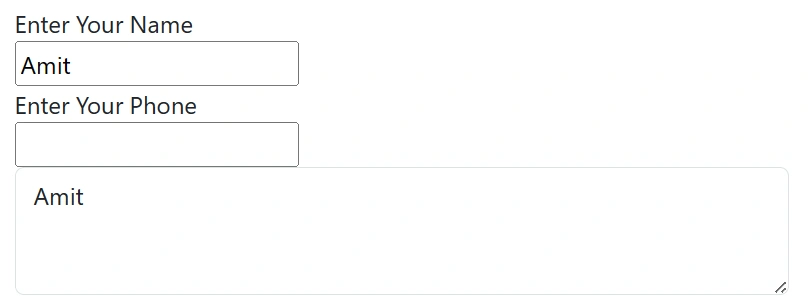
Hi, I have to display like below in textarea when user type in name, Address and Phone Name: ABC Address: XYZ Phone: XXX
Kendo Angular Grid
Inbuilt filters are not working when we use [data]='DataView' instead of using [KendoGridBinding]='DataView.data'. Here, 'DataView: GridDataResult' represents our paginated data array.
Using Angualar 5 how to create a UI with drop down list with values
Using Angualar 5 how to create a UI with drop down list with hardcoded values (Copy,Move,Delete) If I select ‘Delete’ in the dropdown list, then only one text box should be displayed below to the dropdown list – this textbox to enter the Delete File name along with Path (example : C:\aa.txt) If I select ‘Copy Or Move’ in the dropdown list, then two text box should be displayed below to the dropdown list – one text box for Source File name along with Path (example : C:\aa.txt) and other text box for Destination File name along with Path How to do this using Angualar 5, Can you please guide me. I am new to angular Image 1 ???? Image 2:
AngularJS in healthcare
What role does AngularJS play in elevating the web development game for healthcare entrepreneurs?
how to customize offcanvas in angular?
I have some SVG icons in my angular application, when i click on a particular icon, i need to open the bootstrap offcanvas popUp. my application's same functionality is working, but i need to customize the offcanvas width and height.
Angular Get & Set cookies from Response
How to Get and Set cookies values from angular response body
Create tree view in the angular and add two buttons add and sub
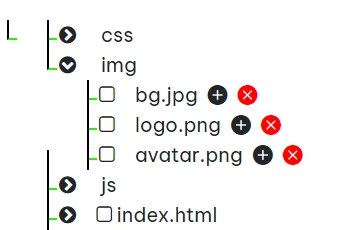
Hi, I have created a tree structure in the angular. as per my requirement, need to add two buttons that is ADD and SUB in the node. EXAMPLE: > CSS >Img >bg.jpg >logo.png >avatar.png >js >index.html here, i have 4 nodes, when i clicked the add button against of Img node, the another node should be added in the main tree. that is Img_clone and comes all the files . like > CSS >Img >bg.jpg >logo.png >avatar.png >js >index.html >Img_clone >bg.jpg >logo.png >avatar.png