Loading
Forums in CSS
background color still display grey instead of white
Hi Team I have two css files, to style ecommerce site. But to some strange reason i cant figure it out where this grey color behind all the div card is showing i tried to inspect the element to look for the background color. Did change it to white, but grey seem to appear dont know which property from the stylesheet this is referenced and need some help. // style sea.css file body { overflow-x: hidden; background-color: #ffffff; } a, button { -webkit-transition: all 0.3s; transition: all 0.3s; outline: none; } a i.fa, button i.fa { margin: 0 5px; } h1 { font-weight: 700; } .btn-primary { color: #fff !important; } .btn + .btn { margin-left: 5px; } .disabled { cursor: not-allowed; } .clickable { cursor: pointer; } .menu-large { position: static !important; } .menu-large .megamenu { padding: 20px; width: 100%; max-width: 1140px; left: 50%; -webkit-transform: translateX(-50%); transform: translateX(-50%); margin-top: -1px; } .menu-large a.nav-link { padding: 7px !important; padding-left: 0 !important; } /* * * ====================================================================== * TOP BAR * ====================================================================== * */ #top { background: #ffffff; padding: 10px 0; } #top .offer { color: #fff; } #top .offer .btn { text-transform: uppercase; letter-spacing: 0.1em; } @media (max-width: 991.98px) { #top { font-size: 0.738rem; text-align: center; } } #top a { color: #fff; } #top ul.menu { padding-top: 5px; margin: 0; font-size: 0.738rem; } #top ul.menu > li { margin-right: 0; } #top ul.menu > li a { color: #eee; } #top ul.menu > li + li:before { content: "|\00a0"; padding: 0 5px; color: #f8f9fa; } #top ul.menu > .active { color: #999; } #top #login-modal .modal-header { background: #379392; } #top #login-modal .modal-header h5 { co
HTML AND CSS
Where can I learn HTML and CSS online, preferably with an online tutorial?
how to make a sidebar mobile friendly
i am a react app using next js and i stuct to some where. i am using tailwind css.its a css related issue.on page load my cart should not display so i hide to the right using translate-x-full on click to cart button i showed to add a class translate-x-0. on laptop its looks fine and working fine but when shited to mobile devies on chrome.this side bar is displaying on the right. i don't know how to fix this issue. My full code is:its a navbar component code with all imports: import React, { useRef } from 'react' import Link from 'next/link' import { CiShoppingCart } from "react-icons/ci"; import { IoCloseCircleOutline } from "react-icons/io5"; import { FaCirclePlus } from "react-icons/fa6"; import { FaCircleMinus } from "react-icons/fa6"; const Navbar = () => { let ref=useRef(); let toggleCart=()=> { if(ref.current.classList.contains("translate-x-full")) { ref.current.classList.remove("translate-x-full"); ref.current.classList.add("translate-x-0"); } else if(!ref.current.classList.contains("translate-x-full")){ ref.current.classList.remove("translate-x-0"); ref.current.classList.add("translate-x-full"); } } return ( <div className='flex flex-col md:flex-row md:justify-start justify-center items-center py-4'> &
HTML textselection end marker disappears
Anybody know why text selection endpoint disappears when my selection comes to the start of the next line
Click Event Not Accurate in Mobile
There is a strange issue as I have a mobile application running on simple Javascript and I have a case were an icon is visible upon a certain condition and there is a click event on that icon but somehow the click position is not accurate, when I click around that icon then it fires so upon clicking 5-7 times on that icon it fires and when I debug through developer tools it works on accurate position. My Icon is in Div and when I change the div to span in developer tools it works as expected When I change this div to span and deploy again it does not work so the thing is that when I change div and span at run time in developer tools it starts working as expected. can anyone help me here?
How would you vertically center an element within its parent container
How would you vertically center an element within its parent container, regardless of the parent's height?
can someone share me roadmap for css learning ?
as i want to start from scrach know some basics of css
How to add a shadow to an element in CSS ?
Help me on how to add a shadow to an element in CSS.
How to find direction or position of the property declared in CSS?
When declaring margin property or padding properties which contains direction or position like TOP, BOTTOM, LEFT, RIGHT... How can I find which position the value is assigned? For example, h1 { margin: 25px 50px 75px; } p { padding: 25px 75px; } I need to know which value is for left margin, right margin and so on. How to find it?
How to keep the final state of an animated element while the rest of t
How to keep the final state of an animated element while the rest of the animation completes in CSS
Code for hovering effect in css it should hover over a tab
Code for hovering effect in css it should hover over a tab
spaces between container to each div class
HI Team I want to create a spaces in between div class container, below is my css style and div class. /css file img { display: block; max-width: 100%; height: auto; margin-bottom: 20px; /* add margin to create space between images */ } @media (min-width: 768px) { picture { width: 100%; height: 100%; } } // div classes <div id="feauture-store"> <div class="box py-4"> <div class="container"> <div class="row"> <div class="col-md-9"> <h2 class="mb-0">Discounted Deals</h2> <div class="container"> <div class="row"> <div class="col-md-6 text-center"> <picture> <source media="(min-width: 68px)" srcset="img/deal2.png"> <img src="img/deal2.png" alt=""> </picture> </div> <div class="col-md-6 text-center"> <picture> <source media = "(min-width:68px)" srcset="img/deal3.png"> <img src="img/deal3.png" alt=""> </picture> </div> </div> </div> </div> </div> </div> </div> </div>
Chrome Update CSS Issue
Hi team, After updating chrome latest version [111.x.x] we are faceing one issue in nav bar , on hover on particulat link we are showing sub menu . due to browser updates subment is displaying behind other html elements. to resolve this issue I tried with z-index property but no luck . same website working as expected in edge browser. team let me know if any sollution for this Thanks madan S B
Last Visible Li on screen
Hi I have a list of Li elements with overflow hidden, I just want to find the last visible Li on screen let say a element which is closest to right
hide text Selection Menu in iOS
How we can hide a text selection menu or context menu options like copy selectall lookup and all in IOS
How to position 2 divs side by side
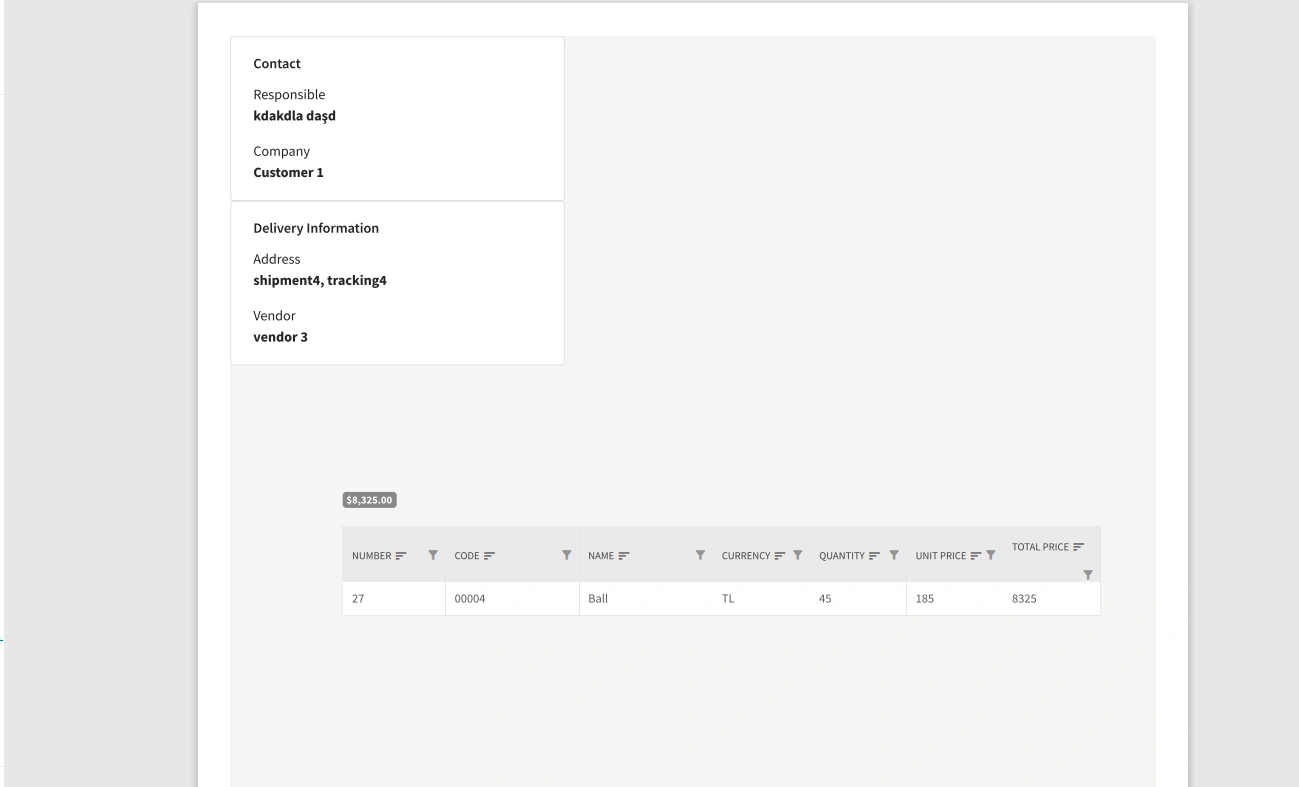
Hello, In my application, I am printing a razor page and I want to display 2 divs side by side. ( Contact and Delivery Information ) I want the grid to start from the left and closer to the others. Here is my sample razor: @page "/dialogcard/{Order}" @using IMS.CoreBusiness @using IMS.UseCases.Interfaces.OrderDetail @inject IViewOrderDetailsByOrderIdUseCase ViewOrderDetailsByOrderIdUseCase @inject DialogService DialogService @inject IJSRuntime JsRuntime @if (orderDetails != null) { <div class="row my-4"> <div class="col-md-12"> <RadzenCard> <h3 class="h5"> Order @Order.OrderId Details </h3> <RadzenTabs> <Tabs> @{ var detailVendorId = 0; } @foreach (var detail in orderDetails) { @if (detailVendorId != detail.VendorId) { <RadzenTabsItem Text="@detail.Vendor.Name"> <div id="printarea1"> <div class="float-container row"> <div class="col-lg-6 d-flex float-child"> <RadzenCard Style="width: 100%; overflow: hidden;"> <h3 class="h5">Contact</h3> <div class="d-flex flex-row"> <div> <div>Responsible</div> <
what's this combinaison of selectors?
Hi, With this code, nothing happens. Why? What's the difference between style p.class1 and .class1 p (or p .class1 )? Thanks. <style type="text/css"> .class1 p { color: green; font-size: 36px } </style> <h4 class="class1">This is text in h4-tag.</h4> <p>This is text in p-tag</p> <p class="class1">This is text in p-tag with class1.</p>
Lag/Stuck While Scrolling in Android
There is lag or it stucks when you keep scrolling down the selection, From the past couple of weeks we are facing the Lag issue in our Android App and some what same is happening in the Chrome in android, when you select the text and starts scrolling down it stucks at certain point randomnly don't know the exact issue, Any body experiencing the same or know how we can overcome this in our Android App,
Column-count property
On using the Column-count:2 property in UL list , the alignment of the LI element becomes different when the elements are in ODD number, on Even number elements it is perfect, Does anyone know why this is happening?