Write scalable JavaScript with static types. Learn TS syntax, generics, unions, narrowing, decorators, modules, build tooling, and tsconfig. Improve DX, refactoring safety, and API design across Node.js and frontend frameworks with practical examples.
626 posts185 contributors
Hi friends, I want to create a class that contains a table that stores two values email and password and I want to create in the class a function to add the values in the table declared in the class how to do it please And thank you in advance
Hello, I have two forms (register and login) Features: When the user clicks on the register button the data will be stored in an array that is in register.component.ts after it is redirected to the login page it must connect by its data entered in the register page How to pass the values from forms To aborder ??please ?? PS: I use angular2 thank you in advance
Angular 4 application developed using the visual studio , need to know how to read the webConfig key in typescript file.
Hi, in my roting app am using childroots.based on one id i need to bind 2 diffrent component ie:Student,Teacher problem 1. in UI am getting 2 tabs Students Teacher student is loading according to id but if i switch teacher i lost the details of student id showing undefined 2.how can i use same param(here id) getteachers() in teacher component same as student i am getting id from details component click event event(){ this.Router.navigate(['Main/student',Id]) } in student component.ts this.subscription = this.Route .params .subscribe(params => { this.Id = +params['MMId']; this.getdetails(this.Id) }); : i have created child roots(containing parameter route) and parent roots path: 'Main', component: Main, children: [ { path: 'student/:Id', component: studentComponent }, { path: 'Teacher', component: TeacherComponent,} <div id
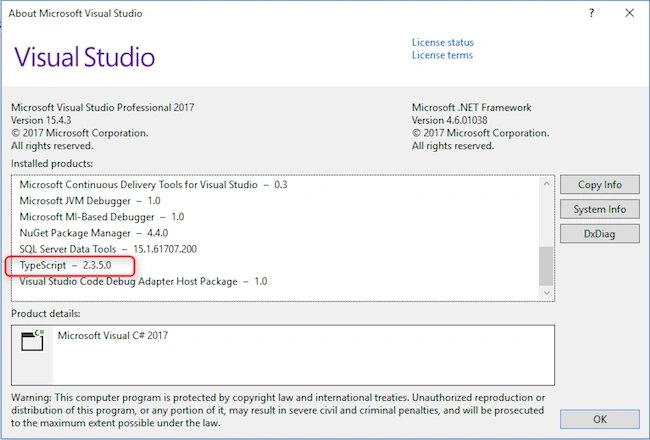
Which version of typescript should use for Visual Studio 2017 version 15.4.3 ? In my computer system typescript is install but not show in solution explorer. Where I am wrong ?
i need to upload abulk data of jsonobject.In service .ts i need to add extraa 4 more values to that object.In body ineed to get this values to save how can i append these 4 values to body my service.ts ************** SaveData(uploaddata: any) { //this four data i need to add to the object "body" // ID":ID, // "CreatedBy": "", // "CreatedOn": "", // "UpdatedBy": "", // "UpdatedOn": "" / let body = JSON.stringify(uploaddata) console.log(body) let headers = new Headers({ 'Content-Type': 'application/json; charset=utf-8' }); let options = new RequestOptions({ headers: headers }); return this._http.post(this.Savecsv, body, options) .map(res => <data>res.json()) .catch(this.handleError); }
i need to select one csv file and convert it in to json list.for that i wrote a javascript function but its not giving the exat json list this is the js method <input type= "file" accept= ".csv" (change)= "convertFile($event)" /> convertFile(csv: any) { this .fileReaded = csv.target.files[0]; let reader: FileReader = new FileReader(); reader.readAsText( this .fileReaded); reader.onload = (e) => { let csv: string = reader.result; let allTextLines = csv.split(/\r|\n|\r/); let headers = allTextLines[0].split( ',' ); let lines = []; for (let i = 0; i < allTextLines.length; i++) { </spa
How to use tool tip in prime ng dynamic data table for Angular 4 I am using primeface datatable with Angular 4,having dynamic rows. how I can show a tooltip whenever a user hovers over a row in my primefaces datatable? Also, the tooltip needs to display a created and updated date coming from the API server.Each row having diffrent dates.While mouse over a row it should show the created and updated dates of particular row.I cannot find any solutions .Am using primeface latest version with Angular.Am using pTemplate and pTooltip but its not working My data tableis like.. <p-dataTable #dt [value]="Slist" styleClass="myTable" exportFilename="Pno12list" reorderableColumns="true" resizableColumns="true" columnResizeMode="expand" selectionMode="single" [(selection)]="selectedResource" [responsive]="true" [rows]="8" [paginator]="true" scrollHeight="300px"> <p-header> <div style="text-align:left"> <p-multiSelect [options]="columnOptions" [(ngModel)]="cols"></p-multiSelect> </div> </p-header> <p-column *ngFor="let col of cols" [header]="col.Header" [field]="col.Field" [sortable]="true" [filter]="true" filterMatchMode="startsWith" filterPlaceholder="Search"</p
Hi I need help to create buttons on unity screen and set different targets on each button. I set buttons with unity UI > Buttons, But I unable to set target on each button, like it start targeting usd on usd click, not others. Please help me. I will be very Thankful to you.
I have imported a file data in a Textarea but i have to show that in a table at the same time?So what can i do for that?
i am using prime ng package for a table view..I acchived the read only table.Now i need to have a button and clicking of that button should add coloumn in UI which is editable. How can I achive that? i have searched many..please help my prime ng table <p-dataTable [value]="marketmodellist" [rows]="7" [paginator]="true" [globalFilter]="gb" #dt > <p-column field="countryName" header="Country Name" [filter]="true" filterPlaceholder="Search"></p-column> <!--<p-column field="submarketCode" header="Year ({{yearFilter||'No Filter'}})" [filter]="true" filterMatchMode="equals"> <ng-template pTemplate="filter" let-col> <i class="fa fa-close" (click)="yearFilter=null;dt.filter(null,col.field,col.filterMatchMode)"></i> <p-slider [style]="{'width':'100%','margin-top':'8px'}" [(ngModel)]="yearFilter" [min]="1970" [max]="2010" (onSlideEnd)="dt.filter($event.value,col.field,col.filterMatchMode)"></p-slider> </ng-template> </p-column>--> <p-column field="countryCode" header="Country Code" [filter]="true" filterMatchMode="equals" > <ng-template pTemplate="filter" let-col> <!--<p-dropdown [options]="brands" [style]="{'width':'100%'}" (onChange)="dt.filter($event.value,col.field,col.filterM
i am binding a base64 image to the UI.which is in a loop.but image is not binding,while inspect element i can c the image but not rendering <td> <span>{{ m.Name }}</span> </td> <td> <!--<img style="width:100px;height:100px" [src]="imageData1">--> <img [src]="'data:image/jpg;base64,'+m.ImageData" style="height:50px;width:50px" /> </td> <td> <span>{{m.Age }}</span>
I want to send uploaded files to base64 so that I can pass to the request(I am using Remote API's). The problem is that I'm using Angular 2 with Typescript and I couldn't find any info on how to do that. I found that in Javascript it can be done with canvas .I have created a javascript function to convert the image to base64 and get file using //insted of ng-Model in the case of file upload var ImgeData = event.srcElement.files; console.log(ImgeData); so my index. html contains <script type='text/javascript'> function encodeImageFileAsURL() { // logic for convert to BASE64 //ng-Model file var ImgeData = event.srcElement.files; console.log(ImgeData); } </script> html will be like <input id="inputFileToLoad" type="file" onchange="encodeImageFileAsURL(); " /> here after selecting the image i am getting the file name and details in var ImgeData = event.srcElement.files; the real confusion coming here after in "ImageData" ive the image(file) details.How can send it along with other json data? my save methode is something like //in Service.ts SaveDetails(mar: model) { let body = JSON.stringify ([ { "Id": 0, "Name": mar.Name, "Age": mar.Age, "ImageUrl": mar.ImageUrl, "ImgeData": "how i can pass that Imagedata in javascriptfunction along with these details??? " "updatedBy": "ADMIN", "updatedOn": "2017-07-05" } ]); console.log(body); let headers = new Headers({ 'Content-Type': 'applica
hi I need to bind image and corresponding details from api..all json data im getting but image is in base64/binary form how can i bind, together please help me
want to encode the uploaded files to base64 so that I can pass them to the request. The problem is that I'm using Angular 2 with Typescript and I couldn't find any info on how to do that. I found that in Javascript it can be done with canvas but I don't know how could I implement the code in Typescript. Even I need to know how to bind the coming base64 image in html please help me What I have tried: I am getting all other json data except base64.I need to bind it as an image.same way I need to post also my html here, user can upload image here as jpeg <input type="file" id="taxname" [(ngModel)]="spam.ImageData" class="form-control browse" value="Browse"> while binding am getting base64 only, how to convert this?. with in one API I need to get <td> <span>{{ m.ImgeData }}</span> </td> how can I achieve this?
information technology can use of agriculture for give me a seminar topic
Hi , I am migrating code from Javascript to TypeScript I have the following function myDateDialog() { var retDay; var retMonth; var retYear; } function openDatePickerDialog(wnd, field, dateFormat) { myDateDialog.retDay = ""; myDateDialog.retMonth = ""; myDateDialog.retYear = ""; var dlgURL = '../DatePicker.htm'; field.value = dateFormat.replace(/yyyy/, myDateDialog.retYea r).replace(/MM/, myDateDialog.retMonth ).replace(/dd/, myDateDialog.retDay ); what would be the best to replace the Javascript code function myDateDialog() , would a class be best and declare retDay , retMonth and retYear as properties ? Then instantiate the class in openDatePickerDialog and set the properties values ? or is there a better approach ? Thanks
I want to read the datas from .csv file using .xml program. I googled it but i did not get the any related result for this topic. Can anyone help me as soon as possible
i am not familiar with angular 2 and typescript. i was reading a article on web pack from this link http://www.dotnetfunda.com/articles/show/3481/webpack-in-angular2 the article shown how to create 3 different typescript files for customer, address and phone no and there they show some coding part like import {Address} from "./Address" class Customer{ a: Address = new Address(); Addresses: Array = new Array (); } import {Phone} from "./Phone" export class Address{ b: Phone = new Phone(); Phones: Array = new Array(); } export class Phone{ <li cla
Hi , I have my .js files in the following directory ../Scripts/lookup.js and many others . I have just renamed my .js files to .s files and if i select "Show all files" in Visual Studio I can see the . js file but i need to include it in the project. Is there a way I can leave my create my .js files in a different directory when I save the chnages to the .ts file ? Also the .js file doesnt seem to generate on save but it does on compiling . Note I dont use the tsconfig.json I wuse Visual Studios "Typescript Build" screen . Should i use a tsconfig.json file and if so where can i place it ? thanks
Hi, I am trying to work with asp.net core angular2 starter application in visula studio 2017 but I am unable to see the template Please tell the process what to install to get the asp.net core angular2 starter application
This blog explains what get and set are, and how to use them in TypeScript.
hi I want to combine TypeScript and Angularjs, for this I use this blog post: http://dotnetbyexample.blogspot.fr/2014/07/angularjs-typescript-setting-up-basic.html but when I run my application it stops with this error: Error Build:Only 'amd' and 'system' modules are supported alongside --out. I tried installing Microsoft.TypeScript.MSBuild and Microsoft.TypeScript.Compiler , but nothing changed and I still have that error. can you help me? thanks
How to run automatically when debug program and generate .ts to .js in a file tsc compiler is also fine...Is other option to compile .ts file. kindly suggest me
right now i am using VS2013 community edition but i want to learn type script. so please guide me from where to download type script which will be compatible for VS2013. also please suggest me few web site for learning type script. thanks