jQuery AJAX is the use of jQuery methods to send asynchronous HTTP requests from a web page without a full page reload. Developers use it to call server-side APIs and scripts, submit or retrieve data, update page content, and handle loading, success, and error responses.
10 posts9 contributors
Learn reusable jQuery AJAX functions for loading indicators, error handling, API responses, dropdowns, string utilities, sanitization, and Bootstrap alerts.

Learn how to build RAG configuration management with jQuery AJAX, Bootstrap, DataTables, and DOMPurify for CRUD operations, validation, status updates, and notifications.
Explore jQuery AJAX vs Fetch API in 2025. Discover which method is best for modern web development, considering performance, syntax, and browser support. Learn when to use each!
This guide delves into using the jQuery Ajax function to read and parse XML data efficiently. It covers the basics of jQuery and Ajax, demonstrating how to make asynchronous requests to fetch XML files.
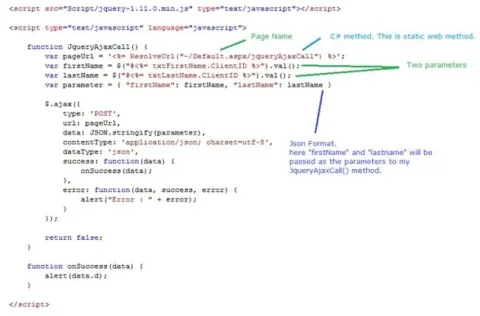
Learn how to call a C# method or function using jQuery Ajax in this step-by-step guide. We'll cover setting up your ASP.NET backend, writing the C# code, and creating the jQuery Ajax call to interact with the server.

create a cascading dropdown functionality where the selection of a "Brand" in the first dropdown (BrandId) should dynamically populate the options in the second dropdown (BrandlistId). However, there are some issues and potential improvements that need to be addressed to ensure correct functionality.

ASP.NET Web API is a smart framework to build HTTP services which can be consumed by Multi platform clients including desktops or smart phone devices, irrespective of browsers or Operating Systems being used.

This article shows how to load on-demand data into a Webgrid on a scroll using ASP.Net and jQuery AJAX.
Inserting data into a database using jQuery ajax and LINQ to SQL.