5 posts about Power Apps performance by 3 contributors.
Know Power Apps performance? Share what you know with developers who are learning it.
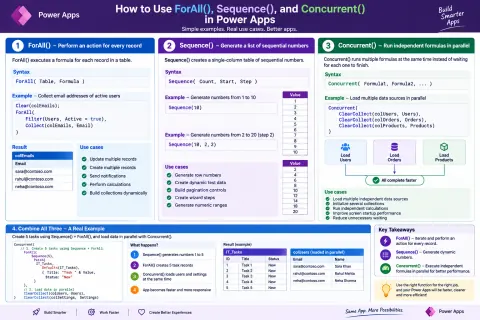
Learn how ForAll(), Sequence(), and Concurrent() work in Power Apps for record processing, dynamic table generation, parallel operations, bulk updates, error handling, and performance optimization.
Master Power Apps debugging with Live Monitor. Analyze real-time events, troubleshoot errors, optimize performance, and streamline SharePoint/connector calls.
This article explains how to implement a centralized theming approach in Power Apps using the App OnStart property. Instead of hardcoding styles, you’ll learn how to create reusable theme variables and apply them across your app for a consistent and maintainable UI. It also covers dynamic styling, hover effects, and best practices to build clean, scalable, and professional Power Apps applications.
Delegation issues can break your Power Apps solution when working with large SharePoint lists. This article explains why delegation warnings occur and provides a practical, step-by-step solution to build scalable, high-performance apps without data loss.
Boost Power Apps performance with concurrency! Learn how to use the Concurrent() function for parallel operations, optimize data loading, and handle data conflicts effectively. Build faster, more responsive apps!
DevSocialUpcoming · 3rd editionAI Agents ConferenceNov 23–27, 2026Live onlineMembers only16days leftRegisterPublish an article in this category and earn +1,000 SHARP when it is approved.
Write an article