3 posts about PowerApps Filter by 3 contributors.
Know PowerApps Filter? Share what you know with developers who are learning it.
Understand the difference between Lookup() and Filter() in PowerApps. Learn when to use each function to retrieve single or multiple records from your data source.
Learn how to create nested galleries in PowerApps, a powerful feature for organizing data visually. By using nested galleries, you can group items and dynamically expand or collapse data entries. This guide covers connecting to a SharePoint list, designing galleries, writing formulas, and implementing interactive elements.
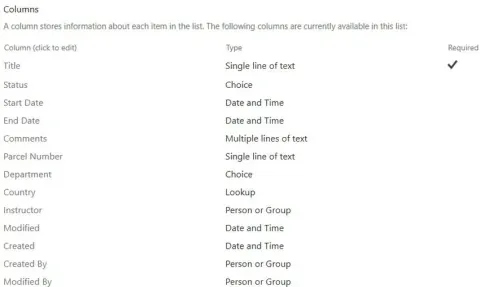
This blog will show you how to use the Filter function to organize information in different SharePoint list columns, whether they contain words, numbers, dates, or choices. We'll make it easy with step-by-step instructions, so you can set up filters and customize your app's look. Get the most out of your SharePoint data by learning how to use the Filter function in PowerApps effectively.
DevSocialUpcoming · 3rd editionAI Agents ConferenceNov 23–27, 2026Live onlineMembers only16days leftRegisterPublish an article in this category and earn +1,000 SHARP when it is approved.
Write an article