
cuBLAS maps parts of FP64 matrix multiplication to faster Tensor Core operations.
NVIDIA cuBLAS can now speed up many double-precision matrix multiplications by converting FP64 inputs into integer work that runs on Tensor Cores, then rebuilding an FP64-quality result. The newer Ozaki-II algorithm reduces the amount of integer matrix work for real-valued DGEMM, while the 2M algorithm reduces complex ZGEMM from the usual four real matrix multiplications to two. For a beginner, the practical point is simple: update CUDA, keep calling cuBLAS GEMM, and measure your real workload before changing numerical settings.
Key takeaways
- CUDA Toolkit 13.4.2 introduced Ozaki-II and 2M support in cuBLAS floating-point emulation for FP64 matrix multiplication.
- Ozaki-II uses modular integer arithmetic and the Chinese Remainder Theorem to reduce the number of Tensor Core GEMMs needed for FP64 emulation.
- The 2M method computes a complex matrix product with two real GEMMs in the exact-integer stage, compared with four in the conventional approach.
- cuBLAS can select emulation automatically when it expects a performance benefit, and it can fall back to native FP64 when needed.
- Use the latest compatible CUDA Toolkit and cuBLAS patch level, because post-release fixes addressed rare correctness issues in fixed-point emulation paths.
What NVIDIA changed in cuBLAS
Scientific software often spends much of its run time in GEMM, short for general matrix-matrix multiplication. For real double-precision matrices, the common BLAS operation is DGEMM. For complex double-precision matrices, it is ZGEMM. These operations appear in simulation codes for chemistry, materials science, weather, engineering, and many other fields.
FP64 is useful because it gives a large numeric range and about 15 to 17 decimal digits of precision. But hardware designed for AI often has much higher throughput for lower-precision or integer Tensor Core operations than for native FP64 arithmetic. NVIDIA’s approach is to use that faster hardware without telling developers to accept lower-quality answers.
In the November 13, 2026 NVIDIA announcement, the company described two additions: Ozaki-II for real FP64 GEMM and 2M for complex FP64 GEMM. They build on cuBLAS floating-point emulation, which was introduced earlier and is documented as a way to transform higher-precision inputs into lower-precision partial computations and then recombine them.
This does not mean every FP64 GEMM will become faster. Matrix size, matrix shape, GPU architecture, memory capacity, data range, and the chosen accuracy policy all matter. cuBLAS can decide that emulation is not worthwhile for a call and use native FP64 instead.
How FP64 emulation works
A floating-point number has a sign, an exponent, and a mantissa. The exponent provides range. The mantissa carries the significant digits. FP64 values can vary across an enormous range, which is one reason a direct conversion to a small integer type is not enough.
cuBLAS fixed-point emulation first gives groups of values a shared power-of-two scaling factor. NVIDIA documents that elements in a row of matrix A or a column of matrix B can share this factor. Each value is then represented by a scaled integer mantissa. Integer Tensor Cores calculate partial products, and cuBLAS reconstructs the floating-point result.
The library’s Automatic Dynamic Precision, or ADP, logic chooses a mantissa width at run time when dynamic control is used. This is important because a bit count that is accurate and fast for one data set may not be correct for another. If the necessary mantissa budget exceeds the configured limit, the NVIDIA announcement says cuBLAS falls back to native FP64 matrix-multiply instructions.
| Term | Plain-English meaning | Why it matters |
|---|---|---|
| DGEMM | Matrix multiplication using real FP64 values. | It is a common hotspot in scientific code. |
| ZGEMM | Matrix multiplication using complex FP64 values. | It traditionally needs more real arithmetic than DGEMM. |
| Tensor Core | A GPU unit built to process matrix operations at high throughput. | FP64 emulation maps partial work to these units. |
| ADP | Automatic Dynamic Precision. | It picks precision settings intended to meet the requested accuracy behavior. |
| Mantissa bit count | The number of integer bits retained for scaled inputs. | More bits can improve accuracy but can require more work. |
Why Ozaki-II is faster than Ozaki-I
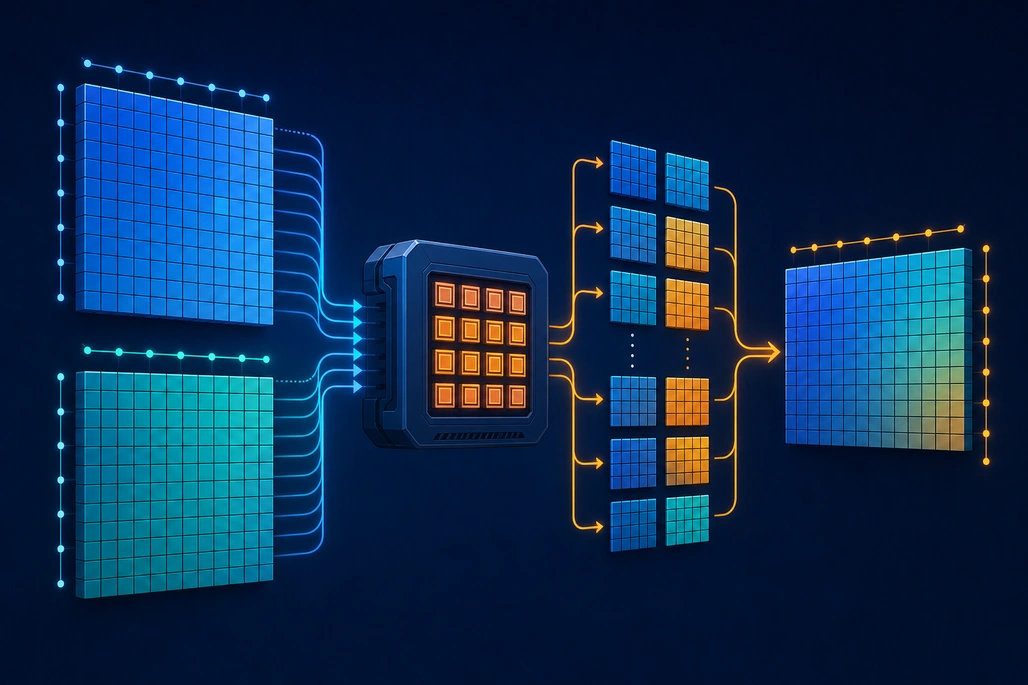
Ozaki-II scales FP64 inputs, calculates integer residues, and reconstructs the result.
The earlier Ozaki-I approach breaks a larger integer representation into 8-bit slices. It then multiplies slices in a triangular pattern. As the desired precision increases, the number of required Tensor Core GEMMs grows roughly with the square of the number of slices.
Ozaki-II takes a different route. It reduces each scaled integer operand modulo several small, pairwise-coprime integers. cuBLAS runs one integer GEMM for each modulus, then reconstructs the full integer product with the Chinese Remainder Theorem. The work grows linearly with the number of moduli rather than quadratically with the slice count.
That sounds theoretical, but it leads to a practical result. At the precision needed to match FP64 behavior, NVIDIA reports that Ozaki-I needs about twice as many Tensor Core GEMMs as Ozaki-II. The academic paper behind Ozaki Scheme II also describes a useful implementation detail: temporary residue matrices can be discarded after each GEMM, which helps keep workspace under control.
NVIDIA reported up to 5.5x faster DGEMM than native FP64 on Vera Rubin NVL72 and up to 3.9x on GB200 for the tested cases in its announcement. Those are vendor benchmark results, not a promise for every matrix shape or application. Treat them as a reason to benchmark, not as a capacity plan.
How the 2M algorithm speeds up complex ZGEMM

The 2M approach reduces the real GEMM work used to form a complex matrix product.
A complex value has a real part and an imaginary part. If A = Ar + iAi and B = Br + iBi, the conventional complex product is computed as four real products: ArBr, AiBi, ArBi, and AiBr. The real and imaginary output parts are reconstructed from those products.
The known 3M method can reduce that work to three real GEMMs, but ordinary floating-point additions and subtractions used during reconstruction can affect numerical stability. That makes developers cautious in high-accuracy scientific software.
The 2M research paper shows that when the real and imaginary values are represented as exact integers, a complex matrix multiplication can use two real GEMMs plus lower-order pre-processing and post-processing. This is why 2M fits the Ozaki-II path. The integer operations are exact at that stage, so the normal floating-point concern around the 3M-style rearrangement changes.
NVIDIA states that cuBLAS beginning with CUDA Toolkit 13.4 uses 2M to accelerate ZGEMM. The announcement reports a 5x ZGEMM speedup over native complex FP64 on GB200 in its tested configuration. It also reports BerkeleyGW Epsilon-module end-to-end gains of 6.6x on Vera Rubin NVL72 and 3.9x on GB200 for the stated test setup.
A minimal cuBLAS DGEMM example
The cleanest place to start is a normal DGEMM call. You do not write Ozaki-II yourself. Create a cuBLAS handle, select the performance-oriented emulation strategy, then call cublasDgemm as usual. In this example, matrices use cuBLAS’s column-major layout.
#include <cublas_v2.h>
#include <cuda_runtime.h>

int main()
{
    const int n = 1024;
    const double alpha = 1.0;
    const double beta = 0.0;
    const size_t bytes = static_cast<size_t>(n) * n * sizeof(double);

    double *dA = nullptr;
    double *dB = nullptr;
    double *dC = nullptr;
    cudaMalloc(&dA, bytes);
    cudaMalloc(&dB, bytes);
    cudaMalloc(&dC, bytes);

    cublasHandle_t handle;
    cublasCreate(&handle);

    cublasSetEmulationStrategy(
        handle,
        CUBLAS_EMULATION_STRATEGY_PERFORMANT);

    cublasDgemm(
        handle,
        CUBLAS_OP_N,
        CUBLAS_OP_N,
        n, n, n,
        &alpha,
        dA, n,
        dB, n,
        &beta,
        dC, n);

    cudaDeviceSynchronize();

    cublasDestroy(handle);
    cudaFree(dA);
    cudaFree(dB);
    cudaFree(dC);
    return 0;
}
CUBLAS_EMULATION_STRATEGY_PERFORMANT tells cuBLAS to use emulation when it finds a performance benefit. CUBLAS_EMULATION_STRATEGY_EAGER is another option, intended to use emulation whenever possible. For a first test, use the performant strategy and compare complete application results against your existing native FP64 baseline.
You can also set CUBLAS_EMULATION_STRATEGY=performant or CUBLAS_EMULATION_STRATEGY=eager as an environment variable. This is useful when you want to evaluate an existing executable without changing its source code.
Choosing automatic or fixed mantissa control
Dynamic mantissa control is the sensible first choice. cuBLAS selects the number of mantissa bits from the actual inputs, attempting to balance speed and accuracy. NVIDIA documents that no single fixed bit count is both performant and accurate for all FP64 inputs.
Fixed mantissa control is for teams that understand their data range and have a verified numerical error budget. You can configure it with cublasSetFixedPointEmulationMantissaControl and set a maximum through cublasSetFixedPointEmulationMaxMantissaBitCount. The environment variable CUBLAS_FIXEDPOINT_EMULATION_MANTISSA_BIT_COUNT provides a process-level alternative.
Do not start by forcing a smaller bit count because a benchmark looks good. In molecular simulation, electronic-structure calculations, financial models, or safety-related engineering, an answer that arrives faster but fails your scientific validation is not useful. Establish tolerances, test representative and difficult inputs, and retain a native FP64 comparison path.
Performance results and what they do not mean
NVIDIA used real applications in its announcement. For coupled cluster singles and doubles, or CCSD, it reported full-FP64 end-to-end speedups of 2x on Vera Rubin NVL72 and 1.4x on GB200. In a domain-specific mixed-precision configuration, the reported figures were 5x and 3.5x, respectively.
For BerkeleyGW, NVIDIA reported that its tested ZGEMM configurations produced the same Epsilon matrix elements to 10 decimal places under the NERSC-10 harness. This is useful evidence that the library can help real scientific applications, but it does not validate a different code base, GPU count, compiler setup, or input distribution.
There is also a newer practical detail to keep in mind. The cuBLAS patch release notes list fixes for fixed-point emulation, including a rare case where Ozaki-II double-complex BLAS3 routines could return incorrect results. Update to the latest compatible cuBLAS patch release before evaluating complex workloads, and maintain regression tests after every toolkit or driver update.
How to get started safely
- Install the newest CUDA Toolkit supported by your operating system, GPU, driver, and application stack.
- Identify DGEMM and ZGEMM calls with a profiler before expecting a large application-level improvement.
- Run your current native FP64 baseline and save outputs, run time, GPU model, driver version, CUDA version, and matrix dimensions.
- Enable
CUBLAS_EMULATION_STRATEGY_PERFORMANTor callcublasSetEmulationStrategyon the cuBLAS handle. - Compare outputs with domain-appropriate error tests, not only a checksum or a few printed values.
- Test small, medium, and production-sized matrices because emulation overhead can outweigh its benefit for smaller calls.
- Only then evaluate fixed mantissa settings, and document the accepted numerical tolerance with the data set that supports it.
Start with automatic settings. The point of cuBLAS emulation is that you can evaluate a new implementation path without replacing your GEMM calls or writing modular arithmetic kernels. That keeps the experiment small and makes it easier to decide if the speedup is real for your application.
Frequently asked questions
Do I need to rewrite my CUDA matrix multiplication code for Ozaki-II?
No. cuBLAS can apply FP64 emulation to supported GEMM operations without application-level GEMM rewrites. You can use the emulation strategy API or environment variables to control how aggressively the library considers emulation.
Is Ozaki-II lower precision than FP64?
Ozaki-II uses integer Tensor Core calculations internally, but its goal in cuBLAS is FP64-quality matrix multiplication through scaling, integer products, and reconstruction. With dynamic settings, cuBLAS can fall back to native FP64 if the selected emulation path cannot meet the configured requirements.
What is the difference between DGEMM and ZGEMM?
DGEMM multiplies real double-precision matrices. ZGEMM multiplies complex double-precision matrices, where each element has real and imaginary components. The 2M algorithm targets the extra work in complex matrix multiplication.
Should I use eager emulation for production scientific code?
Start with the performant strategy and validate your workload. Eager mode asks cuBLAS to use emulation whenever possible, while performant mode uses it when the library expects a performance benefit. Your numerical tests and end-to-end measurements should decide which setting is appropriate.
Why should I update cuBLAS patches before using FP64 emulation?
cuBLAS patch notes include correctness fixes for fixed-point emulation paths, including rare Ozaki-II double-complex cases. A current supported toolkit and patch level reduces the risk of testing an issue that has already been fixed.
Based on reporting by NVIDIA Technical Blog, NVIDIA Documentation and arXiv.

Join the conversation! Your thoughts help the community grow.