
Microsoft 365 Copilot agents help organisations turn business knowledge into useful answers and actions. An HR agent can explain leave policies, an IT agent can guide troubleshooting, and a presales agent can retrieve product information to support a proposal.
Building an effective agent requires more than connecting documents to AI. Solution architects must understand how the agent retrieves information, executes actions, respects permissions, consumes credits, and reports usage.
This article explains these components and the administrative controls needed for an enterprise deployment.
Pricing and product capabilities reflect Microsoft guidance reviewed in October 2026.
Understanding the Two Agent Architectures
Microsoft 365 Copilot supports declarative agents and custom engine agents.
Declarative Agents
A declarative agent uses Microsoft Copilot’s models and orchestration. Its configuration defines:
Instructions: The agent’s purpose, scope, and response behaviour.
Knowledge: Sources such as SharePoint and content available through Copilot connectors.
Actions: APIs or tools that perform business tasks.
Capabilities: Supported features enabled for the agent.
This approach suits focused assistants that work within Microsoft 365. Agent Builder supports simple knowledge scenarios, while other development options support more advanced configurations.
Custom Engine Agents
A custom engine agent gives the development team control over its AI models, orchestration, and application logic.
The team can implement specialised retrieval, integrate business systems, and manage complex workflows. Depending on the implementation, hosting, model usage, and connected services can introduce costs beyond Copilot Credits.
Design decision | Declarative agent | Custom engine agent |
|---|---|---|
Models and orchestration | Managed by Microsoft Copilot | Controlled by the solution |
Customisation | Instructions, knowledge, and supported actions | Custom reasoning and application logic |
Typical scenario | Department knowledge assistant | Specialised business automation |
Operational responsibility | Primarily configuration and governance | Configuration, runtime, integrations, and governance |
Reference Architecture
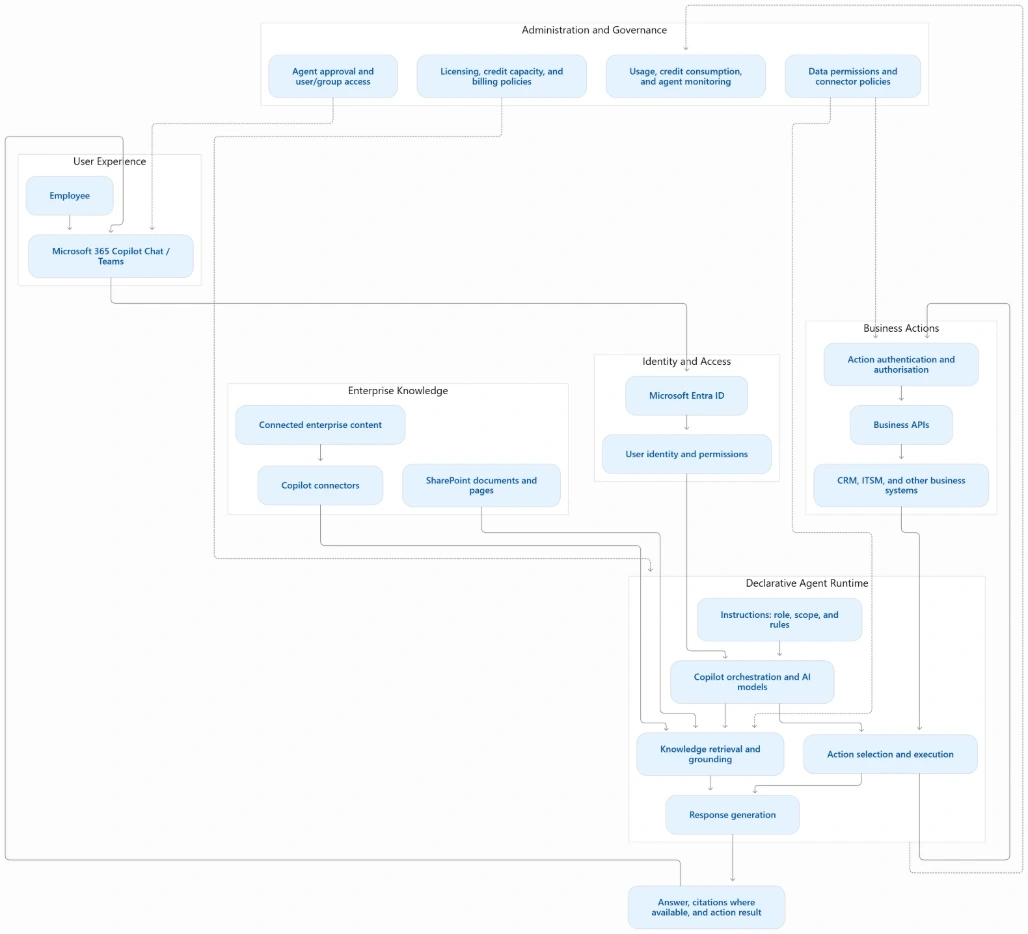
The following diagram represents a typical declarative agent with knowledge retrieval and business actions.
How a Request Flows
Consider an employee asking:
“What is the laptop replacement policy, and can you create a support request?”
The employee signs in using their organisational identity.
The agent interprets the request using its instructions.
Knowledge retrieval finds relevant policy content available to that user.
The agent prepares an answer with supporting evidence where available.
An authorised action creates the support request.
The employee receives the explanation and action result.
Knowledge retrieval and action execution have different security requirements. Sharing an agent does not automatically grant access to its documents. Likewise, each API or workflow must use an appropriate authentication method.
For sensitive actions, the solution should request confirmation before submitting a transaction.
Where Agents Provide Value
Business area | Agent usage |
|---|---|
Human resources | Explain policies, benefits, and onboarding procedures |
IT support | Retrieve troubleshooting guidance and create tickets |
Presales | Compare specifications and retrieve product evidence |
Procurement | Explain purchasing rules and initiate requests |
Operations | Retrieve procedures and coordinate routine tasks |
A useful starting point is one clearly defined task with a reliable knowledge source and a measurable business outcome.
Understanding Licensing and Cost
Agent costs depend on the user’s licence, the agent’s capabilities, and its execution context.
Included Usage
Copilot Chat is available at no additional cost with eligible Microsoft 365 plans. However, access to Copilot Chat does not make every organisational agent interaction free.
Eligible employee-facing agent usage by authenticated Microsoft 365 Copilot licensed users is included, subject to Microsoft’s licensing conditions and fair-use limits. Autonomous operations and separately billed capabilities require additional assessment.
Metered Usage
Copilot Studio offers prepaid capacity and pay-as-you-go billing.
Option | Published pricing |
|---|---|
Prepaid capacity pack | ₹16,640 per month for 25,000 Copilot Credits |
Pay-as-you-go | US list price of $0.01 per Copilot Credit |
Prices depend on region, purchasing agreement, commitment, and applicable taxes. Unused monthly capacity-pack credits do not roll over.
One Question Can Consume Multiple Credits
For agents using standard Copilot Studio billing, examples include:
Activity | Copilot Credits |
|---|---|
Classic answer | 1 |
Generative answer | 2 |
Agent action | 5 |
Tenant Graph grounding | 10 |
Agent flow actions | 13 per 100 actions |
A response using tenant grounding and a generative answer can consume 12 credits.
For example:
1,000 responses × 12 credits = 12,000 credits
At the published PAYG rate, that equals $120, before additional billable activities and taxes.
Forecast consumption from the complete task rather than counting questions alone.
Allocating Credits to Users
Copilot Credits are pooled capacity. Administrators do not assign a capacity pack to each employee in the same way they assign a Microsoft 365 licence.
For Copilot Chat, the configuration connects three elements:
User groups: Identify eligible employees.
Credit policies: Authorise those groups to consume prepaid credits.
Environment capacity: Allocate credits to the associated Copilot Chat environment.
Configuration Steps
Create an Entra security group for the pilot users.
Open Microsoft 365 admin center → Copilot → Billing & usage.
Under Pay-as-you-go services → Microsoft Copilot Chat, create a Copilot credit policy.
Scope the policy to the required group.
Open Power Platform admin center → Licensing → Copilot Studio.
Allocate prepaid capacity to the provisioned Copilot Chat environment.
Configure capacity notifications and overage behaviour.
Copilot credit policies currently apply to Copilot Chat. SharePoint agents use their documented PAYG configuration.
Budgets and Limits Are Different
A PAYG billing-policy budget generates spending notifications. It does not automatically stop consumption when the budget is exceeded.
Microsoft also provides user-level spending controls for specified services through its newer Cost management experience. These controls should not be assumed to apply to every Copilot Chat or Copilot Studio agent.
Always verify the controls available for the service being deployed.
Monitoring Usage and Performance
Monitoring should cover both expenditure and agent effectiveness.
Location | What to monitor |
|---|---|
Microsoft 365 admin center: Copilot Credits report | Metered Copilot Chat usage by user, agent, and billing policy |
Power Platform admin center: Copilot Studio licensing | Prepaid capacity, environment consumption, and overages |
Copilot Studio: Monitor | Agent activity, performance, and billing consumption |
Azure Cost Management | PAYG expenditure and budget alerts |
The Microsoft 365 Credits report focuses on relevant metered usage. It should not be treated as a complete adoption report for all licensed users.
For a pilot, review:
Credits consumed per successful task.
Answer accuracy and supporting evidence.
Failed tool calls and workflow runs.
Remaining prepaid capacity.
PAYG expenditure.
Employee feedback and time saved.
Deployment Recommendation
Start with one agent, a small user group, and a controlled knowledge source. Validate document permissions and action authentication before expanding access.
Measure real consumption over a representative period, then choose the billing model that fits demand. Increase capacity only after confirming that the agent delivers accurate answers and completes useful tasks.
An effective Microsoft 365 Copilot agent combines reliable knowledge, authorised actions, clear cost ownership, and ongoing monitoring.

Join the conversation! Your thoughts help the community grow.