Loading
Articles by Bechir Bejaoui
Working with the frame object
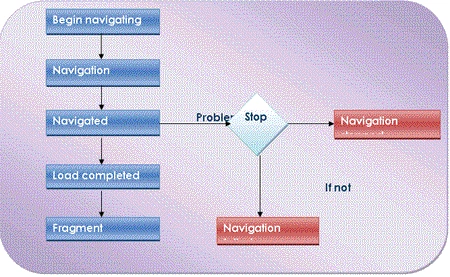
In this article, I will represent the frame object witch is a container control that enables to navigate through internet and display some contents such as an Html page.
Working with WPF Table using C# - Part II
In the previous article, Working with WPF Table using XAML - Part I, we discovered how to perform this task using XAML. Now, we will see how to do the same using C#.
Working with WPF Table using XAML - Part I
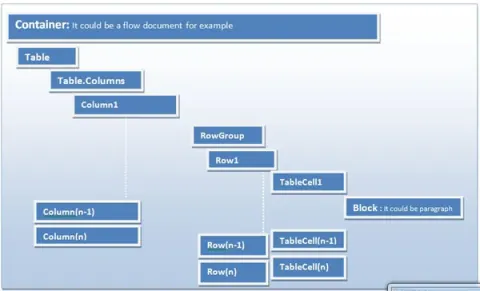
In this article, I will use WPF table in XAML format. This one defines a flexible grid area that contains rows and columns. At the contrast of the Grid object witch is defined in the System.Windows.Controls, the table object is defined in the System.Windows.Documents namespace.
C# and XAML within a Silverlight 2 context? - Binding Modes: Part VIII
In this article I will expose the different binding modes.

C# and XAML within a Silverlight 2 context - Data conversion: Part VII
In this article I will show how to implement a customized converter as a part of the article how does XAML interact within C# code.
Working with WPF ViewBox Control
In this article, we will show how to use a ViewBox control available in WPF and XAML.
Working with the Uniform Grid in WPF
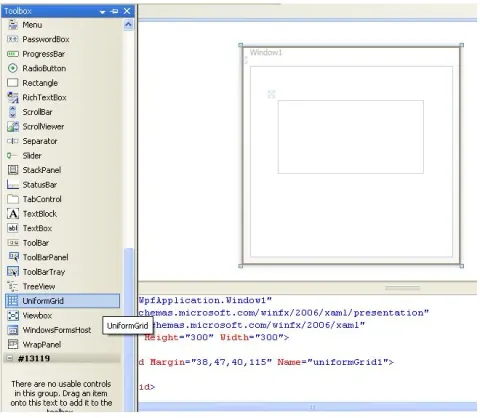
In this article I will introduce the Uniform Grid object. The uniform grid object arranges content in its area so that all the cells in the grid have the same dimension. It represents a perfect solution if someone prefers to prevent the headache of ordering controls within an ordinary Grid object.
XAML and C# within a Silverlight 2 context - Binding process: Part II
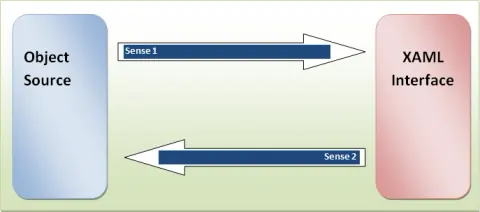
In this article, I will show different techniques to interact with a given XAML UI with a C# code behind object.
Microsoft and the embedded systems
In this article, I try to introduce the embedded system offered feature to the C# developer
Working with a ScrollViewer control in a WPF application
The ScrollViewer is an object that represents a scrollable area that contains other visible controls, it could be found within the System.Windows.Controls. At the contrast of a ScrollBar object, the ScrollViewer is a WPF new feature. So let’s discover its principal characteristics through this article.
C# and XAML within a Silverlight 2 context? - Binding process: Part III
In this article I will continue with the Binding process and I will demonstrate binding technique but from the C# code behind this once.
C# and XAML within a Silverlight 2 context - Data Validation: Part VI
In this article, I will demonstrate how to implement a validation logic as a part of the article how XAML
C# and XAML within a Silverlight 2 context - INotifyPropertyChanged implementation: Part IV
In this article, I will expose the implementation technique of the INotifiedPropertyChanged interface as a part of the article How does XAML interact with the C# code
C# and XAML within a Silverlight 2 context - INotifyCollectionChanged implementation: Part V
In this article I will demonstrate different techniques of how implement the INotifyCollectionChanged interface as a part of the article how does XAML interact with C#

XAML and C# -Introduction: Part I
Introduces Silverlight XAML data binding, including binding modes, property and collection change notifications, validation, and value conversion.
How to define and configure a Grid control within a WPF application using C#: Part II
In a previous article, we discovered how to define and configure a Grid control using XAML. In this second article I’ll demonstrate how to do the same task using the code behind, I mean using C#.
How to define and configure a Grid control within a WPF application using XAML: Part I
In this article, I will try to make a representation of the Grid object witch is directly derived from the Panel abstract class and we can say that is a flexible area that contains rows and columns, it plays a role of container in a given WPF window.
Host a WPF control in a windows application
In this walkthrough, I will demonstrate how to host a WPF control in a windows application.
Integrate WPF control in your Excel solutions
In this article, I will show that it is possible to host a WPF control in a excel solution even that Visual studio and the .Net framework doesn’t provide us a way to host directly a given WPF control in an Excel application. To know how to realize such task, then follow this walkthrough.
Bind a Silverlight DataGrid to a given XML data source
In this article, I will illustrate how to bind a Silverlight DataGrid to a given XML data source
Implementing a Progress Bar in Silverlight 2
In this article, I will show how to implement a simple and classic progress bar in Silverlight 2.0 and Visual Studio 2008.
Integrate the web Webcam functionality using C#-.Net and COM part VIII
In this article, I will demonstrate a totally different technique to integrate the web cam functionality.
Catch a Snapshot via your webcam using C#: Part VII
In this article, I will show how to catch a snapshot view from your personal web cam.
Integrate image scanning within a C# application: Part VI
In this tutorial, I will show a very simple trick of how to integrate the functionality of scanning your documentation with a numeric scanner in your C# application.
Create DCOM application from within .Net environment: Part V
This article explains how to develop a DCOM (Distributed Component Model) application.