Loading
Bechir Bejaoui's contributions
Integrate the web Webcam functionality using C#-.Net and COM part VIII
In this article, I will demonstrate a totally different technique to integrate the web cam functionality.
Catch a Snapshot via your webcam using C#: Part VII
In this article, I will show how to catch a snapshot view from your personal web cam.
Integrate image scanning within a C# application: Part VI
In this tutorial, I will show a very simple trick of how to integrate the functionality of scanning your documentation with a numeric scanner in your C# application.
Create DCOM application from within .Net environment: Part V
This article explains how to develop a DCOM (Distributed Component Model) application.
How to create a COM object using VS 2008 and consume it from VB 6.0 client application: Part II
In this article, we will see how to create a simple COM application in Visual Studio 2008 and how to consume it from a VB6 client application.
Host an OCX control within a .Net windows application-.Net and COM part IV
In this article I will explain how to host an OCX control within a .Net application.
How to create a COM application and consume it from within VC++6.0 - .Net and COM Part III
In this article , I will expose another way to generate a COM component and I will give also a trick of how to consume this generated COM from within VC++ 6.0 application.
Introduction to the interoperation between .Net and COM: Part I
This is a brief introduction to the COM component object model.

Is scala the Java and C# successor????
I try to understand what is the C# poisition in the future languages map?

SQL Server Stored procedures and UDF within a LINQ context-Part I
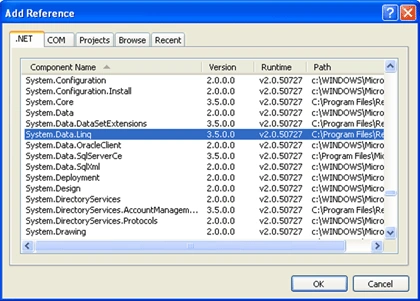
In this two parts particle, I will give techniques of how to deal with stored procedures and user defined functions UDF from within a LINQ context rather than ADO.Net.
SQL Server Stored procedures and UDF within LINQ context-PartII
In the first article, SQL Server Stored procedures and UDF within LINQ context-Part I, I exposed 2 scenarios of how to deal with stored procedures using LINQ, in this second part, I will accomplish the task by demonstrating how to call a user defined function UDF using the same way adopted in the first part.

Handle resource files - Generate a class with strong typed properties using StronglyTypedResourceBuilder: Part VII
You can generate a class with strongly typed properties issued from a given resources file elements or attributes using other way than in Part VI handle resource files where the resgen.exe is invoked to achieve such task.

SQL Server 2008 Express edition is now available
Finally, the SQL server 2008 express, the free version of the SQL server data base engine is available
How to convert a simple DLINQ Query to a data set object
In this article I will represent a trick of how to convert a given DLINQ query to a data set object in order to make use of it as a data source for several controls such as grid view, data grid view and so forth.
Use CompiledQuery.Compile method to build parameterized DLINQ queries
In this article, I will make use of the CompiledQuery.Compile generated method which receives a Lambda expression as parameter, and then it generates a delegate that returns a generic IQueryable object that one can enumerate it through a foreach loop.

Building and consuming parameterized queries from ADO.Net to DLINQ
In this article, I will represent different techniques to build and make use of parameterized queries. The first way is the classical one, and I mean by that the ADO.Net technique. Then I’ll expose the second one using the new technology, namely DLINQ.

Working with the frame object
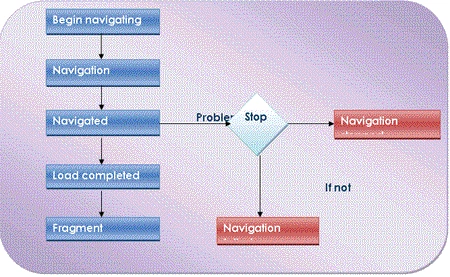
In this article, I will represent the frame object witch is a container control that enables to navigate through internet and display some contents such as an Html page.
Render iteration through an object collection possible using foreach keyword
This article gives you an answer that, why we get a run time error when we use the foreach loop to iterate through our customized objects container collection.
Working with WPF Table using C# - Part II
In the previous article, Working with WPF Table using XAML - Part I, we discovered how to perform this task using XAML. Now, we will see how to do the same using C#.

Working with WPF Viewbox Control
In this article, we will show how to use a ViewBox control available in WPF and XAML. Code sample shows use of Viewbox in XAML and C#.
Working with the Uniform Grid in WPF
In this article I will introduce the Uniform Grid object. The uniform grid object arranges content in its area so that all the cells in the grid have the same dimension. It represents a perfect solution if someone prefers to prevent the headache of ordering controls within an ordinary Grid object.
Working With A ScrollViewer Control In A WPF Application
The ScrollViewer is an object that represents a scrollable area that contains other visible controls, it could be found within the System.Windows.Controls. At the contrast of a ScrollBar object, the ScrollViewer is a WPF new feature. So let’s discover its principal characteristics through this article.
How to Define and Configure a Grid Control Within a WPF Application Using C#: Part II
In a previous article, we discovered how to define and configure a Grid control using XAML. In this second article I’ll demonstrate how to do the same task using the code behind, I mean using C#.
How to Define and Configure a Grid Control Within a WPF Aplication Using XAML: Part I
In this article, I will try to make a representation of the Grid object witch is directly derived from the Panel abstract class and we can say that is a flexible area that contains rows and columns, it plays a role of container in a given WPF window.
Hosting a Windows Control in WPF Application
In my previous article, I demonstrated how to host a WPF control within a windows application and in this tutorial, I will show how to host a windows form control within a WPF application.