Loading
Destin Joy's contributions

Introduction to SharePoint 2013 Upgrade: Part I
In this article we will see what the options are for SharePoint 2013 upgrade features, such as upgrade for service applications, a site health checker, and upgrade for site collections.
SAML-based Claims Authentication For SharePoint Server 2013
This article describes how to configure claims authentication with SharePoint Server 2013 There are five steps to follow when setting up the SharePoint Server 2013 Preview SAML claims authentication. We will go with the same three-tier farm we discussed in my previous article.
SharePoint Server 2013 capabilities
SharePoint 2013 provides a new way to work together. The next version of SharePoint introduces new ways to share your work and work with others, organize your projects and teams and discover people and information.
SharePoint 2013 Team Site Enhancements
This article describes what the new changes team sites in SharePoint Server2013 are.
Deprecated Features in SharePoint 2013 From SharePoint 2010
This article describes the features in SharePoint 2010 Products that have been deprecated or removed from SharePoint 2013.
How to Configure SharePoint 2013 My Sites
This article describes how to configure My Sites in a SharePoint Server 2013 and how to configure all required settings and features related to it.
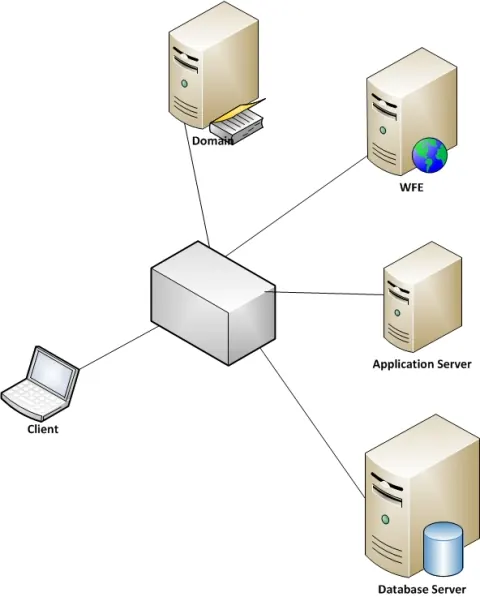
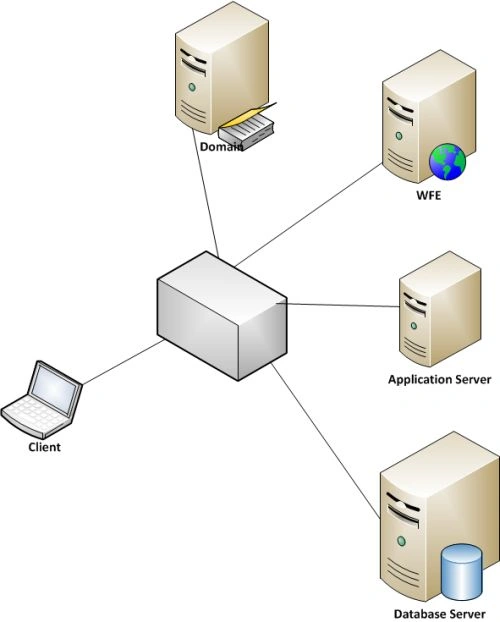
How to Configure Three-Tier Farm For SharePoint Server 2013
Here we are describing the farm architecture and the servers it contains.

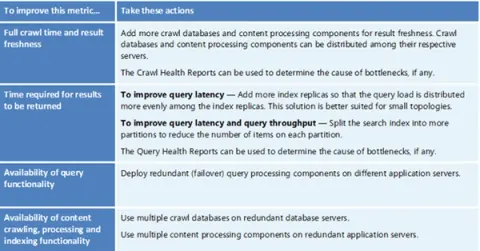
What is New in SharePoint 2013 Search
Here you will see the new features of the search functionality in SharePoint 2013.
How to Migrate a Single List From SharePoint 2007 to 2010 Using PowerShell
In this article I am showing how to migrate a single list from SharePoint 2007 to SharePoint 2010.
What is new in SharePoint 2013
Today I am excited to author my first article about SharePoint 2013 or SharePoint 15, the next version of SharePoint.
Developing BI Applications in SharePoint 2010-Working With Charting Webpart
In this article we will use the Chart Web Part to provide a simple way to provide charts on a Web Part page so that users can visualize data in native lists.
How to Set Item Level Permission Using SharePoint Designer 2010 Work Flow
There are situations where we want to set item level permission dynamically whenever an item is added to a SharePoint list.
Connecting to a web service using Business Connectivity Services (BCS) SharePoint 2010
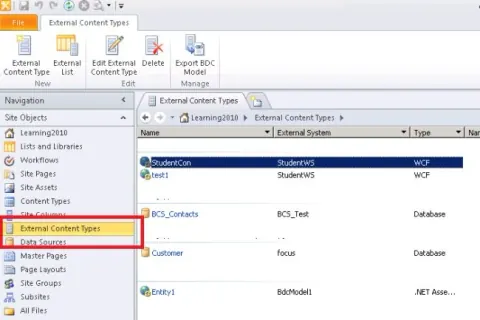
In this article we are going to see how we can access an external web service using Business connectivity Services in SharePoint 2010.
Enable SharePoint 2010 to Render SWF (Flash Files)
In this article I will demonstrate how to enable SharePoint 2010 to render SWF (Flash) Files.
Asset Picker in SharePoint 2010
The asset picker tool enables authors to more easily find, sort, and view various types of assets that are available on the site.

Implementing a Video Library in SharePoint 2010
We can create a new video library to support marketing videos. Viewers need to search and filter the images to find the best image for their needs.
Implementing an Image Library in SharePoint 2010
Here we can create a new image library. Viewers need to search and filter the images to find the best image for their needs.
Working With Retention in SharePoint
In this article we can create two site collection level retention policies and associate these polices with two site collection content types.
Batch Import of Images in SharePoint 2010
Here we can create a library to support the batch import of images. The library leverages the EXIF data in the images to automatically provide metadata for the images.
Working with Retention in SharePoint 2010
In this article we will create two site collection level retention policies and associate these polices with two site collection content types. Then review various ways to view retention policies that affect an item or list.
How to Work With Creating Holds SharePoint 2010
Here we see how to create a hold and associated content for the hold in SharePoint 2010.
How to Convert Word Document to XPS Using SharePoint Designer 2010 Workflow
Here we can see, how to use a custom action within SharePoint Designer to create a custom workflow that can use the Word Automation Service to convert a document into XPS format and then declare it as an in-place record in a document library.
How to Configure Record Center in SharePoint 2010
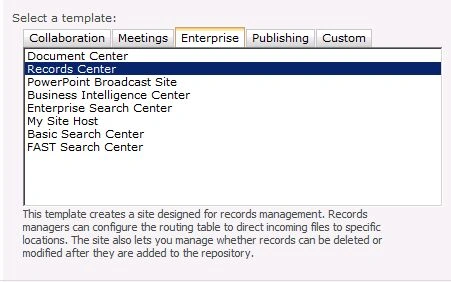
Here we see how to create a new Record Center, configure a Send To connection, and use the Document ID service and Content Organizer to route documents based on content types and column values.