Loading
Blogs by Mike Gold
Interesting Silverlight Bug for RadioButton Grouping
I just ran into an interesting Silverlight 4 bug. If you have a set of radio buttons with a groupname and a completely different set of radio buttons with the same group name in a different part of the tree, they are treated as one group

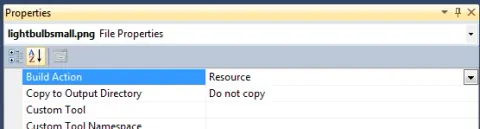
How to add an Image Source as a Resource in WPF
I was struggling with adding an image Source to WPF having lived in the Silverlight world for the last few years, but here it is.

How to create a Histogram using LINQ
LINQ provides a quick and easy way to generate a histogram from your data. Here's how
How to detect the scrollbar has changed in a ScrollViewer in Silverlight
I found this on one of the Microsoft Forums. There is no event handler directly on the scrollviewer to detect if a scrollbar has changed, so you need to get at the internal scrollbar. here's how.
Single Responsibility Principle in Serialization
The Single Responsibility Principle may be one of the most important design concepts in programming. This blog illustrates how Microsoft broke this pattern in MFC, and how they later redeemed themselves in .NET
Porting from C# to Java
I am currently involved in a project of migrating a C# data layer to java in order to run on LINUX. Here are my thoughts on the activity.
Using anonymous delegates with extensions to create your own LINQ extensions
One of the things that is so powerful about the whole LINQ infrastructure is you can add any filter, mapping, or list operator you can think of. Here is an example.
How to add Padding to a Button inside a StackPanel in silverlight
Although not necessarily intuitive, the easiest way to add padding to a button in a stackpanel is through Margins.
Using a ValueConverter as a DataTemplateSelector in Silverlight
Silverlight doesn't have a DataTemplateSelector like WPF. Here is a way to make a ValueConverter do the same thing.
Using the DelegateCommand to handle events in MVVM in Silverlight
PRISM provides a mechanism for bringing event handling directly into your view model called the DelegateCommand. The delegate command can be used with XAML buttons to pass your data context into your view model upon clicking the button by the user
Using a ContainerBindingCollection in a Telerik RadTreeView in Silverlight
A RadTreeView is a Telerik control that allows you to display and select from a hierarchal list. Telerik pays close attention to allowing the user to bind their controls to a ViewModel and having it function correctly. The following demonstrates how you can bind an IsSelected property in your view model to a selection in your RadTreeView using the ContainerBindingCollection
Binding your MVVM model to an AttachedProperty
Just spent about an hour reading blogs and trying to figure out how to bind to attached property. In my many trial and error approaches, I finally came upon one that works, although it seems more like there is a bug in Silverlight 3.
Two ways to use a predicate in LINQ to Filter Results
LINQ gives us a lot of flexibility on how we evaluate collections. Here is in example of two ways to use a predicate on a collection.

Positioning Silverlight Popups Relative to a Control
I just went through the challenge of positioning a Silverlight Popup control relative to an existing control. Here is how I finally solved it.
A DistinctBy extension that takes a Lambda for Distinct
After hunting the web, I found a combination of solutions that work well for an extension that just takes a comparison operator to get your distinct values. Here is my solution.
Sorting an Array with a Lambda Expression
The following example, illustrated in Silverlight, shows you how to sort a list box through a bound ViewModel Property Collection
Reversing a Dictionary in LINQ and C#
Every once in a while you are posed with an interesting puzzle. Someone needed a dictionary reversed and this sounded just like the thing I would enjoy tackling with LINQ.

Extending JQuery
You can extend the jquery object yourself with the extend method and then use those methods you created as if it were any other jquery object.
Anti Pattern: Multiple Purposes for the same method
As I continue in my adventure of product support, I have come across some more anti-patterns that I would like to share with the community at large.
Using LINQ to convert an array from one type to another
LINQ is a powerful tool for converting arrays to different types. Here's how to do it.

Using MVCContrib Grid in a Web 2.0 World with jquery and AJAX
In a web 2.0 world it is not enough to keep posting the entire page back rendered to the browser. Otherwise the whole screen blinks and it looks web 1.0 ish. The following blog describes a strategy of how you can create your own "components" and populate them on a part of the page through the controller.
Passing JSON into an ASP.NET MVC Controller
One of the limitations of the controller I had been struggling with was how to pass JSON back to the controller inside of MVC. Here is how.
Any Authors interested in Writing a Silverlight Book?
C# Corner is gauging interest in a community driven book for Microsoft's latest Silverlight 2.0 beta technology. If you are interested in writing (or even reading this book) please comment below.
How to use the FilterExpression in your GridView
FilterExpression is a property of the SqlDataSource that allows you to filter data in the GridView quickly. Unfortunatley it doesn't maintain its value very well on post backs. The code below will show you how to remedy this problem
How to access a DropDownList in the GridView row programmatically in the RowDataBound event handler
this blog tells you how to access a DropDownList control programmatically in the RowDataBound event handler which occurs for each row as its bound to the database.