Loading
Blogs by Vijai Anand Ramalingam

How to get the taxonomy field value for an item using Client Side Object Model in SharePoint 2013
In this blog you will see how to get the taxonomy field value for an item using Client Object Model in SharePoint 2013.
How to get all the term labels for a particular language using Client Side Object Model in SharePoint 2013
In this blog you will see how to get all the term labels for a particular language using Client Side Object Model in SharePoint 2013.
How to delete the label for specified term using Client Side Object Model in SharePoint 2013
In this blog you will see how to delete the label for specified term using Client Side Object Model in SharePoint 2013.
How to create a new label for specified term using Client Side Object Model in SharePoint 2013
In this blog you will see how to create a new label for specified term using Client Side Object Model in SharePoint 2013.
How to get all the labels for specified term using Client Side Object Model in SharePoint 2013
In this blog you will see how to get all the labels for specified term using Client Side Object Model in SharePoint 2013.
How to deprecate the specified term using Client Side Object Model in SharePoint 2013
In this blog you will see how to deprecate the specified term using Client Side Object Model in SharePoint 2013.
How to move the specified term to different term using Client Side Object Model in SharePoint 2013
In this blog you will see how to move the specified term to different term using Client Side Object Model in SharePoint 2013
How to create a copy of the term within the termset using Client Side Object Model in SharePoint 2013
In this blog you will see how to a copy of the term within the termset using Client Side Object Model in SharePoint 2013.
How to delete the term from the term set using Client Side Object Model in SharePoint 2013
In this blog you will see how to delete the term from the term set using Client Side Object Model in SharePoint 2013.
How to create a new term for the term set using Client Side Object Model in SharePoint 2013
In this blog you will see how to create a new term for the term set using Client Side Object Model in SharePoint 2013.
How to get all the terms for the term set using Client Side Object Model in SharePoint 2013
In this blog you will see how to get all the terms for the term set using Client Side Object Model in SharePoint 2013.
How to set the submission policy for the term set using Client Side Object Model in SharePoint 2013
In this blog you will see how to set the submission policy for the term set using Client Side Object Model in SharePoint 2013.
How to delete the term set from the specified group using Client Side Object Model in SharePoint 2013
In this blog you will see how to delete the term set from the specified group using Client Side Object Model in SharePoint 2013.
How to create a term set for the specified group using Client Side Object Model in SharePoint 2013
In this blog you will see how to create a term set for the specified group using Client Side Object Model in SharePoint 2013.
Get all the termsets for the taxonomy group using Client Side Object Model in SharePoint 2013
In this blog you will see how to get all the termsets for the taxonomy group using Client Side Object Model in SharePoint 2013.
Delete the group from the term store using Client Side Object Model in SharePoint 2013
In this blog you will see how to delete the group from the term store using Client Side Object Model in SharePoint 2013.
Create a new group for the term store using Client Side Object Model in SharePoint 2013
In this blog you will see how to create a new group for the term store using Client Side Object Model in SharePoint 2013.
Get all the groups for the term store using Client Side Object Model in SharePoint 2013
In this blog you will see how to get all the groups for the term store using Client Side Object Model in SharePoint 2013.
Delete the language from the termstore working languages using Client Side Object Model in SharePoint 2013
In this blog you will see how to delete the language from the termstore working languages using Client Side Object Model in SharePoint 2013.
Add the language to the termstore working languages using Client Side Object Model in SharePoint 2013
In this blog you will see how to add the language to the termstore working languages using Client Side Object Model in SharePoint 2013.
Get the default language LCID for the term store using Client Side Object Model in SharePoint 2013:
In this blog you will see how to get the default language LCID for the term store using Client Side Object Model in SharePoint 2013.
Get the default keyword termstore using Client Side Object Model in SharePoint 2013:
In this blog you will see how to get the default keyword termstore using Client Side Object Model in SharePoint 2013.
Get the Default site collection Termstore using Client Side Object Model in SharePoint 2013
In this blog you will see how to get the Default site collection Termstore using Client Side Object Model in SharePoint 2013.
Get all the Term Stores for the provided site using Client Side Object Model in SharePoint 2013
In this blog you will see how to get all the term stores for the provided site using Client Side Object Model in SharePoint 2013.
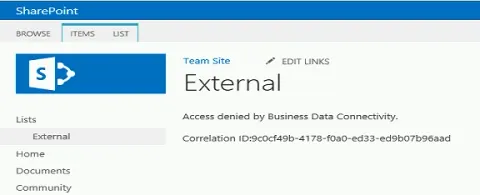
Access denied by business data connectivity in SharePoint 2013
In this blog you will see how to resolve “Access denied by business data connectivity” when accessing the external list in SharePoint 2013.