Loading
Blogs by Vijai Anand Ramalingam
- SharePoint
How to delete a webpart using client object model
In this blog we will be seeing how to delete a webpart using client object model
- SharePoint
Update the title of a webpart using client object model
In this blog we will be seeing how to update the title of a webpart using client object model
- SharePoint
Get all the web parts from the page using client object model
In this blog we will be seeing how to get all the web parts from the page using client object model
- SharePoint
Add user custom action to Site Actions menu using Client Object Model
In this blog we will be seeing about add user custom action to Site Actions menu using Client Object Model
- SharePoint
Delete the user custom action from ECB using Client Object Model
In this blog we will be seeing how to delete the user custom action from ECB using Client Object Model
- SharePoint
Add a user custom action to the ECB menu using Client Object Model
In this blog we will be seeing how to add a user custom action to the ECB menu using Client Object Model
- SharePoint
Get all the user custom actions using client object model
In this blog we will be seeing how to get all the user custom actions using client object model
- SharePoint
Assign list level permission using client object model
In this blog we will be seeing how to assign list level permission using client object model
- SharePoint
Assign the custom permission Level to the group using Client Object Model
In this blog we will be seeing how to assign the custom permission Level to the group using Client Object Model
- SharePoint
Assign the custom permission Level to the user using Client Object Model
In this blog we will be seeing how to assign the custom permission Level to the user using Client Object Model
- SharePoint
Add a custom Permission Level using Client Object Model
In this blog we will be seeing how to add a custom Permission Level using Client Object Model
- SharePoint
Add a new custom group to the site using Client Object Model
In this blog we will be seeing how to add a new custom group to the site using Client Object Model
- SharePoint
Add a new user to a particular group using Client Object model
Inthis blog we will be seeing how to add a new user to a particular group using Client Object model
- SharePoint
Add a user to a particular group who already exists in the site collection using Client Object Model
In this blog we will be seeing how to add a user to a particular group who already exists in the site collection
- SharePoint
Retrieve all the users from a particular group using client object model
In this blog we will be seeing how to retrieve all the users from a particular group
- Learn .NET
Retrieve all the groups from the site using client object model
In this blog we will be seeing how to retrieve all the groups from the site using client object model
- SharePoint
How to create custom sharepoint group and add permission level using powershell
In this blog we will be seeing how to create custom SharePoint group and add permission level using powershell
- SharePoint
How to check the status of farm level features using powershell in SharePoint 2010
In this blog we will be seeing how to check the status of the farm level features in sharepoint using powershell
- SharePoint
How to grant permission to the user or group in the SharePoint list using powershell
In this blog we will be seeing how to grant permission to the user or group in the SharePoint list using powershell.
- SharePoint
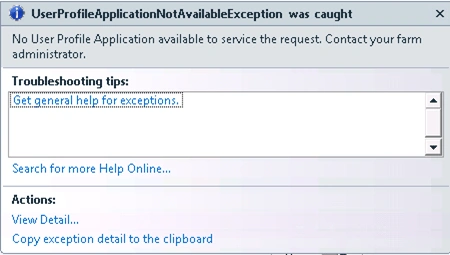
How to resolve "No User Profile Application available to service the request"
In this blog we will be seeing how to resolve "No User Profile Application available to service the request. Contact your farm administrator."
- SharePoint
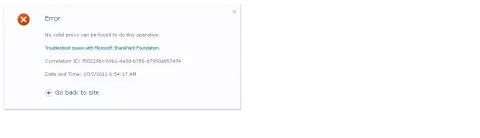
No Valid Proxy can be found to do this operation
In this blog we will be seeing how to resolve "No Valid Proxy can be found to do this operation".
- SharePoint
How to get all the job definitions in the SharePoint farm
In this farm we will be seeing how to get all the job definitions in the SharePoint farm and how to start that immediately
- SharePoint
How to get all the word automation service application proxies in the farm
In this blog we will be seeing how to get all the word automation application proxies in the farm
- Windows PowerShell
Powershell commands for File Types in SharePoint 2010 content index
In this blog we will be seeing the powershell commands for adding, deleting and getting the file types in the content index.
- SharePoint
Unable to connect to the specified address. Verify the URL you entered and contact the service administrator for more details.
How to resolve the error "Unable to connect to the specified address. Verify the URL you entered and contact the service administrator for more details." in SharePoint 2010.