Loading
Jignesh Trivedi's contributions

Creating Custom Tag Helpers With ASP.NET Core MVC
The tag helper enables us to run server-side code to generate HTML, CSS, Javascript code in Razor view.
Anchor Tag Helper In ASP.NET MVC
The Anchor Tag Helper generates HTML anchor (<a> </a>) element by adding a new attribute. The "href" attribute of the anchor tag is created by using new attributes.
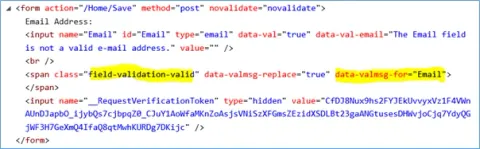
Validation Tag Helpers In ASP.NET Core MVC
This article explains about the validation tag helpers found in ASP.NET Core MVC.
Form Tag Helper And Other Common Tag Helpers In ASP.NET Core MVC
Form tag helper and other common tag helpers in ASP.net core MVC
Working With View Components In ASP.NET Core MVC
View component is newly introduced feature in asp.net core MVC. It is very similar to partial view but it very powerful compared to partial view. It does not use model binding but works only with the data we provide when calling into it.
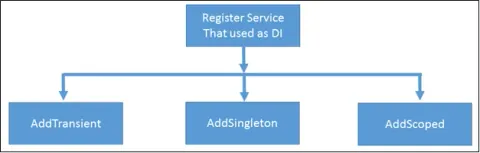
Dependency Injection Into Views In ASP.NET Core MVC
The dependency injection in ASP.net core is not limited to middleware, controller, and models. It also supports dependency injection into view.
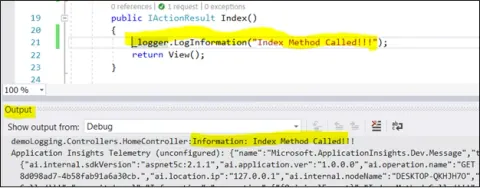
Logging Framework In ASP.NET Core 2.0
Logging is a very critical and essential part of any software. It helps us in the investigation of the essence of problems. Before ASP.NET Core, we had to use third party libraries for logging our application.
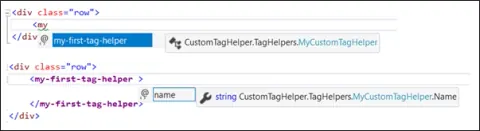
Introduction To Tag Helpers In ASP.NET Core
Tag helper is a new feature in ASP.net MVC. It enables server-side code to create and render HTML elements in Razor View. It is feature of Razor View engine. They are the C# classes which participate in view generation by creating the HTML elements. Using the tag helper, we can change the content of HTML element and add additional attributes to the HTML element. It is very similar to HTML helper in ASP.net MVC.
New Features In ASP.NET Core 2.0
ASP.NET core is a significant redesign of ASP.NET. It is an open source, cross platform framework for developing cloud based applications like web applications, IoT applications, and mobile backend applications.

New String Function In SQL Server 2017
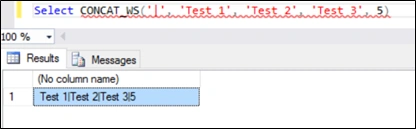
It requires one separator argument and a minimum of two arguments otherwise it raises an error. All the arguments are implicitly converted to string types and then they are concatenated.
Working with JSON in SQL Server
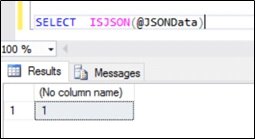
JSON (JavaScript Object Notation) is a lightweight data-interchange format. It is language-independent, easy to understand, and self-describing. It is used as an alternative to XML. JSON is a very popular data interchange format nowadays. Most modern services return the data into the JSON text.
New Features In SQL Server 2017
There are many new features introduced with SQL server 2017 and also there is some performance improvement in existing features. Using the following links, we can learn more details about the new features in SQL server 2017.
Areas In ASP.NET Core MVC
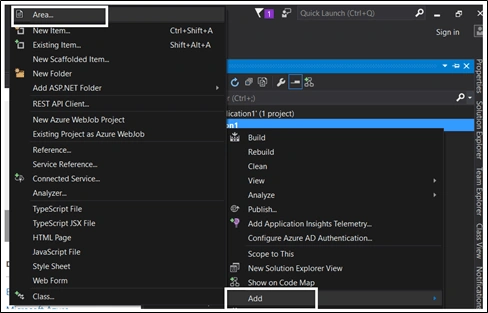
Area is a beautiful feature of ASP.net MVC that allows you to organize related functionality into a group. We can create a hierarchy for the physical grouping of the functionality or business component.
Custom Formatters In ASP.NET Core MVC / Web API
In this article, we will learn how to create custom formatters in ASP.NET Core MVC.
Custom Model Binding In ASP.NET Core MVC
Model binding in MVC maps HTTP request data to the parameters of the controller's action method. The parameter may either be of simple type like integers, strings, double etc. or complex types. MVC binds the request data to the action parameter by parameter name.
Built-In Filter Type In ASP.NET Core MVC
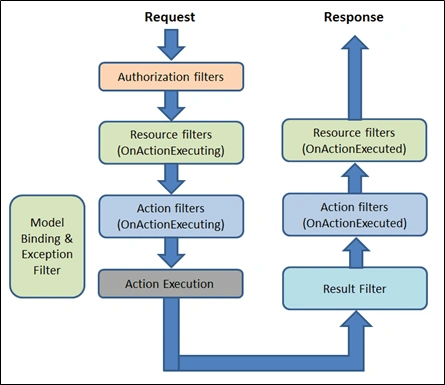
The ASP.net core framework includes five built-in filter types that we can sub-class and customize based on our requirement. The framework supports following built-in filters type.
Internationalization In ASP.NET Core MVC
Globalization is a process of supporting different cultures. Globalization allows us to create multilingual web sites with ASP.net core.
Working With Filters In ASP.NET Core MVC
Filters allow us to run custom code before or after executing the action method. It provides ways to do common repetitive tasks on our action method. The filters are invoked in certain stages in the request processing pipeline.
Performing CRUD Operation In SPA Using ASP.NET Core And Angular 2
Performing CRUD operation in SPA, using ASP.NET Core and Angular 2.
How To Create SPA Using ASP.NET Core And Angular 2
This article teaches you how to create SPA, using an ASP.NET Core and Angular 2.
Controlling Application Behavior Across Multiple Environments With ASP.NET Core
In this article, you will get to know about controlling Application behavior across multiple environments with ASP.NET Core.
File Providers In ASP.NET Core
File Providers in ASP.NET Core. The file system can be accessed through the use of File Providers in ASP.NET Core. The file providers use IFileProvider interface and it has methods to get file information, directory information, and also, the setup change notification. PhysicalFileProvider, EmbeddedFileProvider, CompositeFileProvider, IChangeToken, IFileProvider, IFileInfo, IDirectoryContents.
Publish And Deploy ASP.NET Core MVC On IIS
This article helps you to publish and deploy ASP.NET Core MVC on IIS.
Configuration In ASP.NET Core
Configuration In ASP.NET Core. ASP.NET Core supports many methods of configuration. In ASP.NET Core application, the configuration is stored in name-value pairs and it can be read at runtime from various parts of the application. The name-value pairs may be grouped into multi-level hierarchy.