Loading
Articles by Ketan Sathavara
- SharePoint
How to Use Copilot in SharePoint | New Features, Tips & Tricks
Learn how to use Copilot in SharePoint to create sites, pages, lists, summarize documents, compare proposals, build agents, and automate business workflows.
- Power Apps
How to Use Back() and Navigate() Functions in Power Apps
Learn how to use the Power Apps Back() function for screen navigation, navigation history, edit forms, unsaved changes, and when to use Back() vs Navigate().
- Power Apps
How to Understand and Remember Power Apps Formulas Without Memorizing
Learn how to understand Power Apps formulas using Power Fx, with practical examples of Filter, LookUp, Patch, Set, If, Sum, Sort, and data operations.
- Power Apps
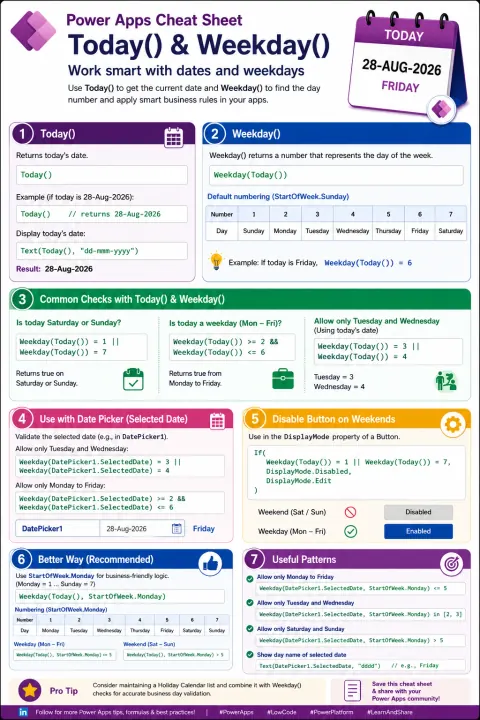
How to Build Date and Weekday Validation in Power Apps
Introduction Date and weekday logic is common in Power Apps—for example, restricting actions to business days, validating selected dates, disabling buttons on weekends, or controlling booking and approval processes. The Today() and Weekday() functions make these scenarios simple and readable. Micros
- Power Automate
How to Use Power Automate Scopes and Configure Run After to Build Reliable Error-Handling Flows
Learn how to use Power Automate Scopes and Configure Run After to build structured TRY-CATCH-FINALLY error handling, improve troubleshooting, and create reliable enterprise workflows.
- SharePoint
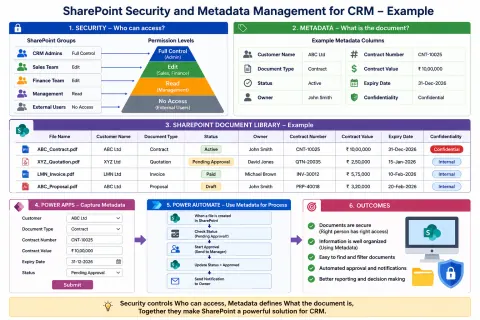
How to Use SharePoint Security and Metadata Management for CRM
Learn how to use SharePoint security and metadata management for CRM document management. Organize customer documents, control access, automate workflows, and integrate Power Apps and Power Automate.
- Power Automate
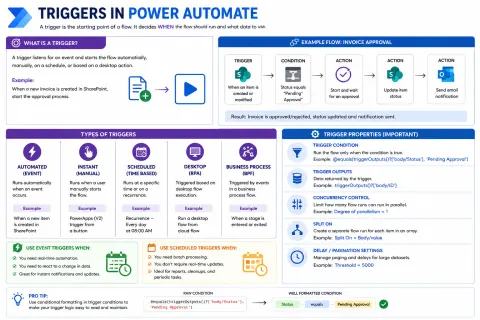
How to Build Efficient Power Automate Flows by Choosing the Right Trigger
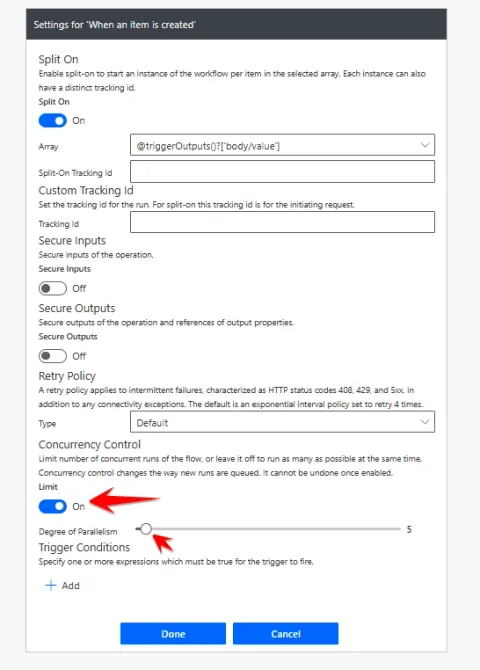
Learn how Power Automate triggers work, including automated, instant, scheduled, and desktop triggers, trigger conditions, outputs, concurrency, Split On, and best practices for efficient flows.
- Power Automate
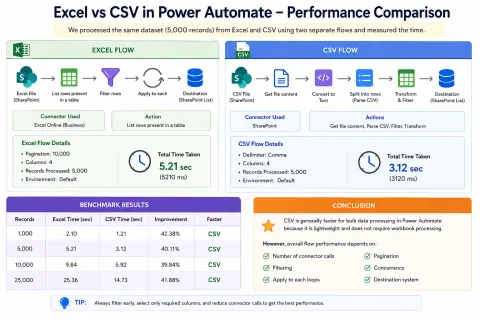
How to Compare Excel vs CSV Performance in Power Automate
Compare Excel vs CSV performance in Power Automate with a practical benchmark using thousands of records, and learn how pagination, filtering, loops, concurrency, connector calls, and batching affect flow performance.
- Web API
How to Troubleshoot API Errors Using HTTP Status Codes
Learn the most common API status codes, including 200, 201, 400, 401, 403, 404, 429, 500, 502, 503, and 504, with simple examples and practical debugging tips.
- Power Automate
How to Use Concurrency in Power Automate
Learn how to use Concurrency Control in Power Automate to process multiple flow runs and Apply to each iterations simultaneously, improve performance, avoid race conditions, and choose the right concurrency level.
- SharePoint
How to Start SharePoint Framework (SPFx) Web Part Development
Learn how to set up a complete SharePoint Framework (SPFx) development environment on Windows using Node.js, Yeoman, React, TypeScript, VS Code, and build your first SharePoint Web Part.
- SharePoint
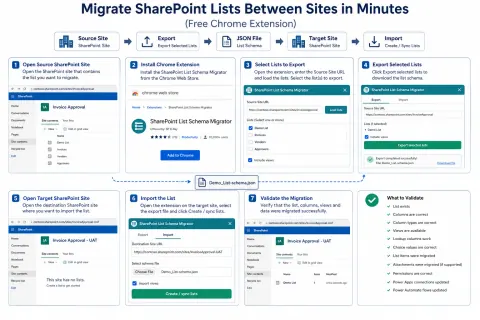
How to Migrate SharePoint Lists Between Sites/Tenants in Minutes Using a Free Chrome Extension
Learn how to migrate SharePoint lists between sites using a Chrome extension, including list schemas, columns, views, content, validation, same-tenant and cross-tenant migration considerations.
- SharePoint
How to Use Version History in SharePoint
Learn how SharePoint Version History tracks file and list item changes, lets you view previous versions, identify modifications, restore older versions, and manage version retention.
- Power Apps
How to Understand GUID in Power Apps and Power Automate
Learn how GUIDs work in Power Apps, Power Automate, Dataverse, and SharePoint, including GUID generation, correlation IDs, audit tracking, integrations, and unique record identification.
- Power Apps
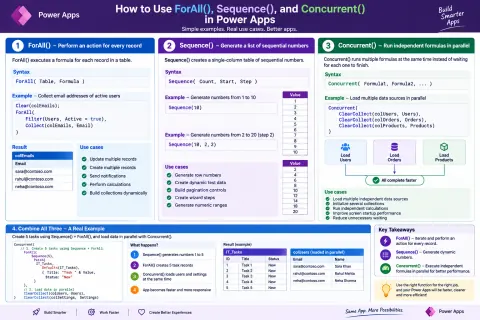
How to Optimize Using ForAll(), Sequence(), and Concurrent() in Power Apps
Learn how ForAll(), Sequence(), and Concurrent() work in Power Apps for record processing, dynamic table generation, parallel operations, bulk updates, error handling, and performance optimization.
- Power Apps
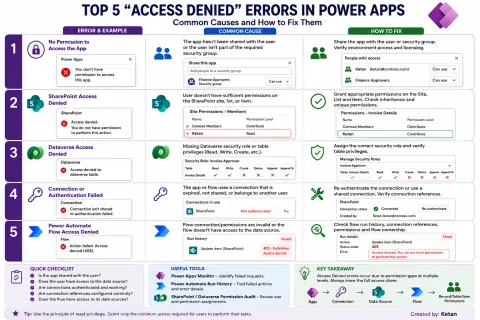
How to Identify and Fix Access Denied Errors in Power Apps
Master Power Apps 'Access Denied' errors! Learn to identify and fix issues across apps, data sources, and flows for seamless operation.
- Power Apps
How to Use Live Monitor in Power Apps: Debugging, Performance, and Network Analysis
Master Power Apps debugging with Live Monitor. Analyze real-time events, troubleshoot errors, optimize performance, and streamline SharePoint/connector calls.
- Power Apps
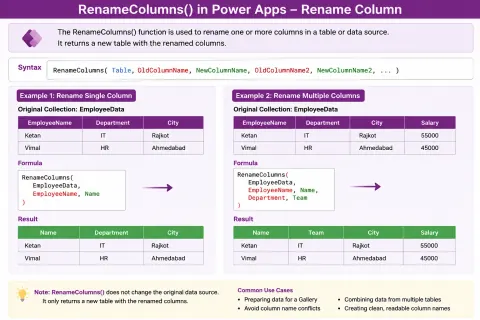
How to Use RenameColumns() in Power Apps
Master RenameColumns() in Power Apps for dynamic data transformation. Rename columns temporarily for galleries & more!
- Power Apps
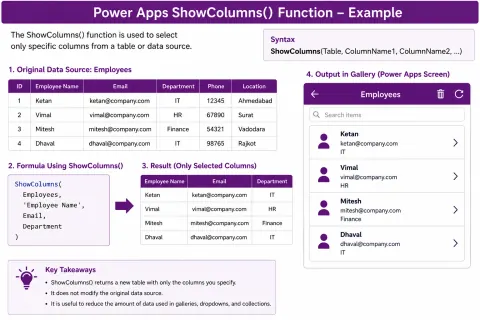
How to use ShowColumns() Function in Power Apps
Master Power Apps' ShowColumns() function to select specific data columns, streamlining your apps and improving performance. Learn syntax and examples.
- Power Apps
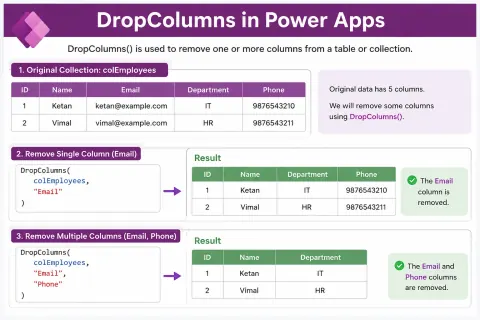
How to Use DropColumns in Power Apps: Remove Unwanted Columns from Data
Master Power Apps' DropColumns() to efficiently remove unwanted columns from tables, collections, and data sources, simplifying your data.
- Power Automate
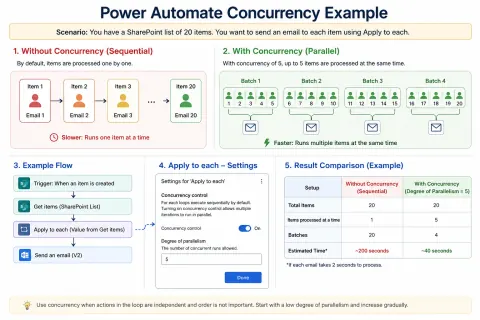
How to Use Concurrency in Power Automate Apply to Each to Speed Up Your Flows
Boost Power Automate flow speed with Concurrency Control in Apply to Each. Process multiple items simultaneously for faster execution.
- Power Automate
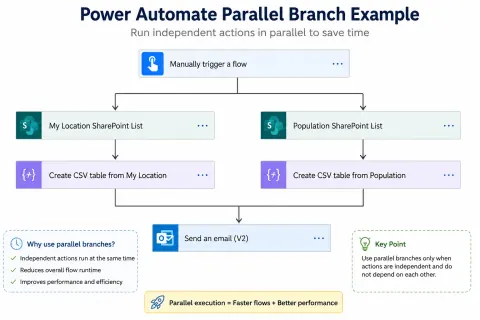
How to Reduce Power Automate Flow Runtime Using Parallel Branches
Boost Power Automate performance! Learn how parallel branches execute independent actions simultaneously, slashing flow runtime and improving efficiency.
- Power Apps
How to Build Modern Applications with Power Apps Code Apps
Build enterprise apps with Power Apps Code Apps using React, TypeScript, and modern web tech. Seamlessly integrate with the Power Platform.
- SharePoint
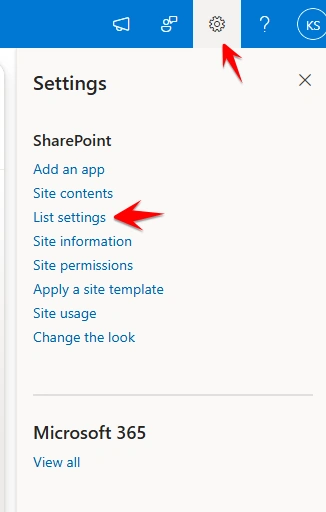
How to Use Indexed Columns in SharePoint to Improve List Performance
Boost SharePoint list performance with indexed columns. Learn how to speed up filtering, sorting, and avoid list view threshold issues.
- Power Apps
How to Use AddColumns() Function in Power Apps
Master Power Apps' AddColumns() to create dynamic, calculated columns without altering your data source. Enhance efficiency and readability.