Loading
Articles by Mahesh Chand
- WCF
User Experience: The Windows File System
WinFS (Windows File System) is the storage platform for Longhorn. This article, a preliminary chapter from the updated Windows User Experience guidelines, presents an overview of WinFS and how it makes possible a better experience for both you and your users.
- Windows Vista
Windows Vista for Developers - A Brief Introduction
With the invent of .NET and C#, Microsoft had already started a new era of programming which swept away the programmers world wide. And now by introducing Windows Vista programming model, Microsoft has proved its seriousness and dedication to the programmers and the programming world. In this article, I will discuss some of the key pillars of Windows Vista programming model.
- .NET 3.0/3.5 SDK
What is WinFX SDK
This article explains what the WinFS SDK is in Windows Longhorn programming model.
- WPF
Windows Presentation FAQs
Windows Presentation Foundation is the library for building presentation (user-interfaces) applications in Windows Vista programming model. This article answers most frequently asked questions related to WPF.
- C#
Out And Ref Parameters In C#
Learn how to use C# out and ref parameters to modify passed variables and return multiple values from methods.
- VC++.NET
Reading and Writing Registry in .NET
In .NET framework, the Registry and the RegistryKey classes provide control to the Windows Registry.
- ADO.NET
The GetChanges of Dataset and DiffGrams
This article discusses the basics of DiffGrams and how DiffGram format is utilized by a DataSet to in this context.
- Visual Basic 2010
Context Menu and Event Handling in VB.NET
This article aims for those who are not yet worked in ContextMenu in .NET environment and would like to understand a little easy way how ContextMenu and its associated event handler works. How can a context menu for a notify icon be programmatically generated when the user right clicks on the notify icon? As a prerequisite, you should know a little bit idea of object oriented programming.
- SQL Queries
Select statement in SQL query
This article primarily devoted to the basics of SQL query, that is SELECT Statement: This SELECT statement is used to fetch data from the table.
- XAML
XAML TextBox
XAML element represents the XAML TextBox control. This article discusses how to create a TextBox and set its various properties such as background and foreground colors, setting size and positions, fonts, wrapping, scrolling, and input validations.
- Visual Basic 2010
Generating Random Number and String in VB.NET
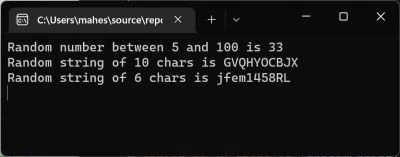
The Random class defined in the .NET Framework class library provides functionality to generate random numbers. This article shows you how you can use this class to generate random numbers and strings and even combination of both.
- C#
How to Generate a Random Number and Random String in C#?
The Random.Next() method returns a random number in C#. The code examples show how to generate a random string and random number in C#.
- Visual Basic 2010
The Convert Class : Conversion made easy in VB.NET
The convert class is used to covert from one data type to another. Most of the common conversions can be done by using this class.
- Internet & Web
Download Files using HTTP and Proxy Server in C#
This article explains how to pass proxy server network credentials when downloading files using HTTP.
- Internet & Web
Using Web Browser Options in C# and VB.NET
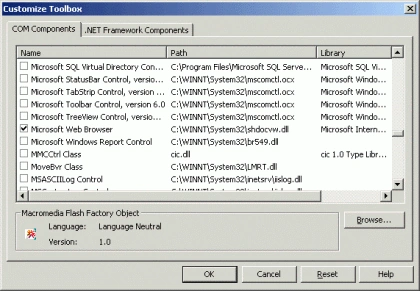
I wrote this article in Sept 2001 in response to a question on discussion forums - how to create a Web Browser in C#? Recently, I got a question on how to use Browser's Save As option programmatically. This article explains how to use Web Browser ActiveX to your project to developer your own customized Web Browser and use its options.
- Windows Forms
Windows Forms 2.0 StatusStrip Control
The StatusStrip control available in Visual Studio 2005 is a powerful StatusBar control with the features provided by StatusBar in previous versions. Besides the StatusBar features, StatusStrip also provides ProgressBar, DropDownButton, SplitButton, and Label features.
- Visual Studio 2005
Windows Forms 2.0 ActiveDocumentHost Control
The ActiveDocumentHost control provides the ability to host OLE Documents within your application. This enables you to create applications that allow in-place editing of documents such as Microsoft Word and Excel.
- Visual Studio 2005
Windows Forms 2.0 MaskedTextBox Control
The MaskedTextBox control is a TextBox with mask feature, which allows you to set the format of the data of TextBox such as zip code, date, time, social security, and phone number.
- Visual Studio 2005
Windows Forms SplitContainer Control
If you have ever written Outlook type user interfaces using Windows Forms, you must be familiar with Splitter control. The Splitter control used to provide functionality to split two controls and dock them. Now Windows Forms 2.0, that ships with Visual Studio 2005 replaces Splitter control with a new control called SplitContainer.
- Visual Studio 2005
Windows Forms WebBrowser Control
Windows Forms 1.0 lacked a Web Browser control. The work around was to use IE ActiveX control using COM Interop. Now Windows Forms 2.0 provides a Web Browser control, which is a managed wrapper of IE ActiveX control. This article talks about the new Web Browser control.
- Visual Studio 2005
Manage and Administer ASP.NET Web Sites in Visual Studio 2005
ASP.NET Configuration Wizard is a new feature available in Visual Studio 2005, which takes care ASP.NET Web Application configuration and deployment problems and allows developers to set Web application settings using a visual interface.
- Visual Studio 2005
Smart HTML Editor in Visual Studio 2005
If you have been writing Web applications using Visual Studio, at some point you would end up editing HTML file by hand. Now HTML Editor available in Visual Studio 2005 now supports Intellisense, which makes developers life much easier when editing HTML file by hand.
- UWP
Tablet PC Ink Editing Modes - Select and Delete Ink
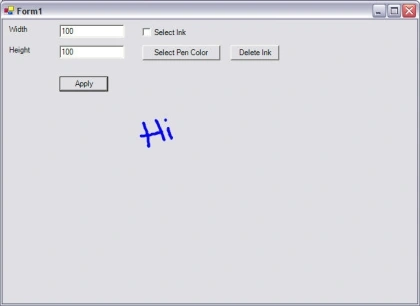
In my previous articles, I discussed how to use Ink and set its properties to draw on a Windows Forms and Windows controls. In this article, I will discuss some more features of Tablet PC Ink including selecting and deleting ink, Ink collection, and Ink object.
- UWP
Working with Tablet PC InkPicture Control in C#
Tablet PC SDK provides two very powerful but easy to use Ink controls for Ink recognition. These two controls are - InkEdit and InkPicture. This article discusses how to work with InkPicture control. See Working with Tablet PC InkEdit control to work with InkEdit control.