Loading
Articles by Mike Gold
Creating a ComboBox in a Toolbar
This article was written in response to a question in the vbdotnetheaven Forum. The question was: How do I put a combobox in a toolbar, Help!
An editable GridView Control in VB.NET
In this article we will take advantage of the XML classes available to us to persist the GridView control that we talked about in our first article in this series. The two classes we utilize in our code are XmlTextWriter and XmlTextReader. These classes enable us to save the information in a grid into an XML file and read an XML file into the grid.
Directory Picker in VB.NET
This article illustrates the use of a treeview in a directory tree user control. You can use this control to visually select files or directories from any file structure on your computer system.

Forms designer in VB.NET
Learn how a VB.NET Windows Forms designer supports placing controls, undoing recent additions, fine-tuning positions with arrow keys, and aligning controls.
Tracking your Lottery Pick on the Web using VB.NET
The program takes advantage of the fact that the New Jersey state lottery publishes its winning numbers on one of its web pages in a form that is fairly easy to parse. Below is the code for extracting the number of the lottery's web site.
Flash Cards Program : How to read and save images in a SQL Server database
I thought it would be fun to write a simple program that displayed flashcards from a database and at the same time, show you how to read and write images to the database. This program is a simple flashcard program that talks to a single table in a Sql Server Database.
Screen Capturing a Form in VB.NET
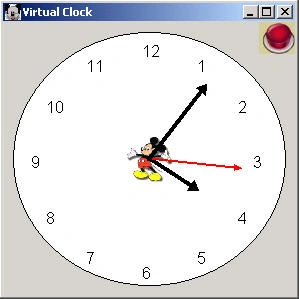
It's that time again! Time to check out a new project written VB.NET and the .NET library. This article describes how to create a virtual clock in VB.NET.
Creating and opening Microsoft Word document from VB.NET
This article is being written in response to a couple inquiries on the question, How do I open a word document from .NET?. I guess after people read my excel article, they were under the impression that I knew how to do this in Word. Luckily, after some hunting around on the forums and feedback from other C# Corner members I got the gist of it.
Extracting data from a UML Tool to Word document using COM Interoperability and VB.NET
This article allows you to read the classes contained inside of WithClass 2000 into a Word Document using COM Interoperability for Word and COM Interoperability for WithClass and presents your classes in a kind of report. The report lists each class which is followed by its list of attribute details and its list of operation details.
A Virtual Clock in C# and GDI+
This article describes how to create a virtual clock in C#. The hands of the clock are drawn using GraphicPaths.
Screen capturing of a Form using GDI+
In most cases, GDI+ speeds up your programming of Graphics because (1) It is not a thin veneer over the Windows SDK (2) It makes sense. However, whenever you lose granularity to create a simpler to use architecture, you tend to lose some functionality. Form Capture is one of these cases. In the cases where you say to yourself: Hey! I could do that in GDI, why can't I do that in GDI+??. The answer is you can.
Printing in VB.NET
This article explains about Printing in VB.NET.Printing is all carried out through components included in the toolbox. The main component that talks to the printer is the PrintDocument component.
Filling out 1040EZ Tax Form in .NET
A few years ago, the government heard the cry of the citizen who was up to his neck in forms and tried to ease the process of filing the 1040 by creating the 1040EZ form. This article shows you how to print out your own 1040EZ form.
Printing out your W2 Form using VB.NET
This article covers a fairly practical aspect of using a computer - dealing with forms. The concepts in this article can be used to create any Form Application so that you can design forms that you can Fill Out, Open, Save, Print and Print Preview.
Printing a Ruler in GDI+ and VB.NET
If you misplaced your ruler, here's an application that will create one for you on your printer! Unfortunately, you'll still need a ruler the first time using it so that you can calibrate the measurement for your particular printer, but once you know the calibration value, you are all set with a fairly accurate ruler. Below is the simple design of our ruler. The ruler itself is drawn in a Form.
Editable GridView control in VB.NET
.Net gives us a few controls that make printing quite easy and handle much of the details of driving the printer internally. In fact, most of our responsibility in printing the GridView control lies in graphically drawing its contents. The drawing of the GridView control is accomplished using GDI+.
A GridView component in VB.NET
This article explains how to use a GridVies component in VB.NET. This example shows you how I've wrapped a ListView in a UserControl and turned it into a simple grid control. I just want to put a string in a row and column position, or populate a row, or populate a column.
Creating and opening Microsoft Word document
This article is being written in response to a couple inquiries on the question, How do I open a word document from .NET?.
Using Transformations in GDI+ and VB.NET
The documentation on transforms in GDI+ is a little sparse in MSDN right now, so I decided to right an article on an sample program on how to use them. Transforms are matrices that allow you to rotate and translate your graphics shapes. In this example we are going to rotate a very powerful element in VB.NET called the GraphicsPath.

Simple Color Syntax Code Editor for PHP written in C# and .NET: Part I
The Application is a simple Windows Form program that allows you to open and save the text files edited in the rich edit control, as well as print them out. The program takes advantage of a “syntax” text file for PHP which lists the functions and keywords contained in the PHP language.
Animated GraphicsPath
This simple application illustrates how GraphicsPaths can be animated to look like something is moving across the screen. Previous articles in this forum have covered GraphicsPaths such as John O'Donnell's Rotation Sample.

Part I: Simple Color Syntax Code Editor for PHP written in C# and .NET
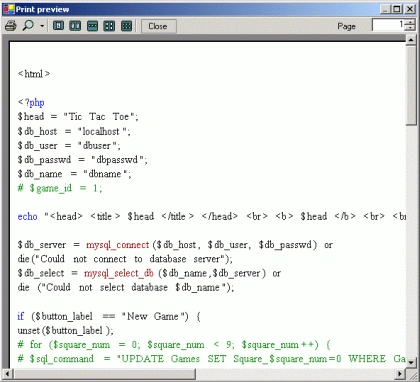
The second part of this article shows how to print out the contents of a RichTextBox control.
A Virtual Clock in VB.NET and GDI+
Learn how to create a virtual clock in VB.NET using GDI+ graphics, timer ticks, clock hands, and rotation transforms.
Using ThreadPool to run animated Gifs in VB.NET
One of the nice features incorporated into the .NET framework is the ThreadPool class. In this article we will discuss the use of the ThreadPool class in conjunction with the ImageAnimator class to run 3 animated gifs in separate threads.