Loading
Custom 404 Error Page in ASP.NET Using Bootstrap 5
This blog showcases a clean Bootstrap design and a futuristic glitch animation, both crafted with HTML, CSS, and Google Fonts to provide stylish, responsive, and user-friendly error handling.
Comprehensive Guide to Bootstrap Admin Dashboard
Bootstrap Admin Dashboards streamline back-end management with responsive layouts, pre-designed components, and customization options. They ensure consistency, scalability, and efficiency, integrating seamlessly with plugins for enhanced functionality and data visualization.
How To Create A Responsive Bootstrap Table
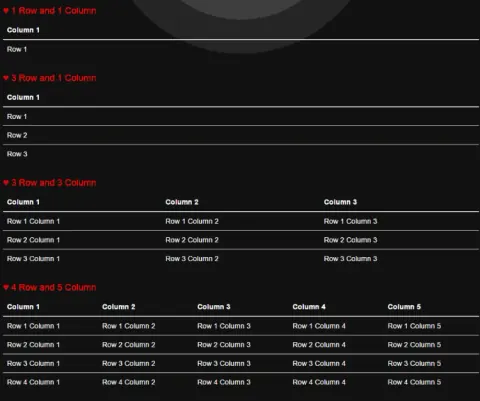
This blog helps you to create Bootstrap tables, which are responsive, and you can create any number of rows and columns in them. They adjust themselves on all the screen sizes
Buttons In Bootstrap
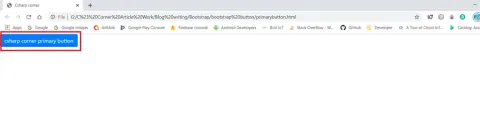
In this blog, I explain about how to use bootstrap buttons in webpage.
Dynamic Progress Bar Using Bootstrap And jQuery
In this session, we will learn about bootstrap progress bar, the types bootstrap progress bar, and how we can create a dynamic bootstrap progress bar using jQuery.
Bootstrap ToolTip
In this session, we will learn how to create a tool-tip, how we will use it and why we will use it.
Change The Size Of Bootstrap Colorpicker
If you want to change the size of bootstrap colorpicker, here are a few changes you have to make in bootstrap-colorpicker.js and bootstrap-colorpicker.css files.
Bootstrap 4 Card Classes
In this write-up, we will learn about Bootstrap 4 Card classes. Bootstrap is an open source framework to create responsive web applications. Bootstrap card classes are useful to create bordered boxes. Bootstrap 4 cards classes replace old panels, wells, and thumbnails.
Bootstrap 4 Table Classes
In this write-up, we will learn about Bootstrap 4 Table classes. Bootstrap is an open source framework to create responsive web applications.
Bootstrap 4 Utility Classes - Part Four
In this write-up, we will learn about Bootstrap 4 utility classes or helper classes. This is the fourth part of this series of Bootstrap 4 utility classes. In this part we will discuss text classes, block element classes, vertical align classes and close icon classes. Utility classes are useful to add style quickly without writing CSS classes.
Bootstrap 4 Utility Classes - Part Three
In this write-up, we will learn about Bootstrap 4 utility classes or Helper classes. This is the Third part of this article series of Bootstrap 4 utility classes. In this Part we will discuss spacing ,position,Background Colors utilities classes. Utility classes is useful to add style quickly without writing CSS classes.
Bootstrap 4 Utility Classes - Part Two
In this article, we will learn about Bootstrap 4 utility classes or Helper classes. This is the second part of this article series of Bootstrap 4 utility classes. In this Part we will discuss height and width classes, shadow class and Visibility class. Utility classes is useful to add style quickly without writing CSS classes.
Bootstrap 4 Utility Classes - Part One
In this write-up, we will learn about Bootstrap 4 utility classes or helper classes. Utility classes are useful to add style quickly without writing any CSS class. By using utility classes, we can add and remove styles quickly and make the elements responsive.
Designing Accordion Using Panel In Bootstrap
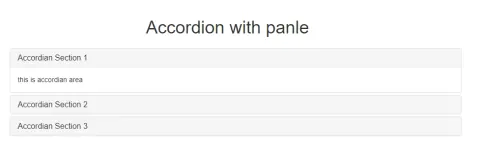
Before designing or writing the code, let us understand the basic structure of the code. We will see how to design an accordion menu using the panel in bootstrap.
Menu Tab In Bootstrap
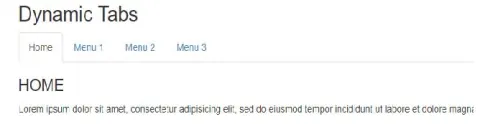
Here, we are going to create menu tab using Bootstrap and HTML
Bootstrap Modal Popup Video
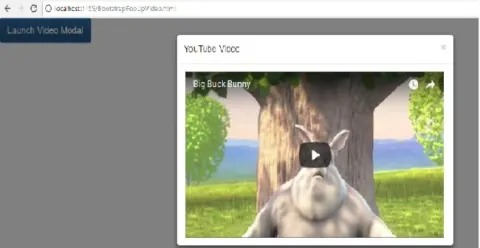
Here, we are playing a video on click of a link and playing that video in the bootstrap modal popup.
Extending Form Controls With Bootstrap
Bootstrap input groups component used to create interactive form controls limited to only textual input.
Google Map GPS Locator Using MVC And BootBox - Part Thirteen
Here i will show you how to know your current location using google map GPS.
Google Map Animated Markers With Different Color For Different Places Using MVC And Bootstrap - Part Twelve
By using this concept people can easily get the information about types of places like Hospitals, temples, Parks, etc.
Google Map View With Travel Distance And Duration Between Places Using ASP.NET MVC And Bootstrap In Real-Time - Part Ten
The directionsDisplay in Google Map helps us to show routes between places.
Google Maps - Distance And Duration Calculation Between Places Using ASP.NET MVC And Bootstrap In Real-Time - Part Nine
It is operated by using Google API Key. The source and destination textbox will show you places.
Google Maps- Route Direction Information Between Source And Destination Using ASP.NET MVC And Bootstrap In Real-Time - Part Eleven
Using the directionsDisplay and directionsService in Google Map helps us to show Route Direction Information between source and destination.
Google Maps Travelling Mode Using Bootstrap In ASP.NET MVC - PART Seven
Use of the DirectionsService object to fetch directions for different travel modes.
Google Maps - Route Style Between Multiple Places Using Bootstrap In ASP.NET MVC - Part Eight
In this blog, we select cities and accordingly Google Route will be changed automatically with the specified color.
Google Maps - Polygon With Animated Marker Using Bootstrap In ASP.NET MVC - Part Six
Google Maps - Polygon With Animated Marker Using Bootstrap In ASP.NET MVC.