Build modern Windows desktop apps with WPF and MVVM. Learn XAML, binding, commands, templating, dependency properties, navigation, and async UI. Improve performance, accessibility, and testing for robust, maintainable projects.
1,319 posts332 contributors
This article talks about the creation of WPF Application Setup Installer using the Visual Studio Installer project template.
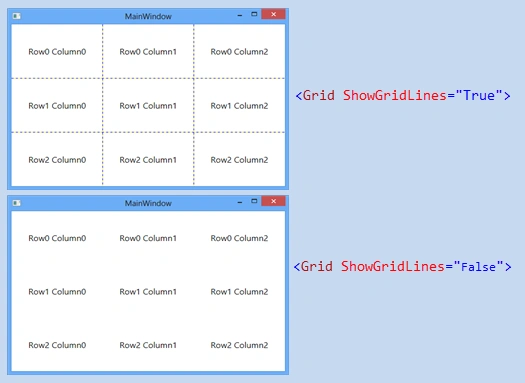
In this tutorials you will learn how to use the grid layout in WPF.
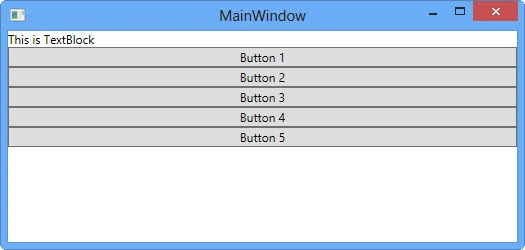
In this tutorial you will learn how to use, set the Orientation Property, and how controls behave in a StackPanel in WPF.
In this tutorial you will learn how to use the WrapPanel in WPF. You will also understand that what is difference between WrapPanel in StackPanel.You will also learn to align the controls inside a Wrap Panel etc.
In this video you will learn how to use the dock panel in WPF. You will learn the different DockPanel Properties through which you can dock the elements according to your need. etc.
In this video you learn how to use the Canvas layout control in WPF.You will also learn that how you can use the different properties to set the elements posting inside Canvas Control. Also you will see what are ways to set the ZIndex property of controls.
In this tutorial you will learn to create an image button control in WPF. Also you will learn about putting image inside button control using stack panel, how to change background color of button in WPF, how to change border brush of button control in WPF.
In this tutorial you will learn how to put image inside button control in WPF and how to use the Button Template to create an image button control.
In this video we will learn how to use the ListBox control in WPF. This video also shows how to use the Custom Content inside the ListBox Control.
In this video you will learn to use the ComboBox Control in WPF. This video tutorial also covers the different features of the combobox like customising the content in Combobox and IsEditable property.
In this video we will learn to use the ComboBox events and Dynamic Data Binding. we will use the Entity Data Model to bind the ComboBox. Also we will learn the different properties of a ComboBox control.
In this video we will learn to use the ContextMenu in WPF. This video also covers the different events and properties of a menu item.
In this video we will learn to use the slider control in WPF.
In this video we will learn to use the ScrollViwer Control in WPF.
In this Video you will learn to use the ProgressBar Control in WPF. This video show the way to animate a ProgressBar in WPF using C#.
In this video, we will learn how to use the Calendar control in WPF. It covers the different properties of a Calendar control, like DisplayMode Property in WPF SelectionMode, SelectedDates, BlackoutDates, DisplayDateStart, DisplayDateEnd, FirstDayOfWeek, IsTodayHighlighted etc. Also, this tutorial covers the Events of a Calendar control in WPF.
In this video, we will learn about the DatePicker Control in WPF. Also, we will discuss about the differences between a DatePicker Control and Calendar Control properties.
In this video we will learn about creating Splash Screen in WPF. First of all we will understand that what is splash screen and why we use them, Then we will create an example using WPF.
In this video we will understand that how we can use the DataGrid Control in WPF. We will bind the DataGrid control using ItemsSource with a static List of Employees.
In this session we will learn about the SelectionMode and SelectionUnit Properties of DataGrid Control in WPF, We will also understand about the RowDetailsTemplate of DataGrid Control.
In this video we'll learn about Windows Form Vs WPF Windows and also features of WPF if you like and want more then subscribe my youtube channel.
In this video we'll learn about WPF Fundamentals with WPF Architecture and also features of WPF if you like and want more then subscribe my youtube channel.
First video in a new series on what I consider to be enterprise MVVM development for WPF. We will begin covering practical application development scenarios that you will encounter in the real-world, and focus on building high quality, low maintenance, enterprise solutions.