Loading
Mahesh Chand's contributions
- Article · Visual Studio 2005
Master Pages in ASP.NET 2.0
Master pages is a new concept in ASP.NET 2.0, which allows site developers to build master templates for their site's look and feel and put all common code which is shared by all the pages. In this article, I will show you how to take advantage of master pages in your applications when building a Web site using ASP.NET 2.0.
- Article · Visual Studio
Building a Web Site using Visual Studio 2005
Learn about Visual Studio 2005 features for building websites with new controls, including creating pages without writing code.
- Article · ADO.NET in VB.NET
Working with ADO.NET Database Components in VS.NET
Working with ADO.NET Database Components in VS.NET and WinForms is so fun. You write few lines of code and these controls take care of rest for you. In this article, I'm going to show you how to use these database Components in your .NET WinForms applications using VB.NET.
- Article · ADO.NET in VB.NET
Working with Data-bounds controls
Working with data-bound controls in VS.NET IDE is a fun. You just set couple of properties and you're all set to view, add, and update data using these data-bound controls. Some of these common controls are DataGrid, DataCombo, and ListBox.
- Article · Windows Controls
Multi Column ListView Control in VB.NET
There are many questions about adding multiple columns to a ListView control. Some times its hard for beginners to find even small clues like ListView multi column won't work until you set its View property as Details.
- Article · ADO.NET in VB.NET
Displaying data in a DataGrid in VB.NET
This article explains you how easy is reading a database and Displaying data in a DataGrid using DataSet.
- Article · ADO.NET in VB.NET
Getting a Database Tables
OleDb data provider's connection class (OleDbConnection) provides a method GetOleDbSchemaTable that returns a database schema. The code listed in Listing 1 shows you to call this method. I am using Access 2000 Northwind database.
- Article · ADO.NET in VB.NET
Using OleDbDataReader to read data
OleDbDataReader class is very useful when you need to read fast data. The OleDbDataReader class is defined in the System.Data.OleDb namespace. So before you use this class, you need to add these namespaces before using ADO.NET components.
- Article · Visual Basic 2010
Windows Forms in VB.NET
This is a simple tutorial which shows you beginners how to create a WindForms application in VB.NET.
- Article · Visual Basic 2010
Downloading Web Pages in VB.NET
In this article, you'll see VB.NET version of how to use Web classes to download a file through HTTP. You can use three different ways to download a file contents through HTTP.
- Article · GDI+
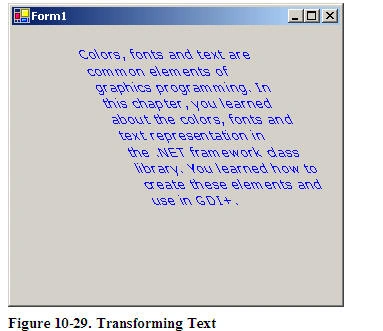
Text Transformation using GDI+ and C#
This article shows you how to use GDI+ classes defined in the .NET Framework class library to apply transformations on text.
- Article · GDI+
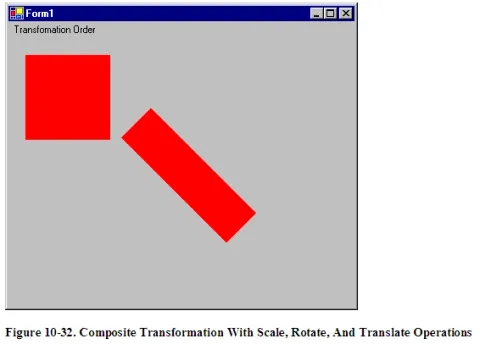
Significance of Transformation Order
When applying a composite transformation on graphics objects, the order of transformations plays a vital role. This article shows you various aspects of the transformation order and the results.
- Article · GDI+
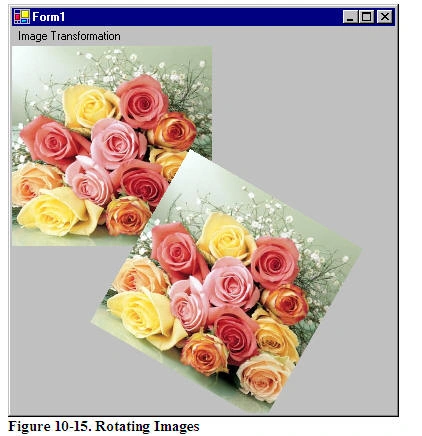
Image Transformation in C# with GDI+
Image transformation is exactly the same as any other transformation process. In this section we will see how to rotate, scale, translate, reflect, and shear images.
- Article · GDI+
Color Transformations and the Color Matrix
This article discusses the color transformations and how to apply Color Matrix on image colors to provide various effects such as gray scale effects, reduce or increase the contrast, brightness, or redness of an image.
- Article · GDI+
The Graphics Class and Transformations
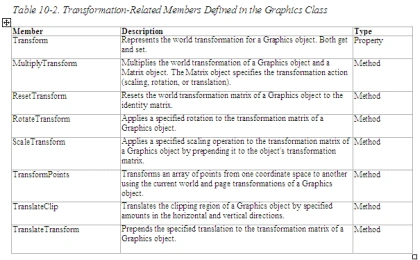
The Graphics class defined the transformation related functionality. This article discussed the Graphics class and its members that participate in transformation process.
- Article · GDI+
Introduction to GDI+ Transformations
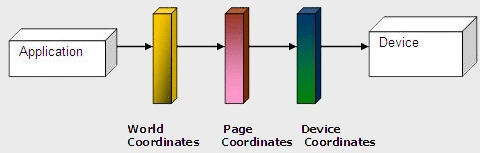
A transformation is a process that changes graphics objects from one state to another. Rotation, scaling, reflection, translation, and shearing are some examples of transformation. Transformations can be applied not only to graphics shapes, curves, and images, but even to image colors.
- Article · UWP
Tablet PC - Frequently Asked Questions
This article answers some of the frequently asked questions related to Tablet PC and Tablet PC application development.
- Article · GDI+
The Matrix Class and Transformations
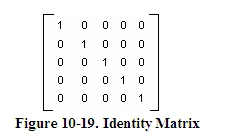
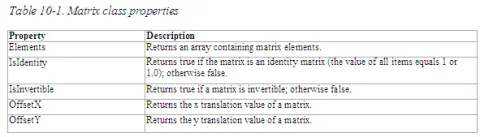
Matrices play a vital role in the transformation process. In GDI+, the Matrix class represents a 3×2 matrix that contains x, y, and w values in the first, second, and third columns, respectively.
- Article · Visual Studio 2005
Building Windows Longhorn Applications using Visual Studio codename Whidbey
The preview version of the next version of Visual Studio 2003 is called Visual Studio codename Whidbey. Visual Studio Whidbey has a support for building applications for Windows codename Longhorn, which is a new addition to the Windows operating systems series and successor of Windows XP. In this article, you will get a glimpse of Whidbey and support of Windows Longhorn applications.
- Article · Windows Controls
Working with Windows TabControl with C#
Windows TabControl is a useful control that allows you display multiple dialogs tabs on a single form by switching between the tabs. In this tutorial, I will explain how to create and use a TabControl in your Windows applications with C#.
- Article · Windows Vista
Windows Longhorn Installation - Life Made Easy?
Before installing Windows Longhorn on my new laptop, which is running Windows XP, my first thought were if my existing applications, drivers, and tools will work.
- Article · Visual Basic 2010
Retrieving Environment variables in VB.NET
In one of my recent applications, I needed machine name, program files folder, and other system related variables. The System.Environment class provides handy members to do so. In this article, I will talk about the Environment class and its members and how to use them in your applications.
- Article · Crystal Reports
Understanding Crystal Report Viewers
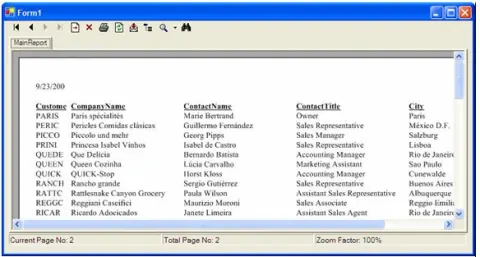
Crystal Report Viewers work as a container of a report and allow us to view a crystal report in Windows and Web applications. Crystal Reports for Visual Studio .NET provides two report viewers – Windows Forms Viewer and Web Forms Viewer.
- Article · Crystal Reports
Display Sorted Records in Crystal Reports
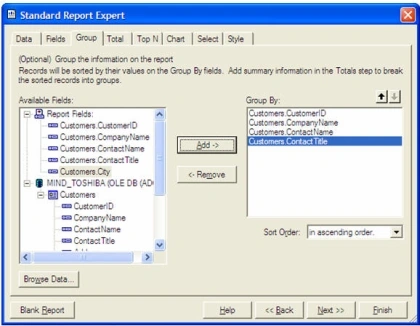
This article shows you how to use Crystal Reports options to sort a report records.
- Article · ADO.NET in VB.NET
Reading and writing BLOB in ADO.NET
Often you may need to save user images in a database and then read back from a database when needed. For an example, we’ll save an author’s photo in a database so it can be read later to display in the author’s article. In this article, you will learn how to read and write BLOB data using ADO.NET.