Loading
Mahesh Chand's contributions
- Article · Crystal Reports
Introductions to Crystal Reports in .NET
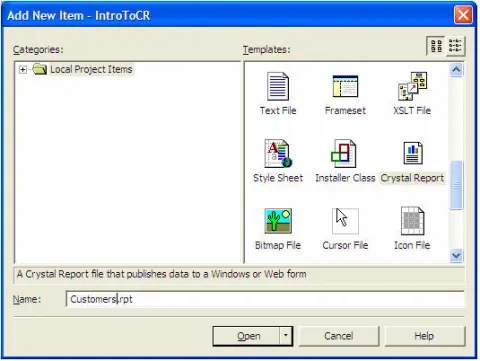
Here I will show you how to create a simple report using Crystal Reports and Visual Studio .NET. Here we will learn to add a Report to a Project, add a Data Source, add a Crystal Report Viewer Control, attaching Report to Crystal Report Viewer Control.
- Article · ADO.NET
Implementing paging in ADO.NET
Learn how to implement custom paging in ADO.NET using DataAdapter, DataSet, and SQL queries to retrieve selected pages of data.
- Article · Threading
Interlocking Threads
Recently, I was building multi-threaded applications and noticed some intermittent data inconsistency. Soon, I found the culprit was locking mechanism. After doing some research, I gathered the following information and as usual decide to share with you guys.
- Article · Visual Basic 2010
Loading a Form Icon in VB.NET
In this article, I will show you how to load an icon of a Form programmatically.
- Article · ASP.NET
Gathering a Web Site Users Information in ASP.NET
In this article, I will show you how you can collect information about your site visitors using ASP.NET classes.
- Article · GDI+ in VB.NET
Working with GDI+ Pens and Fonts in VB.NET
Pens and fonts are two common and most used objects in GDI+. This tutorial explains how to use pens and fonts in your VB.NET applications.
- Article · GDI+ in VB.NET
Drawing transparent Images and Shapes using Alpha Blending
A transparent image is an image, which you can see through. To test this, you draw some graphics shapes on a surface and draw image on top of those shapes and you should be able to see the shapes. Alpha blending is a process of mixing colors and generating a transparent affect.
- Article · Visual Basic 2010
Web Browser in C# and VB.NET
There are many questions on discussion forums about creating a web browser or using existing web browser ActiveX control in C# or VB.NET. This article explains how to add and web browser ActiveX to your project to developer your own customized web browser.
- Article · ADO.NET in VB.NET
Get a Database Table properties programmatically
This program displays you a table properties such as its column names, types, and column properties. I have used a database mcTest.mdb which has a table called 'Developer'. You can download this attached database and change the path of the database according to your location.
- Article · ADO.NET in VB.NET
Creating a SQL Server database programmatically using VB.NET
In this application, I’ll create a SQL Server database, create a database table, add data to it, create database objects such as views, stored procedures, rules, and index and view data in the data grid using Sql data provider.
- Article · Visual Basic 2010
Writing to XML Files in VB.NET
The XmlTextWriter class is derived from XmlWriter class, which represents a writer that provides fast non-cached forward-only way of generating XML documents based on the W3C Extensible Markup Language (XML) 1.0 specification.In this article, I will show you how to use XmlTextWriter class to create an XML document and write data to the document.
- Article · Visual Basic 2010
Reading XML Files in VB.NET
In this article, I will show you how to use XmlTextReader class to read an XML document and write data to the console.
- Article · XML
Inserting Data to an XML Document
Learn how to use XmlDocument and XmlNode in VB.NET to insert XML data into new or existing XML documents.
- Article · Visual Basic 2010
Get IP Address of a HOST in VB.NET
The .Net DNS class can be used to get a host name or an IP of a given host name. To use DNS class in your project, you need to include System.Net.
- Article · ADO.NET in VB.NET
Understanding ODBC .NET data provider
The ODBC .NET data provider provides access to ODBC data sources with the help of native ODBC drivers in the same way that the OleDb .Net data provider accesses native OLE DB providers. One of the best things about working with ADO.NET data providers is all data providers define the similar class hierarchy. The only things you need to change are the classes and the connection string.
- Article · ADO.NET in VB.NET
Accessing Excel Database using ADO.NET
This simple program shows how access an access database using ADO.NET. It opens a database mcTest.mdb from your application directory.
- Article · ADO.NET in VB.NET
The GetChanges of DataSet and DiffGrams
Recently there was a discussion related to DataSet’s HasChanges and GetChanges methods. This article discusses the basics of DiffGrams and how DiffGram format is utilized by a DataSet to in this context.
- Article · Visual Basic 2010
Download contents of a Web Page through HTTP
CSDownloadURL is a class which has two functions - SetURL and DownloadURL. The set URL sets the current URL and GetDownload downloads the URL contents and returns its contents in a string.
- Article · ADO.NET in VB.NET
Accessing MySQL Database in VB.NET
In this article, I will show you how to access MySQL server database using ODBC data provider. There are two ways to access MySQL Server database using ODBC data providers. First, using ODBC data source name and second by passing connection string direct in the OdbcConnection object.
- Article · Visual Basic 2010
Working with StatusBars in VB.NET
A status bar control is used to display the status of your applications functionality. You can add as many as panels to a status bar as you want and use these panels to display different type of information.
- Article · Visual Basic 2010
Working with ProgressBar in VB.NET
The Progressbar class provides progress bar control functionality in the .NET framework. You need progress bars to display the progress of your application or background tasks.
- Article · Visual Basic 2010
Adding items to a ListBox control
This article shows you how to add items to a ListBox control.
- Article · Windows Controls
Adding Images to a Toolbar Buttons
This article shows you how you can take advantage of Visual Studio .NET wizards to add images to a Toolbar control buttons.
- Article · Visual Basic 2010
Creating Interactive Buttons
By using control properties, you can give your program an interactive look as you see on web sites. One of them is mouse over. When you mouse over on a hyperlink, it changes the color.
- Article · Windows Controls
Working with Timer Control in VB.NET
The Timer control allows you to set a time interval to execute an event after that interval continuously. It is useful when you want to execute certain applications after a certain interval.