Loading
Everything in CSS
CSS3 2D Transforms
CSS3 2D transforms are a set of CSS properties that allow you to manipulate elements in two-dimensional space
CSS3 Transition Timing Functions
CSS3 transition timing functions are a powerful tool for creating smooth and engaging animations on your website
CSS3 Transform Origin
CSS3 Transform Origin is a highly useful property that enables you to change the origin point of various transformations such as rotate, scale, and skew.
spaces between container to each div class
HI Team I want to create a spaces in between div class container, below is my css style and div class. /css file img { display: block; max-width: 100%; height: auto; margin-bottom: 20px; /* add margin to create space between images */ } @media (min-width: 768px) { picture { width: 100%; height: 100%; } } // div classes <div id="feauture-store"> <div class="box py-4"> <div class="container"> <div class="row"> <div class="col-md-9"> <h2 class="mb-0">Discounted Deals</h2> <div class="container"> <div class="row"> <div class="col-md-6 text-center"> <picture> <source media="(min-width: 68px)" srcset="img/deal2.png"> <img src="img/deal2.png" alt=""> </picture> </div> <div class="col-md-6 text-center"> <picture> <source media = "(min-width:68px)" srcset="img/deal3.png"> <img src="img/deal3.png" alt=""> </picture> </div> </div> </div> </div> </div> </div> </div> </div>
Chrome Update CSS Issue
Hi team, After updating chrome latest version [111.x.x] we are faceing one issue in nav bar , on hover on particulat link we are showing sub menu . due to browser updates subment is displaying behind other html elements. to resolve this issue I tried with z-index property but no luck . same website working as expected in edge browser. team let me know if any sollution for this Thanks madan S B
A Comprehensive Guide to the CSS Gap Property: Improving Web Layouts
Learn about the CSS Gap Property and how it simplifies adding space between elements. Discover how to use this powerful property to improve your code and fine-tune spacing. Check out our comparison with other similar properties and explore browser compatibility.
Center A DIV Inside Another DIV Using CSS
To center a DIV inside another div we have three different ways. Using position, flexbox, and grid property.
Last Visible Li on screen
Hi I have a list of Li elements with overflow hidden, I just want to find the last visible Li on screen let say a element which is closest to right
hide text Selection Menu in iOS
How we can hide a text selection menu or context menu options like copy selectall lookup and all in IOS
How to position 2 divs side by side
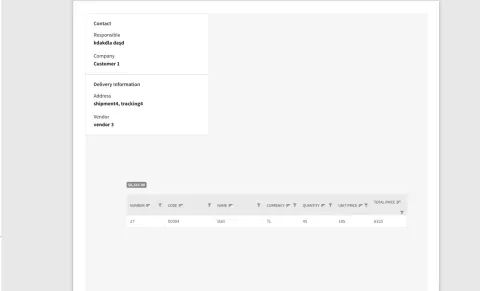
Hello, In my application, I am printing a razor page and I want to display 2 divs side by side. ( Contact and Delivery Information ) I want the grid to start from the left and closer to the others. Here is my sample razor: @page "/dialogcard/{Order}" @using IMS.CoreBusiness @using IMS.UseCases.Interfaces.OrderDetail @inject IViewOrderDetailsByOrderIdUseCase ViewOrderDetailsByOrderIdUseCase @inject DialogService DialogService @inject IJSRuntime JsRuntime @if (orderDetails != null) { <div class="row my-4"> <div class="col-md-12"> <RadzenCard> <h3 class="h5"> Order @Order.OrderId Details </h3> <RadzenTabs> <Tabs> @{ var detailVendorId = 0; } @foreach (var detail in orderDetails) { @if (detailVendorId != detail.VendorId) { <RadzenTabsItem Text="@detail.Vendor.Name"> <div id="printarea1"> <div class="float-container row"> <div class="col-lg-6 d-flex float-child"> <RadzenCard Style="width: 100%; overflow: hidden;"> <h3 class="h5">Contact</h3> <div class="d-flex flex-row"> <div> <div>Responsible</div> <
what's this combinaison of selectors?
Hi, With this code, nothing happens. Why? What's the difference between style p.class1 and .class1 p (or p .class1 )? Thanks. <style type="text/css"> .class1 p { color: green; font-size: 36px } </style> <h4 class="class1">This is text in h4-tag.</h4> <p>This is text in p-tag</p> <p class="class1">This is text in p-tag with class1.</p>
Lag/Stuck While Scrolling in Android
There is lag or it stucks when you keep scrolling down the selection, From the past couple of weeks we are facing the Lag issue in our Android App and some what same is happening in the Chrome in android, when you select the text and starts scrolling down it stucks at certain point randomnly don't know the exact issue, Any body experiencing the same or know how we can overcome this in our Android App,
Column-count property
On using the Column-count:2 property in UL list , the alignment of the LI element becomes different when the elements are in ODD number, on Even number elements it is perfect, Does anyone know why this is happening?
How To Add CSS In HTML
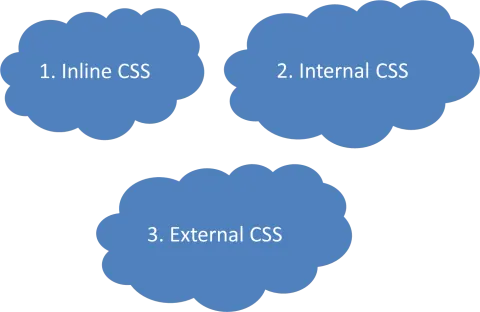
We have 3 different ways Inline as inside the tag itself, Internal as inside the head tag, and External in a different file.
What is box-sizing property in CSS and its use?
What is **box-sizing** property in CSS and its use?
CSS Font-Family Property
Let's see how we can use the CSS font-family property. We have also discussed the generic fonts, default fonts, fallback fonts, and web-safe fonts.
CSS Hacks - Modal Window/Dialog Using CSS
In this blog, you will learn how to create Modal Window/Dialog using CSS.
CSS For Large Projects And Large Teams
In this article, you will learn how to manage CSS in a large project, with many developers across multiple years.
Types of Cascading Style Sheets (CSS)
In this article, we will learn about the types of CSS.
CSS Injection - Exploitation
In this article, you will learn about CSS Injection-Exploitation.