Build modern Windows desktop apps with WPF and MVVM. Learn XAML, binding, commands, templating, dependency properties, navigation, and async UI. Improve performance, accessibility, and testing for robust, maintainable projects.
1,319 posts332 contributors
This article discusses how use cookies in WPF Applications using C#.
This article demonstrates how to add a splash screen to a WPF application using Visual Studio.
There are often times when you need to show multiple Windows when a WPF application starts.
When you build a WPF application, do you wonder who owns your application? Definitely not you! You heard me right.
This Article briefly discusses the major differences between Windows Presentation Foundation (WPF) versions 3.0 and 3.5.
This Article provides a guided tour of the Windows Presentation Foundation (WPF) class hierarchy.
In this article, I discuss how we can use ADO.NET DataSet to get data from a database and bind to a WPF ListBox control using data binding process in WPF.
The attached project shows how to use Timer and animations to generate rings on a certain interval of time using WPF and C#.
This article demonstrates how to build transparent and semi-transparent controls in WPF.
FindName method of FrameworkElement class is used to find elements or controls by their Name properties. This article shows how to find controls on a Window by name.
This article demonstrates how to build transparent and semi-transparent controls in WPF.
This article shows how to use XAML Floater element to create floaters and add them to the contents of a WPF document.
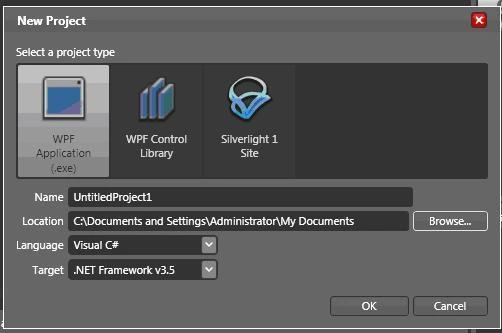
This is just a brief description to create a application using expression blend.
Learn how WPF routed events and routed commands work together and why they are important concepts for WPF development.
This article shows how to use a MessageBox control in WPF and VB.NET.
Learn how to convert a BitmapImage to grayscale in WPF using FormatConvertedBitmap and the Gray32Float pixel format.
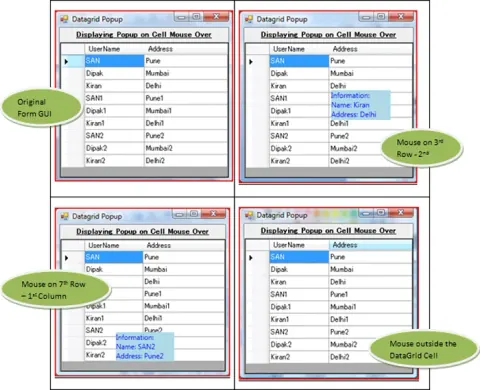
To show a popup when the mouse is hovered over the DataGrid cell with the information of the particular row’s columns. And, to hide the popup when the mouse leaves the DataGrid’s cell.
Hi everyone, I have come across a very unusual problem trying to animate dynamically created rectangles in my VB.NET 3.5/WPF project. I create a series of rectangles based on the number of columns and rows a user inputs. That is no problem, they are all created just fine. I then set each rectangle the event handler for MouseLeftButtonDown: AddHandler rec.MouseLeftButtonDown, AddressOf Control_MouseLeftButtonDown Again, that works fine, when I click on a rectangle that event is fired and I can pull the name of the rectangle selected. But when I add animation to it, the rectangle doesn't animate, the entire form animates! if I maximize the form, it doesn't run the animation on the form, but if it is free floating, the form actually runs the animation...not the rectangle. But, as I said, when I check the name of the object (sender)...it comes back with the name of the rectangle...not the form, so sender is being seen as the rectangle and not the form. Any ideas as to why this happens? My code is this: Private Sub Control_MouseLeftButtonDown( ByVal sender As Object , ByVal e As <FONT s
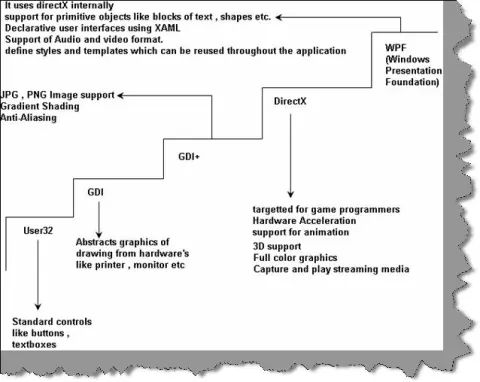
In this article we will go through FAQ's from WPF section. We will start first with understanding why WPF..? and later we will create a small sample hello world project for WPF which will make us understand WPF much better.
This document describes step by step solution to some of general problems developer face in wpf application.
This article will demonstrate how to create the Navigation Based Windows Application in WPF.
Hi, I am new with wpf browser application. I added two pages in the application. I have a textbox in first page and i want to use that textbox data in the second page. what my expression would be? for example in vb.net i use (frmlogin.Textbox1.Text) but i do not know how its gona work in vb.net browser application. Thank you.